Overtime Request Automation: Paid Overtime or Time Off in Lieu Before Payroll
Overtime approval should happen before payroll, not during payroll cleanup.
NextGen Workforce helps businesses manage overtime requests, approvals, paid overtime, time off in lieu, configurable multipliers, audit history, and payroll-ready records before payroll runs.
For many businesses, overtime becomes a payroll problem because the approval happens too late.
An employee works extra hours. A manager reviews it after the pay period. Payroll has to confirm whether the hours were approved, whether they should be paid, whether they should be converted to time off in lieu, and whether the correct earning code or balance should be updated.
That creates manual cleanup.
NextGen Workforce helps move this process earlier by giving employees and managers a structured overtime request workflow.
Still Approving Overtime by Email or Spreadsheet?
NextGen Workforce helps employees request overtime, choose paid overtime or time off in lieu, route approvals, apply configurable multipliers, and prepare payroll-ready records.
Why Overtime Requests Need a Better Workflow
Quick answer: An overtime request workflow helps employees submit extra hours for review, lets managers approve or reject those hours, and gives payroll clear instructions before processing paid overtime or time off in lieu.
Overtime is not only a payroll calculation.
It is also an approval process.
Payroll teams need to know whether the extra time was authorized, why it happened, who approved it, and how it should be handled.
Without a structured workflow, overtime decisions often happen through emails, messages, spreadsheets, or verbal approvals.
That creates several problems:
- Employees work extra time without approval.
- Managers approve overtime too late.
- Payroll does not know whether overtime should be paid or banked.
- Time off in lieu balances are updated manually.
- Rejected overtime has no clear audit history.
- Payroll-ready reports need last-minute correction.
A good overtime request workflow gives everyone the same record.
The employee submits the request. The manager reviews it. Payroll receives approved and categorized data.
Paid Overtime vs. Time Off in Lieu
Quick answer: Paid overtime means approved extra hours are paid through payroll. Time off in lieu means approved overtime is converted into paid time off or banked time, where allowed by law and company policy.
Businesses may handle approved overtime in different ways depending on country, province, state, employment agreement, employee classification, and company policy.
In many Canadian employment contexts, time off in lieu or banked overtime can be allowed when specific rules are followed. For example, Canadian federal labour standards describe overtime compensation as either overtime pay or time off with pay equivalent to 1.5 hours for every overtime hour worked, subject to applicable rules.
However, this is not universal everywhere. In the United States, covered nonexempt private-sector employees are generally entitled to overtime pay under the Fair Labor Standards Act. Employers should verify whether compensatory time off is allowed for their specific workforce before offering it.
| Option | What It Means | Payroll or Balance Impact |
|---|---|---|
| Paid overtime | Approved extra hours are paid at the applicable overtime rate | Payroll earning code is updated |
| Time off in lieu | Approved overtime is converted into paid time off or banked time where allowed | Time bank or leave balance is credited |
| Pending approval | Request is waiting for manager review | Not finalized for payroll |
| Rejected request | Manager denies the overtime request | Handled based on company policy and legal requirements |
The key is clarity.
Payroll should not have to guess whether approved overtime should be paid or credited as time off in lieu.
How the 1.5x Time Off in Lieu Rule Can Work
Quick answer: Where time off in lieu is allowed, a company may credit overtime hours at a configured multiplier, such as 1.5x. For example, 2 approved overtime hours can become 3 hours of banked time.
Some businesses allow employees to receive paid time off instead of paid overtime.
This is often called:
- time off in lieu
- TOIL
- banked overtime
- compensatory time
- time bank
Example:
| Approved Overtime Hours | Multiplier | Time Off in Lieu Credit |
|---|---|---|
| 1 hour | 1.5x | 1.5 hours |
| 2 hours | 1.5x | 3 hours |
| 4 hours | 1.5x | 6 hours |
With NextGen Workforce, this can be handled as a configurable policy.
For example, if an employee requests 2 hours of approved overtime as time off in lieu, the system can credit 3 hours to the employee’s time bank when the configured multiplier is 1.5x.
This helps reduce manual balance updates and gives payroll a clearer audit trail.
Why Retroactive Overtime Requests Matter
Quick answer: Retroactive overtime requests allow employees to submit overtime after the work was performed, within a configured window such as 72 hours. This helps businesses handle emergency work without losing approval control.
Not all overtime is planned in advance.
Sometimes employees work extra hours because of an emergency, customer request, production issue, staffing gap, late shift coverage, or urgent project deadline.
In those cases, a strict “advance approval only” process may not reflect reality.
That is why many businesses need a retroactive overtime request window.
For example, a company may allow employees to submit overtime requests for previous days within a configured window, such as 72 hours after the work was performed.
This is not presented as a universal legal rule. It is a company policy setting.
The benefit is control.
- Employees can explain why overtime happened.
- Managers can approve or reject the request.
- Payroll can see the approval decision before processing.
- The system can keep an audit record.
This helps prevent overtime from becoming an unstructured payroll exception.
How NextGen Workforce Automates Overtime Requests
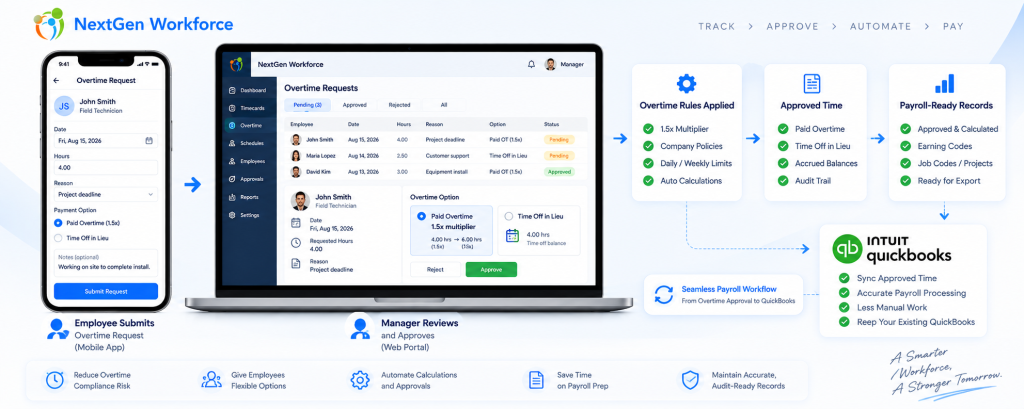
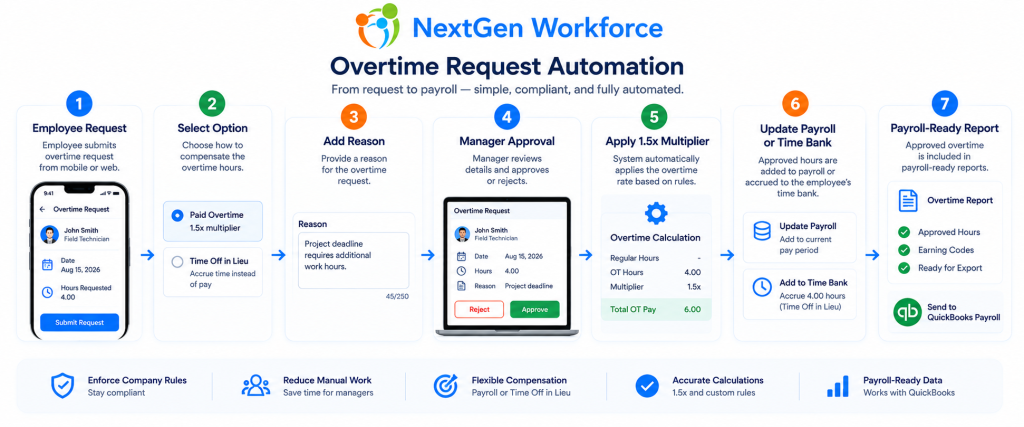
Quick answer: NextGen Workforce can automate overtime requests by allowing employees to select the date, hours, reason, and preferred handling method, then route the request to a manager for approval before payroll.
A practical overtime request workflow can look like this:
- Employee selects the overtime date.
- Employee enters requested overtime hours.
- Employee chooses paid overtime or time off in lieu, where allowed.
- Employee adds a reason or note.
- System checks the request window, such as previous 72 hours.
- Manager receives the approval request.
- Manager approves, rejects, or requests clarification.
- Approved paid overtime flows to payroll-ready records.
- Approved time off in lieu credits the employee balance using the configured multiplier.
- The full approval history is stored for audit and reporting.
This gives payroll a cleaner record.
Instead of seeing extra hours with no context, payroll can see the request, reason, approval decision, approver, timestamp, and payroll handling type.
Want Overtime Approval Before Payroll Runs?
NextGen Workforce helps route overtime requests, apply approval rules, credit time off in lieu where allowed, and prepare payroll-ready overtime records.
What Payroll Should See Before Processing Overtime
Quick answer: Payroll should see the employee, overtime date, requested hours, approved hours, paid overtime or time off in lieu selection, multiplier, earning code, approver, approval timestamp, and audit history.
Payroll teams need clear data before they process extra hours.
A strong overtime request workflow should provide:
- Employee name and ID
- Work date
- Requested overtime hours
- Approved overtime hours
- Reason for overtime
- Paid overtime or time off in lieu selection
- Multiplier, such as 1.5x where configured
- Payroll earning code or time bank code
- Manager approval status
- Approver name
- Approval or rejection timestamp
- Rejection reason if denied
- Audit history
This makes payroll review easier.
It also helps managers make overtime decisions before the payroll deadline.
Manual Overtime Approval vs. NextGen Workforce
Quick answer: Manual overtime approval relies on messages, spreadsheets, and late payroll review. NextGen Workforce creates a structured request, approval, balance, and payroll-ready workflow.
| Overtime Task | Manual Process | NextGen Workforce Workflow |
|---|---|---|
| Employee request | Email, message, or verbal request | Structured overtime request form |
| Request timing | Often unclear or late | Configured advance or retroactive request window |
| Reason for overtime | Often missing | Reason and notes captured with request |
| Manager approval | Email or manual confirmation | Digital approval workflow |
| Paid OT vs. TOIL | Payroll may need to ask later | Selected and reviewed during request |
| 1.5x calculation | Spreadsheet calculation | Configurable multiplier |
| Balance update | Manual time bank adjustment | Approved time off in lieu can update balance |
| Payroll records | Manual cleanup before payroll | Payroll-ready approved records |
| Audit trail | Scattered across emails or files | Request, approval, rejection, and timestamp history |
The biggest difference is timing.
Manual overtime workflows push decisions to payroll day.
NextGen Workforce helps collect the decision before payroll runs.
Example Workflow: Paid Overtime Request
Quick answer: In a paid overtime workflow, the employee requests extra hours, the manager approves the request, and payroll receives the approved overtime hours as a payroll-ready earning record.
Here is a simple example.
- Employee works 2 extra hours on Tuesday.
- Employee submits an overtime request within the allowed window.
- Employee selects Paid Overtime.
- Employee adds the reason: “Emergency shift coverage.”
- Manager reviews the request.
- Manager approves 2 overtime hours.
- Payroll receives the approved overtime hours for payroll review.
This gives payroll a clear approved record instead of an unexplained timesheet exception.
Example Workflow: Time Off in Lieu Request
Quick answer: In a time off in lieu workflow, approved overtime can be converted into banked time using a configured multiplier, such as 1.5x, where allowed by law and company policy.
Here is another example.
- Employee works 2 extra hours on Thursday.
- Employee submits an overtime request within the allowed window.
- Employee selects Time Off in Lieu.
- Company policy uses a 1.5x multiplier.
- Manager approves the request.
- The system credits 3 hours to the employee’s time bank.
- Payroll and HR can see the approved balance adjustment.
This helps reduce manual balance corrections.
It also gives HR and payroll a stronger record of why the time bank changed.
What Happens If an Overtime Request Is Rejected?
Quick answer: If an overtime request is rejected, the system should record the rejection reason, keep the audit history, and handle the worked hours based on company policy and applicable law.
Rejected overtime needs careful handling.
A manager may reject a request because the overtime was not authorized, the hours were entered incorrectly, the employee selected the wrong category, or more information is needed.
However, if the employee actually worked the hours, payroll and HR may still need to review how those hours must be handled under applicable law and company policy.
NextGen Workforce can help by keeping the request record clear:
- who submitted the request
- what date the request covered
- how many hours were requested
- whether paid overtime or time off in lieu was selected
- who rejected it
- why it was rejected
- when the decision was made
This creates a better audit trail than email approvals or spreadsheet notes.
Where This Workflow Helps Most
Quick answer: Overtime request automation is useful for businesses with hourly employees, shift teams, field workers, healthcare staff, security teams, manufacturing employees, construction crews, hospitality teams, and policy-heavy payroll workflows.
This type of workflow is especially useful for businesses that deal with frequent overtime or approval complexity.
Manufacturing and Warehousing
Manufacturing teams often need overtime approval for production demands, late shifts, weekend work, and staffing gaps.
Healthcare and Clinics
Healthcare teams may need urgent shift coverage and retroactive approval when employees stay late or cover gaps.
Security and Cleaning Services
Employees may work at multiple client sites and need manager approval for extra coverage hours.
Construction and Field Service
Crews may work longer due to jobsite delays, emergency service calls, travel, or customer requirements.
Retail and Hospitality
Managers may need to approve extra hours caused by shift swaps, late closings, no-shows, or customer demand.
Canadian Employers Using Time Off in Lieu
Canadian employers that allow time off in lieu or banked overtime may need a controlled approval and balance workflow, especially when overtime is credited at a multiplier such as 1.5x.
Compliance Note: Rules Vary by Region
Quick answer: Paid overtime and time off in lieu rules vary by jurisdiction. Employers should confirm whether time off in lieu is allowed for their employees before configuring an overtime request policy.
Overtime rules are not the same everywhere.
In the United States, covered nonexempt employees under the Fair Labor Standards Act generally must receive overtime pay at not less than one and one-half times the regular rate of pay after 40 hours in a workweek.
In Canada, federal and provincial rules may allow overtime to be compensated through paid time off or banked overtime when required conditions are met.
For example, federally regulated Canadian workplaces may allow time off with pay equivalent to 1.5 hours for each overtime hour worked, subject to the applicable rules. Ontario, Alberta, and British Columbia also have their own employment standards rules for overtime pay, time off in lieu, or banked overtime.
Because rules vary, employers should confirm:
- whether time off in lieu is allowed for their workforce
- whether written agreement or employee request is required
- which multiplier applies
- when banked time must be used or paid out
- what happens at termination
- what records must be kept
Important: This article is for general informational purposes only and is not legal advice. Employers should confirm overtime and time off in lieu rules with the applicable labour agency, payroll advisor, or legal counsel.
Need a Configurable Overtime Approval Workflow?
NextGen Workforce helps businesses configure overtime requests, approval rules, retroactive request windows, paid overtime, time off in lieu, 1.5x multipliers, audit history, and payroll-ready reports.
How This Supports QuickBooks Payroll Workflows
Quick answer: NextGen Workforce helps prepare approved overtime data before payroll processing, so QuickBooks workflows start with cleaner regular hours, overtime hours, time off in lieu records, earning codes, approvals, and audit history.
QuickBooks can process payroll, but payroll still depends on clean time data.
If overtime approvals are unclear, payroll teams may need to check emails, ask managers, update spreadsheets, or manually adjust time banks before processing payroll.
NextGen Workforce helps reduce that cleanup by preparing approved overtime records before payroll begins.
For QuickBooks workflows, this can help payroll teams review:
- approved overtime hours
- paid overtime records
- time off in lieu credits where allowed
- regular, overtime, and premium categories
- manager approvals
- employee notes and reasons
- audit history
- payroll-ready reports
This helps businesses move from manual overtime cleanup to a more controlled approval process.
Frequently Asked Questions
What is overtime request automation?
Overtime request automation is a workflow where employees submit overtime hours for approval, managers review the request, and payroll receives approved overtime records before processing payroll.
Can employees request overtime in advance?
Yes. Businesses can configure workflows where employees request planned overtime before working extra hours, subject to company policy.
Can employees request overtime after they already worked?
Yes. Businesses can configure a retroactive request window, such as allowing employees to submit overtime requests for previous days within 72 hours. This should be treated as company policy, not a universal legal rule.
Can employees choose paid overtime or time off in lieu?
Where allowed by law and company policy, employees can be given an option to request paid overtime or time off in lieu. Employers should confirm whether this option is permitted for their workforce.
Can time off in lieu be credited at 1.5x?
Yes, where allowed and configured. For example, 2 approved overtime hours may become 3 hours of time off in lieu when a 1.5x multiplier applies.
What happens after manager approval?
Approved paid overtime can flow into payroll-ready records. Approved time off in lieu can update the employee’s time bank or leave balance based on the configured policy.
What happens if an overtime request is rejected?
The rejection should be recorded with the manager, timestamp, and reason. Any worked hours should then be handled according to company policy and applicable employment law.
Can payroll see approved overtime separately?
Yes. A structured workflow can show approved overtime, pending overtime, rejected requests, paid overtime, and time off in lieu records separately for payroll review.
Can this support QuickBooks payroll workflows?
Yes. NextGen Workforce helps businesses prepare cleaner, approved, payroll-ready overtime data before QuickBooks payroll workflows begin.
About NextGen Workforce
See How NextGen Workforce Handles Overtime Requests
Book a short demo and show us your current overtime approval process. We will walk through how NextGen Workforce can help manage paid overtime, time off in lieu, approvals, audit history, and payroll-ready records.

The NGW Workforce team writes about HR tech, time tracking, scheduling, and workforce compliance.