
OBBBA Overtime Reporting: Why Employers Need Cleaner Time Data Before Payroll
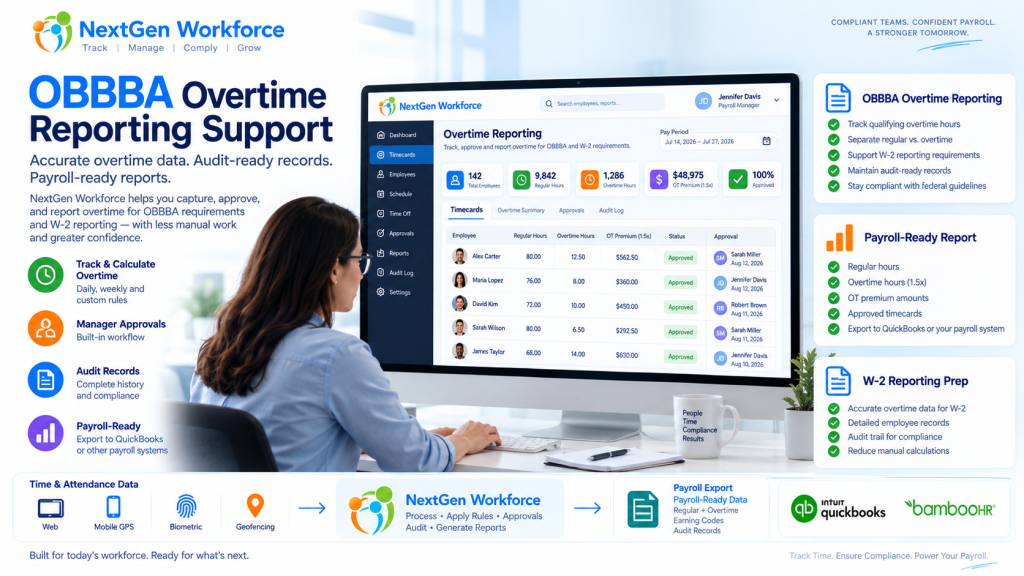
OBBBA Overtime Reporting: Why Employers Need Cleaner Time Data Before Payroll New overtime reporting rules are giving employers one more reason to clean up time data before payroll starts. The One Big Beautiful Bill Act, often shortened as OBBBA, added a new deduction for qualified overtime compensation for tax years 2025 through 2028. IRS guidance says the deduction generally applies to the overtime pay that exceeds the employee’s regular rate of pay, such as the “half” portion of time-and-a-half overtime compensation, when it meets the rules and is properly reported. Source: IRS qualified overtime compensation FAQs That sounds like a tax rule. But for employers, it quickly becomes a workforce data problem. Can your team clearly separate regular hours, overtime hours, overtime premium amounts, approvals, pay periods, employee records, and audit details before payroll reporting? If not, payroll may have to rebuild the story later. NextGen Workforce supports OBBBA-ready overtime tracking and reporting workflows to help employers review approved overtime, separate overtime premium data, maintain audit history, and prepare payroll-ready reports. We are not saying software alone makes an employer “fully compliant.” Eligibility, tax treatment, payroll reporting, and final filing decisions should be confirmed with your payroll provider, CPA, or legal advisor. But one thing is clear: if overtime is messy in the timecard, it will be messy in payroll reporting. Preparing for OBBBA “No Tax on Overtime” Reporting? NextGen Workforce helps employers track overtime, review approvals, separate overtime premium data, and generate payroll-ready overtime reports before payroll reporting. Talk To An Expert What Changed Under OBBBA? Quick answer: OBBBA created a temporary deduction for certain qualified overtime compensation for tax years 2025 through 2028. IRS guidance says employers and other payors must separately report qualified overtime compensation for 2026 and later years. Source: IRS The OBBBA “No Tax on Overtime” provision does not mean every overtime dollar is automatically tax-free. The IRS explains that the deduction applies to qualified overtime compensation. In general, this refers to the amount above the employee’s regular rate of pay that is required under section 7 of the Fair Labor Standards Act, commonly known as FLSA overtime. Source: IRS announcement For a simple time-and-a-half example, if an employee’s regular rate is $20 per hour and overtime is paid at $30 per hour, the possible qualified overtime compensation is generally the extra $10 premium portion, not the full $30 overtime rate. That distinction matters. Payroll teams may need to identify overtime hours, regular rate amounts, overtime premium amounts, and reporting details. If the source timecard data is not clean, the reporting process becomes harder. Why Employers Should Not Wait Until Year-End Quick answer: Overtime reporting starts when time is recorded, reviewed, approved, and categorized. Waiting until year-end can leave payroll teams sorting through missing punches, unclear overtime, and incomplete audit history. Year-end reporting is not where overtime data begins. It begins when the employee works extra time. Then it passes through several steps: the employee clocks in and out the system calculates regular and overtime hours the manager reviews the timecard exceptions are corrected overtime is approved or flagged payroll reviews totals reports or exports are prepared If those steps are not clean, payroll may be forced to fix the data later. That is not a good place to be when reporting rules require more detail. A relatable example: an employee works 46 hours in a week. The timecard shows the total hours, but one punch was edited, overtime approval is missing, and the employee worked across two job codes. Payroll now has to answer three questions before reporting anything: were the extra hours valid, how much was overtime premium, and which records support the calculation? That is why employers should treat OBBBA reporting as a time data readiness project, not just a tax form update. What Employers Need to Track for OBBBA-Ready Overtime Reporting Quick answer: Employers should be able to review regular hours, overtime hours, overtime premium amounts, manager approvals, pay periods, employee details, audit history, and payroll-ready report outputs. Every employer’s final reporting workflow may be different. However, the workforce data behind the process usually includes the same building blocks. Data Area Why It Matters Employee record Payroll needs the correct employee, pay period, and worker details. Clock-in and clock-out data Overtime starts with accurate time records. Regular hours Payroll needs to know the base hours before overtime is calculated. Overtime hours Overtime must be separated from regular time. Overtime premium portion The OBBBA deduction generally focuses on the premium amount above the regular rate, when it qualifies. Manager approval Approved overtime is easier to defend and process than unreviewed overtime. Edits and corrections Missing punches and changed records should have a clear audit trail. Pay code or earning code Payroll may need separate categories for regular, overtime, premium, or reportable overtime data. Payroll-ready report Payroll needs a clean output for review, export, or final reporting workflows. The main idea is simple. Do not make payroll search for overtime data across spreadsheets, emails, edits, and manager messages. Put the review process inside the workforce workflow. Regular Hours, Overtime Hours, and Overtime Premium Are Not the Same Quick answer: For OBBBA-related overtime reporting, employers may need to distinguish between total overtime pay and the overtime premium portion that exceeds the regular rate of pay. This is where many teams may get confused. Overtime reporting is not always just “show me everyone with more than 40 hours.” For example: Item Example Regular rate $20 per hour Overtime rate $30 per hour Regular portion inside overtime hour $20 Overtime premium portion $10 That $10 difference is the part employers may need to identify for qualified overtime compensation workflows, depending on the employee, pay type, FLSA rules, and final payroll reporting process. That is why time tracking and payroll data need to speak the same language. It is not enough to know that overtime happened. You need to know how it was calculated, reviewed, approved, and reported. 2025 Transition Year vs. 2026 Reporting Quick answer:
Overtime Request Automation: Paid Overtime or Time Off in Lieu Before Payroll
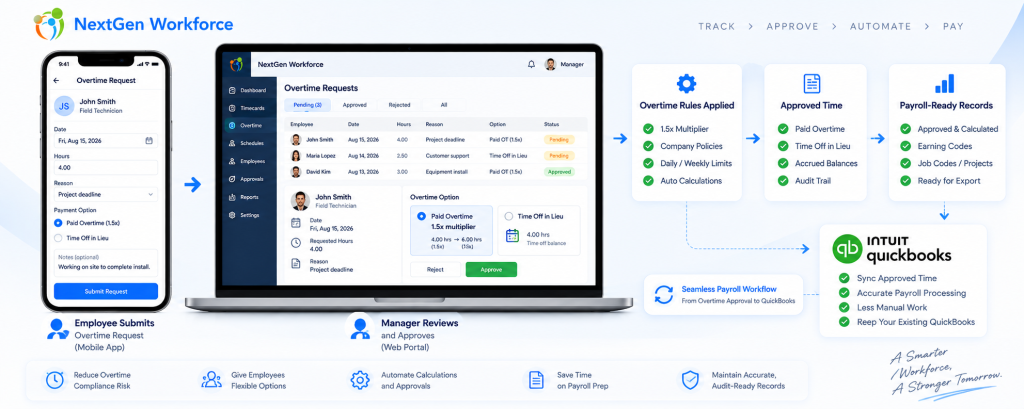
Overtime Request Automation: Paid Overtime or Time Off in Lieu Before Payroll By NextGen Workforce Editorial Team Last updated: September 2026 Overtime approval should happen before payroll, not during payroll cleanup. NextGen Workforce helps businesses manage overtime requests, approvals, paid overtime, time off in lieu, configurable multipliers, audit history, and payroll-ready records before payroll runs. For many businesses, overtime becomes a payroll problem because the approval happens too late. An employee works extra hours. A manager reviews it after the pay period. Payroll has to confirm whether the hours were approved, whether they should be paid, whether they should be converted to time off in lieu, and whether the correct earning code or balance should be updated. That creates manual cleanup. NextGen Workforce helps move this process earlier by giving employees and managers a structured overtime request workflow. Still Approving Overtime by Email or Spreadsheet? NextGen Workforce helps employees request overtime, choose paid overtime or time off in lieu, route approvals, apply configurable multipliers, and prepare payroll-ready records. Talk To An Expert Why Overtime Requests Need a Better Workflow Quick answer: An overtime request workflow helps employees submit extra hours for review, lets managers approve or reject those hours, and gives payroll clear instructions before processing paid overtime or time off in lieu. Overtime is not only a payroll calculation. It is also an approval process. Payroll teams need to know whether the extra time was authorized, why it happened, who approved it, and how it should be handled. Without a structured workflow, overtime decisions often happen through emails, messages, spreadsheets, or verbal approvals. That creates several problems: Employees work extra time without approval. Managers approve overtime too late. Payroll does not know whether overtime should be paid or banked. Time off in lieu balances are updated manually. Rejected overtime has no clear audit history. Payroll-ready reports need last-minute correction. A good overtime request workflow gives everyone the same record. The employee submits the request. The manager reviews it. Payroll receives approved and categorized data. Paid Overtime vs. Time Off in Lieu Quick answer: Paid overtime means approved extra hours are paid through payroll. Time off in lieu means approved overtime is converted into paid time off or banked time, where allowed by law and company policy. Businesses may handle approved overtime in different ways depending on country, province, state, employment agreement, employee classification, and company policy. In many Canadian employment contexts, time off in lieu or banked overtime can be allowed when specific rules are followed. For example, Canadian federal labour standards describe overtime compensation as either overtime pay or time off with pay equivalent to 1.5 hours for every overtime hour worked, subject to applicable rules. However, this is not universal everywhere. In the United States, covered nonexempt private-sector employees are generally entitled to overtime pay under the Fair Labor Standards Act. Employers should verify whether compensatory time off is allowed for their specific workforce before offering it. Option What It Means Payroll or Balance Impact Paid overtime Approved extra hours are paid at the applicable overtime rate Payroll earning code is updated Time off in lieu Approved overtime is converted into paid time off or banked time where allowed Time bank or leave balance is credited Pending approval Request is waiting for manager review Not finalized for payroll Rejected request Manager denies the overtime request Handled based on company policy and legal requirements The key is clarity. Payroll should not have to guess whether approved overtime should be paid or credited as time off in lieu. How the 1.5x Time Off in Lieu Rule Can Work Quick answer: Where time off in lieu is allowed, a company may credit overtime hours at a configured multiplier, such as 1.5x. For example, 2 approved overtime hours can become 3 hours of banked time. Some businesses allow employees to receive paid time off instead of paid overtime. This is often called: time off in lieu TOIL banked overtime compensatory time time bank Example: Approved Overtime Hours Multiplier Time Off in Lieu Credit 1 hour 1.5x 1.5 hours 2 hours 1.5x 3 hours 4 hours 1.5x 6 hours With NextGen Workforce, this can be handled as a configurable policy. For example, if an employee requests 2 hours of approved overtime as time off in lieu, the system can credit 3 hours to the employee’s time bank when the configured multiplier is 1.5x. This helps reduce manual balance updates and gives payroll a clearer audit trail. Why Retroactive Overtime Requests Matter Quick answer: Retroactive overtime requests allow employees to submit overtime after the work was performed, within a configured window such as 72 hours. This helps businesses handle emergency work without losing approval control. Not all overtime is planned in advance. Sometimes employees work extra hours because of an emergency, customer request, production issue, staffing gap, late shift coverage, or urgent project deadline. In those cases, a strict “advance approval only” process may not reflect reality. That is why many businesses need a retroactive overtime request window. For example, a company may allow employees to submit overtime requests for previous days within a configured window, such as 72 hours after the work was performed. This is not presented as a universal legal rule. It is a company policy setting. The benefit is control. Employees can explain why overtime happened. Managers can approve or reject the request. Payroll can see the approval decision before processing. The system can keep an audit record. This helps prevent overtime from becoming an unstructured payroll exception. How NextGen Workforce Automates Overtime Requests Quick answer: NextGen Workforce can automate overtime requests by allowing employees to select the date, hours, reason, and preferred handling method, then route the request to a manager for approval before payroll. A practical overtime request workflow can look like this: Employee selects the overtime date. Employee enters requested overtime hours. Employee chooses paid overtime or time off in lieu, where allowed. Employee adds a reason or note. System checks the request window, such