California Meal Premium Automation: Catch 5-Hour and 10-Hour Meal Break Issues Before Payroll
California meal premium errors are usually found too late.
California meal premium automation helps employers review first meal, second meal, short meal, missed meal, and late meal issues before payroll runs. For hourly teams, this means payroll can catch 5-hour and 10-hour meal break problems earlier instead of fixing them after timecards are already closed.
That is the real payroll problem.
California meal period rules are not only a legal policy. They are a daily timecard review workflow.
An employee works past the fifth hour without a meal break. Another employee works more than 10 hours and may need a second meal period review. A manager forgets to approve a meal premium. Payroll discovers the issue after the pay period closes.
When this review is manual, mistakes are easy to miss.
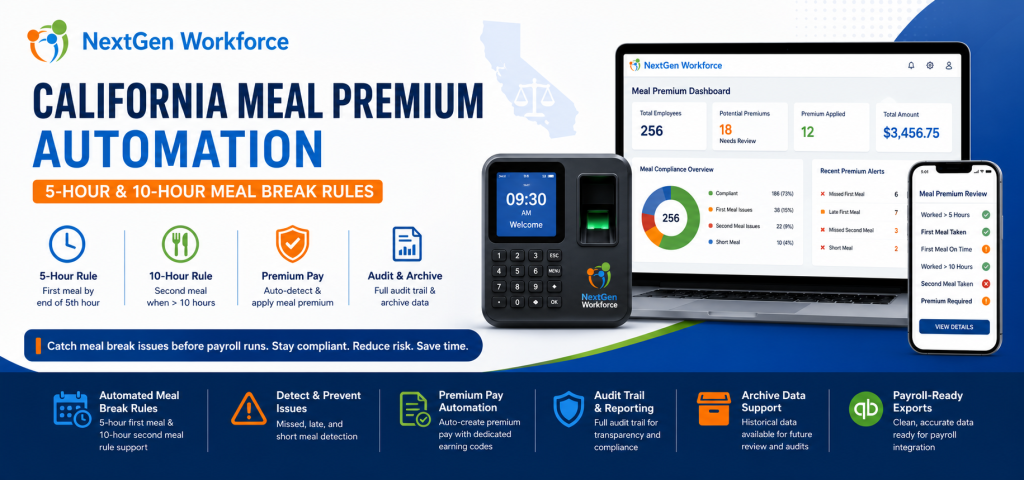
NextGen Workforce is enhancing support and automation for California meal premium workflows, including 5-hour first meal review, 10-hour second meal review, premium pay handling, audit visibility, and archive data for payroll and compliance review.
Still Reviewing California Meal Premiums Manually?
NextGen Workforce helps businesses detect missed, late, short, first, and second meal break issues before payroll runs.
Review meal premium triggers, approvals, audit history, archive data, and payroll-ready premium records in one connected workflow.
What Is California Meal Premium Pay?
Quick answer: California meal premium pay generally applies when an employer does not provide a required meal period. In that situation, the employee may be owed one additional hour of pay at the regular rate for that workday.
California meal break compliance matters because the timing and availability of meal periods affect payroll.
For many nonexempt employees, a meal period must generally be provided when the work period is more than five hours. The meal period generally must be provided no later than the end of the employee’s fifth hour of work.
When an employee works more than 10 hours in a day, a second meal period may also be required.
If a required meal period is not provided, meal premium pay may be owed.
For payroll teams, this creates a practical problem.
They must know whether the employee worked long enough to trigger a meal rule, whether the meal break was taken, whether it was taken on time, whether it was long enough, and whether a premium should be added.
Key takeaway: California meal premium review should happen before payroll, not after payroll discovers a missing premium.
Why California Meal Premium Errors Happen
Quick answer: California meal premium errors happen when timecards, break records, schedules, manager approvals, and payroll codes are reviewed manually or stored in separate systems.
Most meal premium issues do not happen because payroll teams are careless.
They happen because the workflow is fragmented.
A manager may review total hours but not meal timing. Payroll may review overtime but not break length. An employee may have a valid unpaid break, but the break record may be missing. Another employee may work more than 10 hours, but the second meal review may not happen before payroll starts.
These problems become harder when teams work long shifts, multiple job sites, changing schedules, or high-volume hourly operations.
Manual review creates several risks:
- Late first meal: The meal may start after the required timing window.
- Missed meal: No qualifying meal break appears on the timecard.
- Short meal: The meal break may be shorter than required.
- Second meal risk: Shifts over 10 hours may need additional review.
- Duplicate premiums: Payroll may accidentally add the same premium more than once.
- Missing pay code: Meal premium may not appear under the correct earning code.
- No audit trail: Managers and payroll may not see who reviewed what.
- No archive view: Historical records may be hard to verify later.
As a result, payroll teams spend time checking records manually instead of starting with clean, reviewed data.
The 5-Hour First Meal Rule: Why Timing Matters
Quick answer: California meal period review should check whether an employee who works more than five hours received a qualifying meal period no later than the end of the fifth hour, unless a valid exception or waiver applies.
The first meal period is one of the most common areas where payroll mistakes happen.
It is not enough to know that the employee took a meal break.
The system also needs to know when the meal break started, whether it was long enough, and whether the employee’s worked time crossed the rule threshold.
For example, if an employee clocks in at 7:00 AM and works a full shift, the system should review whether the first meal period was provided within the expected timing window.
When this is done manually, payroll may only see total hours.
However, meal premium review requires more than total hours. It requires a time-based check.
NextGen Workforce helps automate this review by checking timecard and break data against configured California meal premium rules.
The 10-Hour Second Meal Rule: Why It Is Easy To Miss
Quick answer: When an employee works more than 10 hours in a day, the timecard may need second meal period review. This is easy to miss when payroll only checks total hours, overtime, or the first meal break.
Second meal period review is where manual processes often break down.
A long shift may already have overtime. Payroll may focus on regular and overtime categories. Meanwhile, the second meal requirement may not be reviewed carefully.
That creates risk.
If the employee works more than 10 hours, the system should check whether a second meal period is required, whether it was provided, and whether any waiver or exception applies.
NextGen Workforce helps businesses review these 10-hour meal break scenarios before payroll runs.
This gives payroll teams better visibility into possible second meal premium issues before timecards are finalized.
How NextGen Workforce Automates California Meal Premium Support
Quick answer: NextGen Workforce helps automate California meal premium support by reviewing worked hours, meal break timing, meal break length, first meal rules, second meal rules, premium pay triggers, audit details, archive data, and payroll-ready earning codes.
NextGen Workforce is built for businesses with complex attendance rules.
California meal premium review is exactly the type of workflow where configurable automation matters.
Instead of asking payroll teams to manually inspect every timecard, NextGen Workforce helps review meal break conditions as part of the attendance and payroll-readiness workflow.
5-Hour First Meal Review
NextGen Workforce can review whether an employee’s shift crosses the first meal threshold and whether the meal break appears within the expected timing window.
This helps identify possible late or missing first meal issues before payroll.
10-Hour Second Meal Review
For longer shifts, NextGen Workforce can review whether the employee crossed the 10-hour threshold and whether a second meal period should be reviewed.
This helps payroll teams catch second meal issues that are often missed during manual review.
Short Meal Detection
A meal break may exist, but still be too short.
NextGen Workforce can help flag short meal scenarios so managers and payroll teams can review whether a meal premium should apply.
Missed Meal Detection
If no qualifying meal break appears for a covered shift, the system can help identify the missing meal issue.
This reduces the chance that payroll misses a premium pay trigger.
Dedicated Meal Premium Pay Code
Meal premium pay should be visible and categorized clearly.
NextGen Workforce can support a dedicated meal premium earning code, such as MEALPREMIUM, so payroll can review premium hours separately from regular, overtime, PTO, or holiday hours.
Duplicate Premium Protection
Running compliance rules more than once should not create duplicate premium rows.
NextGen Workforce can support controlled processing so meal premium entries are not repeatedly added for the same issue.
Audit Trail For Review
Payroll and managers need to understand why a premium was created or flagged.
NextGen Workforce supports audit visibility so teams can review the underlying reason, timecard details, rule output, and review history.
Archive Data For Historical Compliance
California meal premium questions may come up after payroll closes.
NextGen Workforce supports archive data so businesses can review historical timecards, meal premium decisions, rule outputs, approvals, and payroll-ready records later.
This is important for payroll review, internal audits, customer-specific reporting, and compliance support.
Need Meal Premium Rules Your Current System Cannot Handle?
NextGen Workforce helps businesses configure California meal premium automation, first and second meal review, audit visibility, archive data, approvals, and payroll-ready reporting.
If your payroll team is still checking meal premiums manually, our team can review your workflow.
Manual Meal Premium Review Vs. NextGen Workforce
Quick answer: Manual meal premium review depends on payroll checking every timecard, break record, and exception. NextGen Workforce helps automate the review by applying configured rules and preparing audit-friendly payroll data.
| Meal Premium Scenario | Manual Risk | NextGen Workforce Helps |
|---|---|---|
| Worked over 5 hours with no meal | Payroll may miss the premium | Flag or create meal premium for review |
| Late first meal | Timing issue may be missed | Review meal timing against configured rule |
| Short meal break | Break exists, but may not qualify | Identify short meal scenarios |
| Worked over 10 hours | Second meal review may be missed | Check second meal requirement |
| Premium already added | Duplicate premium risk | Help prevent duplicate premium entries |
| Payroll export | Premium may use wrong pay code | Support dedicated MEALPREMIUM code |
| Audit review | Hard to explain why premium was added | Provide rule and timecard audit visibility |
| Historical review | Old records are hard to verify | Support archive data for later review |
The difference is control.
Manual review pushes risk to payroll day. By contrast, NextGen Workforce helps identify meal premium issues during the timecard review process.
California Meal Premium Audit And Archive Support
Quick answer: Audit and archive support helps employers review meal premium decisions after the rule runs. This gives HR, payroll, and managers better visibility into why a premium was flagged, created, skipped, approved, or reviewed.
Meal premium automation should not be a black box.
Payroll teams need to see why something happened.
If the system creates a meal premium, the team should be able to review the timecard, shift length, meal break timing, rule output, earning code, and payroll status.
If the system does not create a premium, the team may still need to understand why.
That is where audit and archive data become important.
NextGen Workforce can help maintain a clearer record of:
- Original timecard details: Clock-in, clock-out, and worked hours.
- Break records: Meal start time, meal end time, and meal duration.
- Rule evaluation: First meal, second meal, short meal, and missed meal review.
- Premium decision: Whether a premium was created, flagged, skipped, or already existed.
- Pay code mapping: Whether the premium uses the correct earning code.
- Approval history: Manager or payroll review status.
- Archive records: Historical data for future review and reporting.
This helps HR and payroll teams answer questions with confidence.
It also helps businesses review patterns across employees, departments, schedules, and locations.
Who Needs California Meal Premium Automation Most?
Quick answer: California meal premium automation is most useful for employers with hourly employees, long shifts, shift-based schedules, field teams, high-volume timecards, multi-location operations, or frequent payroll corrections.
This workflow is especially useful when managers cannot manually review every break record.
Healthcare
Healthcare teams often work long shifts, urgent coverage changes, and complex schedules.
Meal premium automation helps payroll review first and second meal issues before payroll closes.
Security
Security teams often work posts, overnight shifts, mobile patrols, and extended hours.
Meal break timing, missed meals, and long-shift second meal review can become difficult manually.
Manufacturing And Warehousing
Manufacturing and warehouse teams often run shift-based operations with overtime and production demands.
Automated meal premium review helps reduce payroll cleanup for high-volume timecards.
Hospitality And Retail
Hospitality and retail teams often deal with changing schedules, part-time employees, and late clock-outs.
Meal premium automation helps managers catch issues earlier.
Construction And Field Service
Field employees may work across job sites and mobile locations.
Connected attendance, geofencing, meal review, and payroll-ready reporting help improve visibility before payroll runs.
Cleaning Services
Cleaning teams often work across customer locations, evening shifts, and variable schedules.
Automated meal review helps payroll avoid manual inspection of every timecard.
Managing California Hourly Teams?
NextGen Workforce helps businesses automate meal premium review, attendance rules, overtime, approvals, geofencing, payroll-ready reporting, audit data, and archive history.
California Meal Premium Audit Checklist Before Payroll
Quick answer: Before payroll runs, employers should review first meal timing, second meal triggers, missed meals, short meals, waiver status where applicable, premium pay codes, duplicate premiums, approvals, audit records, and archive data.
Payroll should not receive unresolved meal premium issues.
Before payroll, review these items:
- First meal threshold: Did the employee work more than five hours?
- First meal timing: Was the meal provided within the expected timing window?
- Meal duration: Was the meal break long enough?
- Missed meal: Is there no qualifying meal break?
- Second meal threshold: Did the employee work more than 10 hours?
- Second meal review: Was a second meal required or reviewed?
- Waiver review: Was any waiver or exception properly documented where applicable?
- Premium code: Is the premium mapped to the correct earning code?
- Duplicate check: Was the premium already added?
- Manager approval: Were meal exceptions reviewed before payroll?
- Audit trail: Can payroll see why the premium was created or skipped?
- Archive data: Are historical records available for future review?
This gives payroll a cleaner starting point.
It also helps managers and HR teams understand meal premium decisions before employees ask questions.
Free Checklist: California Meal Premium Audit Checklist
Use this checklist to review first meal, second meal, missed meal, short meal, premium pay, audit, archive, and payroll-ready records before payroll runs.
Why NextGen Workforce Is Different
Quick answer: NextGen Workforce is built for real-world attendance complexity. The platform can support custom meal premium rules, overtime, scheduling, geofencing, biometric time tracking, approvals, payroll-ready reports, audit data, and archive history.
Many businesses do not struggle because they lack a time clock.
They struggle because their actual rules do not fit inside basic time tracking software.
Based on real implementation experience, California meal premium issues are rarely caused by one simple rule.
They happen because timecards, break punches, schedules, approvals, payroll codes, audit records, archive data, and customer-specific policies are disconnected.
NextGen Workforce helps close that gap.
The platform is flexible enough to support customer-specific attendance rules and payroll workflows, including California meal premium automation for 5-hour and 10-hour meal break review.
That flexibility helps businesses move from manual payroll cleanup to proactive compliance review.
Ready To Catch Meal Premium Issues Before Payroll?
NextGen Workforce helps California employers automate meal premium review, apply attendance rules, manage approvals, preserve audit and archive data, and prepare payroll-ready premium records.
If your team is still checking meal premiums manually, now is a good time to review your workflow.
Frequently Asked Questions About California Meal Premium Automation
What Is California Meal Premium Pay?
California meal premium pay generally refers to one additional hour of pay at the employee’s regular rate when a required meal period is not provided.
Employers should review official California guidance and consult counsel for specific situations.
What Is The California 5-Hour Meal Break Rule?
For many nonexempt employees, a meal period is generally required when the employee works more than five hours.
The meal period generally must be provided no later than the end of the fifth hour of work, unless a valid exception or waiver applies.
When Is A Second Meal Period Required In California?
A second meal period is generally required when an employee works more than 10 hours in a day.
Waiver rules and exceptions may apply depending on the total hours worked and other conditions.
Can Software Detect Meal Premium Issues?
Yes. Software can help review worked hours, meal break timing, meal duration, missing meal records, second meal triggers, premium pay codes, approvals, and payroll-ready reporting.
This reduces manual review before payroll.
Can NextGen Workforce Support California Meal Premium Automation?
Yes. NextGen Workforce supports enhanced California meal premium automation for 5-hour and 10-hour meal break review, including missed meal, short meal, late meal, second meal, premium code, audit, and archive support.
Can NextGen Workforce Help Prevent Duplicate Meal Premiums?
Yes. NextGen Workforce can support controlled rule processing to help avoid duplicate meal premium entries when rules are reviewed or processed more than once.
Does NextGen Workforce Support Audit And Archive Data?
Yes. NextGen Workforce supports audit visibility and archive data so HR, payroll, and managers can review meal premium decisions, rule outputs, approvals, and historical records later.
Can Meal Premium Records Be Prepared For Payroll?
Yes. NextGen Workforce can help prepare payroll-ready meal premium records with dedicated earning codes such as MEALPREMIUM, depending on the customer’s payroll setup.
About The Author
Official Sources And Legal Note
For current legal details, review the California Department of Industrial Relations meal period guidance and the applicable California wage order for your industry.
This article is for general workforce management education only. It is not legal, payroll, or compliance advice. California meal period rules may vary by employee classification, industry, wage order, collective bargaining agreement, waiver status, schedule type, and specific circumstances. Employers should consult qualified counsel before making legal or payroll compliance decisions.

The NGW Workforce team writes about HR tech, time tracking, scheduling, and workforce compliance.