QuickBooks Time Alternative for Complex Attendance Rules
QuickBooks users do not always need another payroll tool.
Many businesses need cleaner, approved, payroll-ready time data before payroll starts. If your team is still fixing missing punches, overtime, PTO, job codes, manager approvals, geofence exceptions, or custom attendance rules before processing payroll in QuickBooks, the real issue may be the time tracking workflow before payroll.
QuickBooks is strong for accounting and payroll workflows.
However, payroll accuracy depends on the data that reaches QuickBooks.
If employee hours are incomplete, unapproved, or categorized incorrectly, payroll teams still have to clean up the records manually.
That is where NextGen Workforce helps.
NextGen Workforce supports businesses that use QuickBooks but need more flexible time tracking, biometric attendance, mobile GPS clock-in, geofencing, web kiosk punching, custom punch fields, complex overtime rules, PTO, approvals, audit-ready records, and payroll-ready reports.
Using QuickBooks But Still Fixing Timesheets Manually?
NextGen Workforce helps businesses prepare clean, reviewed, and payroll-ready time data before payroll runs.
Track punches, schedules, overtime, PTO, approvals, job codes, GPS locations, geofence exceptions, and custom rules in one connected workflow.
Why Businesses Look for a QuickBooks Time Alternative
Quick answer: Businesses often look for a QuickBooks Time alternative when their attendance rules, field tracking needs, biometric clock requirements, job codes, approvals, or payroll workflows are more complex than a basic time tracking setup.
For simple teams, basic time tracking may be enough.
Employees clock in, managers review hours, and payroll processes the records.
However, many businesses using QuickBooks have more complex workforce requirements.
They may need to track field employee locations, enforce jobsite geofences, capture custom fields, apply daily and weekly overtime, manage PTO, approve exceptions, handle shift premiums, track web kiosk punches, or support biometric devices.
When those details are not handled before payroll, QuickBooks receives data that still needs work.
That creates payroll cleanup.
- Missing punches: Payroll has to chase employees or managers.
- Unapproved overtime: Extra hours are discovered too late.
- PTO mismatches: Approved leave does not match the timesheet.
- Wrong earning codes: Regular, overtime, holiday, and premium hours need correction.
- Job code gaps: Project, department, client, or cost code details are missing.
- Field punch issues: Mobile employees clock in from different locations without enough visibility.
- Custom rule gaps: Company-specific attendance rules still need spreadsheet work.
In practice, the problem is not always payroll.
The problem is that time data is not payroll-ready before it reaches payroll.
QuickBooks Can Process Payroll, But It Cannot Fix Messy Time Data
Quick answer: QuickBooks can help process payroll, but payroll accuracy depends on complete, approved, and correctly categorized time records. NextGen Workforce helps prepare that data before payroll starts.
Payroll teams need more than total hours.
They need time records that are complete, approved, categorized, and ready for payroll review.
Before data reaches QuickBooks, businesses often need to confirm:
- Did every employee clock in and out?
- Did managers approve the timecard?
- Was overtime calculated correctly?
- Was PTO or sick time included?
- Were holiday hours categorized properly?
- Were shift premiums or differentials applied?
- Were job codes, project codes, or custom fields captured?
- Were GPS or geofence exceptions reviewed?
- Were payroll earning categories mapped correctly?
If these items are not reviewed before payroll, payroll teams still need manual cleanup.
NextGen Workforce helps move that cleanup earlier in the workflow.
Key takeaway: The goal is not just to track time. The goal is to prepare clean, approved, payroll-ready time data before QuickBooks payroll processing.
How NextGen Workforce Supports QuickBooks Payroll-Ready Workflows
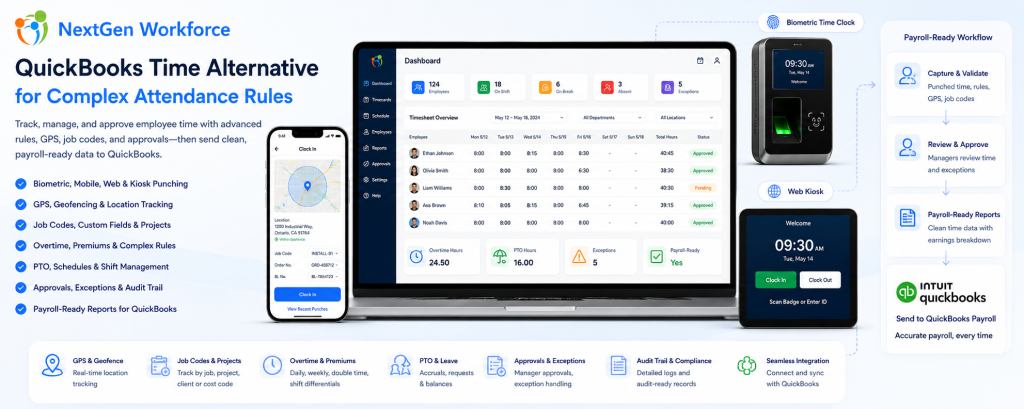
Quick answer: NextGen Workforce helps businesses capture employee time, apply attendance rules, review exceptions, approve timecards, and prepare payroll-ready reports before data reaches QuickBooks.
NextGen Workforce is built for businesses that need more than a simple clock-in screen.
The workflow can support different teams, different attendance methods, and different payroll requirements.
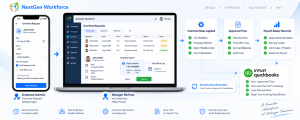
Step 1: Employees Clock In
Employees can clock in using mobile, web kiosk, biometric hardware, or other supported attendance workflows.
This gives businesses flexibility based on the type of workforce.
Step 2: Required Details Are Captured
Where needed, the system can capture GPS location, geofence status, job code, project, department, work location, Order No., BL No., task, or notes during punch workflows.
This is useful for field teams, construction crews, heavy machinery companies, service teams, and project-based businesses.
Step 3: Attendance Rules Are Applied
NextGen Workforce can support configurable attendance rules such as overtime, double time, shift differentials, rounding, grace periods, meal rules, auto clock-out, holiday rules, and customer-specific policies.
Step 4: Exceptions Are Reviewed
Managers and payroll teams can review missing punches, late clock-ins, early departures, overtime warnings, geofence issues, incomplete custom fields, or timecard exceptions.
Step 5: Managers Approve Timecards
Approval workflows help ensure time records are reviewed before payroll starts.
This reduces the need for payroll teams to chase managers at the end of the pay period.
Step 6: Payroll-Ready Reports Are Prepared
After review, NextGen Workforce helps prepare regular hours, overtime, double time, PTO, sick time, holiday hours, shift premiums, job codes, and other payroll-ready data.
Step 7: QuickBooks Receives Cleaner Data
Payroll starts with reviewed, categorized, and more reliable time records.
This helps reduce spreadsheet cleanup before payroll processing.
Need More Than Basic Time Tracking for QuickBooks?
NextGen Workforce helps businesses manage biometric time clocks, mobile GPS clock-in, geofencing, web kiosk punching, custom punch fields, overtime rules, PTO, approvals, and payroll-ready reports.
When Basic Time Tracking Is Not Enough
Quick answer: Basic time tracking is often not enough when a business needs biometric verification, mobile GPS tracking, geofencing, custom punch fields, complex overtime, PTO workflows, shift premiums, or approval rules before QuickBooks payroll.
Many businesses start with simple time tracking.
That works until the workforce becomes more complex.
Then payroll teams need more context around each punch.
| Business Need | Why Basic Time Tracking Struggles | How NextGen Workforce Helps |
|---|---|---|
| Biometric attendance | PINs or manual entry may not verify identity strongly enough | Supports biometric time clock workflows |
| Mobile field teams | Employees work away from a fixed location | Supports mobile GPS clock-in and location visibility |
| Jobsite control | Clock-ins may happen away from approved sites | Supports geofencing workflows |
| Shared device punching | Not every site needs dedicated hardware | Supports web kiosk punching from tablets, PCs, or shared devices |
| Custom job data | Payroll and operations need more than hours | Captures custom fields such as job code, Order No., BL No., project, or notes |
| Complex overtime | Manual calculations create payroll risk | Supports configurable overtime, double time, and premium rules |
| Manager approvals | Email or verbal approvals are hard to audit | Supports digital approval workflows before payroll |
| Payroll-ready reporting | Payroll still needs spreadsheets | Prepares reviewed and categorized time records |
This is where NextGen Workforce is different.
It is not limited to one fixed time clock model.
The platform can support different attendance workflows for different teams and locations.
QuickBooks Time Alternative for Field Teams
Quick answer: Field teams often need mobile clock-in, GPS visibility, geofencing, client-site tracking, job codes, custom fields, and reports that connect time records to payroll and operations.
Field teams rarely work from one fixed office.
They may visit customer sites, job sites, routes, branches, equipment yards, or remote work locations.
That means payroll needs more than clock-in time.
Operations may also need to know where the employee worked, which job was performed, which client was served, or which reference number belongs to the time entry.
NextGen Workforce helps field teams capture important data during the punch workflow.
Examples include:
- GPS location
- geofence status
- job code
- project
- client or customer
- Order No.
- BL No.
- task or activity
- notes
This helps payroll and operations work from the same record instead of separate spreadsheets.
QuickBooks Time Alternative for Manufacturing and Shift-Based Teams
Quick answer: Manufacturing and shift-based teams often need biometric time clocks, shift schedules, overtime rules, shift differentials, late punch alerts, and payroll-ready reports before QuickBooks payroll.
Manufacturing teams often have strict shift schedules.
Employees may clock in early, clock out late, miss punches, work overtime, or qualify for shift differentials.
If those rules are checked manually, payroll becomes harder every pay period.
NextGen Workforce helps support:
- biometric time clocks for on-site attendance
- scheduled versus actual hour review
- late arrival and early departure alerts
- daily or weekly overtime rules
- double time or premium rules where configured
- shift differential tracking
- manager approval workflows
- payroll-ready reports for QuickBooks workflows
This helps manufacturing and shift-based teams reduce payroll cleanup before processing.
QuickBooks Time Alternative for Construction and Project-Based Work
Quick answer: Construction and project-based businesses often need job costing, project codes, crew location, certified payroll support, geofencing, overtime rules, and payroll-ready reporting before QuickBooks payroll.
Construction time tracking is rarely simple.
Crews may work across job sites, projects, classifications, tasks, and cost codes.
Payroll and operations need to understand not only how many hours were worked, but where those hours belong.
NextGen Workforce can help capture:
- project or job code
- crew or site location
- mobile GPS punches
- geofence exceptions
- labor category or work code
- daily and weekly hours
- overtime and premium categories
- manager approvals
- payroll-ready export records
For contractors, this creates cleaner time data before payroll and reporting.
QuickBooks Time Alternative for Retail, Hospitality, and Multi-Location Teams
Quick answer: Retail, hospitality, and multi-location teams often need store attendance, shift coverage, late punch control, manager approvals, PTO tracking, overtime rules, and payroll-ready reports.
Retail and hospitality teams often have high employee movement.
Schedules change. Employees swap shifts. Managers approve late. Part-time employees may work across locations. Payroll has to verify hours quickly.
NextGen Workforce helps businesses manage:
- store-level attendance
- multi-location time tracking
- schedule versus actual hour review
- late punch and missing punch alerts
- shift swaps and manager approvals
- PTO and holiday records
- overtime and premium rules
- payroll-ready reports for QuickBooks workflows
This helps reduce last-minute corrections before payroll.
Have Hourly Teams Across Multiple Locations?
NextGen Workforce helps businesses manage attendance, schedules, approvals, geofencing, PTO, overtime, and payroll-ready data before QuickBooks payroll processing.
Real Implementation Experience: Why Flexibility Matters
Quick answer: NextGen Workforce is built from real implementation experience with businesses that need custom overtime, biometric clocks, mobile field data capture, California meal premium automation, certified payroll support, and QuickBooks-ready reports.
Many workforce systems work well when the rules are simple.
But businesses often come to NextGen Workforce when their real-world requirements do not fit a fixed setup.
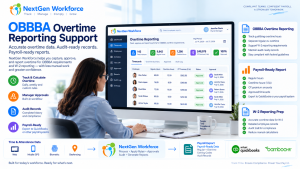
Biometric Time Tracking With Custom Overtime
A Canadian customer using QuickBooks needed biometric attendance and custom overtime rules.
Their employees receive overtime after 80 hours in a two-week pay period and double time after 12 hours in a single day.
NextGen Workforce can support this type of configurable attendance workflow before payroll review.
Mobile Field Clock-In With Order No. and BL No.
A field-based company needed employees to capture Order No. and BL No. during mobile clock-in after reaching the client location.
NextGen Workforce can support custom punch fields so those values stay connected to the employee’s time record and can appear in reports or exports.
California Meal Premium Automation
California employers may need to review 5-hour first meal and 10-hour second meal break scenarios before payroll.
NextGen Workforce supports enhanced California meal premium workflows, including meal premium review, dedicated earning codes, audit visibility, archive data, and payroll-ready premium records.
Certified Payroll and Project-Based Reporting
Contractors may need time records connected to project codes, classifications, job hours, overtime, and export-ready data.
NextGen Workforce helps capture structured time and project information so payroll and compliance teams have cleaner records.
Key takeaway: Many time tracking tools capture punches. NextGen Workforce captures the payroll, job, location, approval, and compliance context behind those punches.
Manual Payroll Cleanup vs. NextGen Workforce + QuickBooks
Quick answer: Manual payroll cleanup forces teams to fix time records at the end of the pay period. NextGen Workforce helps businesses review and organize time data before QuickBooks payroll workflows begin.
| Payroll Task | Manual Process | NextGen Workforce Workflow |
|---|---|---|
| Time capture | Paper, spreadsheet, or basic punch records | Biometric, mobile, web kiosk, GPS, or geofencing workflows |
| Missing punches | Payroll follows up manually | Exceptions reviewed before payroll |
| Overtime | Spreadsheet calculation | Configurable overtime and premium rules |
| PTO and holidays | Checked separately | Connected time-off and holiday records |
| Job data | Notes, messages, or separate sheets | Custom punch fields and job codes |
| Location review | Supervisor confirmation | GPS and geofencing support |
| Approvals | Email or verbal approval | Digital timecard approval workflows |
| QuickBooks payroll | Manual cleanup before processing | Payroll-ready reports and categorized hours |
The difference is timing.
Manual processes push problems to payroll day.
NextGen Workforce helps teams find and fix issues before payroll starts.
What To Check Before Choosing a QuickBooks Time Alternative
Quick answer: Before choosing a QuickBooks Time alternative, confirm whether the system supports biometric clocks, mobile GPS, geofencing, web kiosk, custom fields, overtime rules, PTO, approvals, job codes, and payroll-ready reports.
Before choosing a time tracking system for QuickBooks workflows, ask these questions:
- Attendance methods: Can employees clock in by mobile, kiosk, biometric device, or web?
- Mobile teams: Can field employees clock in with GPS visibility?
- Geofencing: Can punches be validated against approved job sites or locations?
- Web kiosk: Can employees punch from a tablet, PC, laptop, or shared device?
- Custom fields: Can employees capture job code, project, Order No., BL No., or notes?
- Overtime: Can the system support daily, weekly, double time, or custom overtime rules?
- PTO: Can approved time off connect with the timecard?
- Approvals: Can managers approve timecards before payroll?
- Reports: Can payroll review categorized time before QuickBooks?
- Flexibility: Can the workflow be configured around your business rules?
If the answer is no, payroll may still end up doing manual cleanup.
Ready To Reduce Payroll Cleanup Before QuickBooks?
NextGen Workforce helps businesses prepare cleaner, approved, payroll-ready time data with biometric clocks, mobile GPS, geofencing, web kiosk punching, overtime rules, PTO, approvals, custom fields, and reports.
Frequently Asked Questions
Is NextGen Workforce a QuickBooks Time Alternative?
NextGen Workforce can be a strong option for businesses using QuickBooks that need flexible time tracking, biometric attendance, mobile GPS clock-in, geofencing, web kiosk punching, custom attendance rules, approvals, and payroll-ready reports.
Does NextGen Workforce Work With QuickBooks Payroll Workflows?
NextGen Workforce helps businesses prepare clean, reviewed, payroll-ready time data for QuickBooks workflows.
This may include regular hours, overtime, PTO, holidays, approvals, job codes, custom fields, and categorized time records for payroll review.
Can NextGen Workforce Track Overtime Before Payroll?
Yes. NextGen Workforce can support configurable overtime, double time, shift premium, holiday, and customer-specific attendance rules based on business requirements.
Can Employees Clock In Using Biometric Devices?
Yes. NextGen Workforce supports biometric time clock workflows, including fingerprint or face reader options depending on the customer setup.
Can Field Employees Use Mobile GPS Clock-In?
Yes. Field employees can use mobile clock-in workflows, and GPS tracking can help managers review where punches happened.
Can NextGen Workforce Support Geofencing?
Yes. NextGen Workforce supports geofencing workflows so businesses can validate or restrict punches based on approved job sites, branches, customer locations, or work areas.
Can Employees Clock In From a Web Kiosk?
Yes. NextGen Workforce supports web kiosk attendance from a tablet, PC, laptop, or shared device, with options such as IP restrictions and custom punch fields.
Can Custom Fields Be Captured During Clock-In?
Yes. NextGen Workforce can capture custom punch fields such as job code, project, department, work location, Order No., BL No., task, or notes during punch workflows.
Who Is This Best For?
This workflow is best for businesses using QuickBooks with hourly employees, field workers, multi-location teams, shift schedules, biometric clock needs, mobile attendance, overtime rules, job codes, and complex payroll workflows.
About NextGen Workforce
See How NextGen Workforce Supports QuickBooks Users
Book a short demo and show us your current time tracking, scheduling, approval, or payroll challenge. We will walk through how NextGen Workforce can help prepare cleaner time data before payroll runs.

The NGW Workforce team writes about HR tech, time tracking, scheduling, and workforce compliance.