
QuickBooks Time Alternative for Complex Attendance Rules
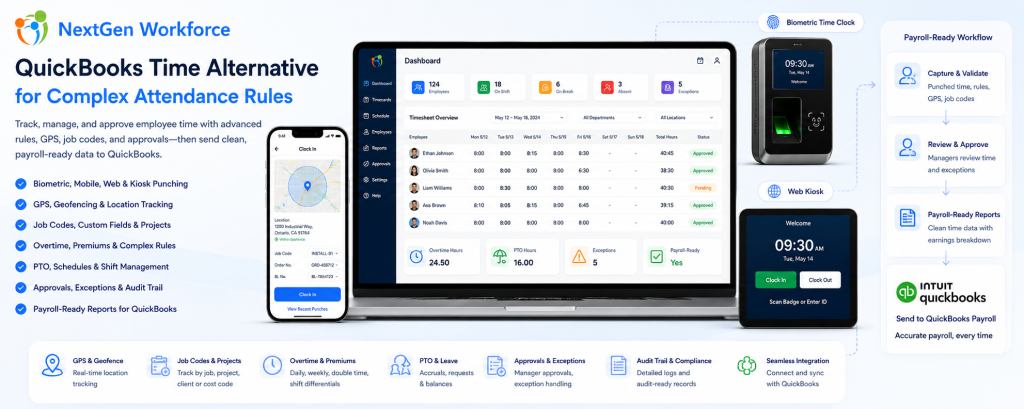
QuickBooks Time Alternative for Complex Attendance Rules By NextGen Workforce Editorial Team Last updated: August 2026 QuickBooks users do not always need another payroll tool. Many businesses need cleaner, approved, payroll-ready time data before payroll starts. If your team is still fixing missing punches, overtime, PTO, job codes, manager approvals, geofence exceptions, or custom attendance rules before processing payroll in QuickBooks, the real issue may be the time tracking workflow before payroll. QuickBooks is strong for accounting and payroll workflows. However, payroll accuracy depends on the data that reaches QuickBooks. If employee hours are incomplete, unapproved, or categorized incorrectly, payroll teams still have to clean up the records manually. That is where NextGen Workforce helps. NextGen Workforce supports businesses that use QuickBooks but need more flexible time tracking, biometric attendance, mobile GPS clock-in, geofencing, web kiosk punching, custom punch fields, complex overtime rules, PTO, approvals, audit-ready records, and payroll-ready reports. Using QuickBooks But Still Fixing Timesheets Manually? NextGen Workforce helps businesses prepare clean, reviewed, and payroll-ready time data before payroll runs. Track punches, schedules, overtime, PTO, approvals, job codes, GPS locations, geofence exceptions, and custom rules in one connected workflow. QuickBooks Time Tracking Demo Why Businesses Look for a QuickBooks Time Alternative Quick answer: Businesses often look for a QuickBooks Time alternative when their attendance rules, field tracking needs, biometric clock requirements, job codes, approvals, or payroll workflows are more complex than a basic time tracking setup. For simple teams, basic time tracking may be enough. Employees clock in, managers review hours, and payroll processes the records. However, many businesses using QuickBooks have more complex workforce requirements. They may need to track field employee locations, enforce jobsite geofences, capture custom fields, apply daily and weekly overtime, manage PTO, approve exceptions, handle shift premiums, track web kiosk punches, or support biometric devices. When those details are not handled before payroll, QuickBooks receives data that still needs work. That creates payroll cleanup. Missing punches: Payroll has to chase employees or managers. Unapproved overtime: Extra hours are discovered too late. PTO mismatches: Approved leave does not match the timesheet. Wrong earning codes: Regular, overtime, holiday, and premium hours need correction. Job code gaps: Project, department, client, or cost code details are missing. Field punch issues: Mobile employees clock in from different locations without enough visibility. Custom rule gaps: Company-specific attendance rules still need spreadsheet work. In practice, the problem is not always payroll. The problem is that time data is not payroll-ready before it reaches payroll. QuickBooks Can Process Payroll, But It Cannot Fix Messy Time Data Quick answer: QuickBooks can help process payroll, but payroll accuracy depends on complete, approved, and correctly categorized time records. NextGen Workforce helps prepare that data before payroll starts. Payroll teams need more than total hours. They need time records that are complete, approved, categorized, and ready for payroll review. Before data reaches QuickBooks, businesses often need to confirm: Did every employee clock in and out? Did managers approve the timecard? Was overtime calculated correctly? Was PTO or sick time included? Were holiday hours categorized properly? Were shift premiums or differentials applied? Were job codes, project codes, or custom fields captured? Were GPS or geofence exceptions reviewed? Were payroll earning categories mapped correctly? If these items are not reviewed before payroll, payroll teams still need manual cleanup. NextGen Workforce helps move that cleanup earlier in the workflow. Key takeaway: The goal is not just to track time. The goal is to prepare clean, approved, payroll-ready time data before QuickBooks payroll processing. How NextGen Workforce Supports QuickBooks Payroll-Ready Workflows Quick answer: NextGen Workforce helps businesses capture employee time, apply attendance rules, review exceptions, approve timecards, and prepare payroll-ready reports before data reaches QuickBooks. NextGen Workforce is built for businesses that need more than a simple clock-in screen. The workflow can support different teams, different attendance methods, and different payroll requirements. Step 1: Employees Clock In Employees can clock in using mobile, web kiosk, biometric hardware, or other supported attendance workflows. This gives businesses flexibility based on the type of workforce. Step 2: Required Details Are Captured Where needed, the system can capture GPS location, geofence status, job code, project, department, work location, Order No., BL No., task, or notes during punch workflows. This is useful for field teams, construction crews, heavy machinery companies, service teams, and project-based businesses. Step 3: Attendance Rules Are Applied NextGen Workforce can support configurable attendance rules such as overtime, double time, shift differentials, rounding, grace periods, meal rules, auto clock-out, holiday rules, and customer-specific policies. Step 4: Exceptions Are Reviewed Managers and payroll teams can review missing punches, late clock-ins, early departures, overtime warnings, geofence issues, incomplete custom fields, or timecard exceptions. Step 5: Managers Approve Timecards Approval workflows help ensure time records are reviewed before payroll starts. This reduces the need for payroll teams to chase managers at the end of the pay period. Step 6: Payroll-Ready Reports Are Prepared After review, NextGen Workforce helps prepare regular hours, overtime, double time, PTO, sick time, holiday hours, shift premiums, job codes, and other payroll-ready data. Step 7: QuickBooks Receives Cleaner Data Payroll starts with reviewed, categorized, and more reliable time records. This helps reduce spreadsheet cleanup before payroll processing. Need More Than Basic Time Tracking for QuickBooks? NextGen Workforce helps businesses manage biometric time clocks, mobile GPS clock-in, geofencing, web kiosk punching, custom punch fields, overtime rules, PTO, approvals, and payroll-ready reports. Talk To An Expert When Basic Time Tracking Is Not Enough Quick answer: Basic time tracking is often not enough when a business needs biometric verification, mobile GPS tracking, geofencing, custom punch fields, complex overtime, PTO workflows, shift premiums, or approval rules before QuickBooks payroll. Many businesses start with simple time tracking. That works until the workforce becomes more complex. Then payroll teams need more context around each punch. Business Need Why Basic Time Tracking Struggles How NextGen Workforce Helps Biometric attendance PINs or manual entry may not verify identity strongly enough Supports biometric time clock workflows Mobile field teams