OBBBA Overtime Reporting: Why Employers Need Cleaner Time Data Before Payroll
New overtime reporting rules are giving employers one more reason to clean up time data before payroll starts.
The One Big Beautiful Bill Act, often shortened as OBBBA, added a new deduction for qualified overtime compensation for tax years 2025 through 2028. IRS guidance says the deduction generally applies to the overtime pay that exceeds the employee’s regular rate of pay, such as the “half” portion of time-and-a-half overtime compensation, when it meets the rules and is properly reported. Source: IRS qualified overtime compensation FAQs
That sounds like a tax rule. But for employers, it quickly becomes a workforce data problem.
Can your team clearly separate regular hours, overtime hours, overtime premium amounts, approvals, pay periods, employee records, and audit details before payroll reporting?
If not, payroll may have to rebuild the story later.
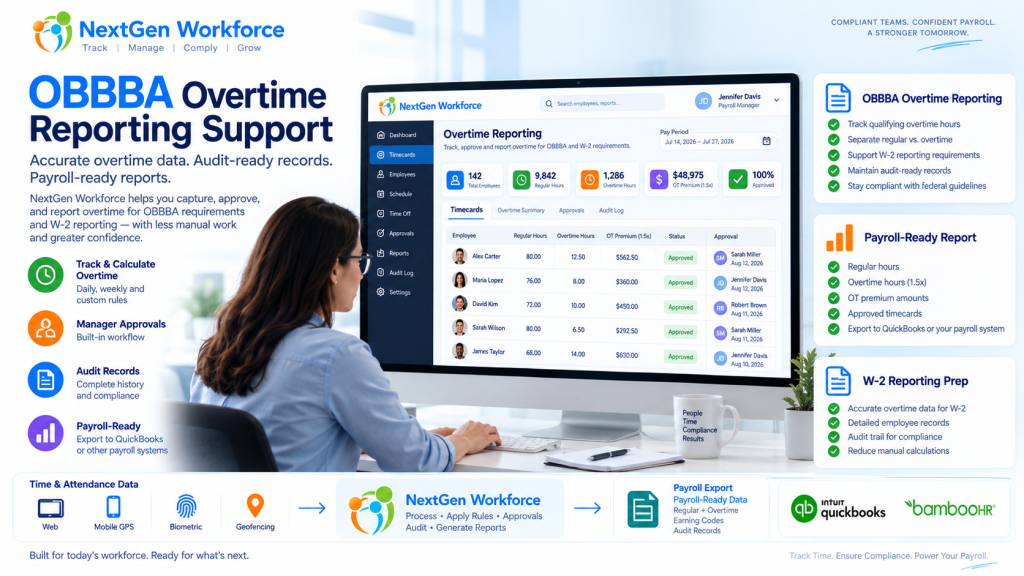
NextGen Workforce supports OBBBA-ready overtime tracking and reporting workflows to help employers review approved overtime, separate overtime premium data, maintain audit history, and prepare payroll-ready reports.
We are not saying software alone makes an employer “fully compliant.” Eligibility, tax treatment, payroll reporting, and final filing decisions should be confirmed with your payroll provider, CPA, or legal advisor.
But one thing is clear: if overtime is messy in the timecard, it will be messy in payroll reporting.
Preparing for OBBBA “No Tax on Overtime” Reporting?
NextGen Workforce helps employers track overtime, review approvals, separate overtime premium data, and generate payroll-ready overtime reports before payroll reporting.
What Changed Under OBBBA?
Quick answer: OBBBA created a temporary deduction for certain qualified overtime compensation for tax years 2025 through 2028. IRS guidance says employers and other payors must separately report qualified overtime compensation for 2026 and later years. Source: IRS
The OBBBA “No Tax on Overtime” provision does not mean every overtime dollar is automatically tax-free.
The IRS explains that the deduction applies to qualified overtime compensation. In general, this refers to the amount above the employee’s regular rate of pay that is required under section 7 of the Fair Labor Standards Act, commonly known as FLSA overtime. Source: IRS announcement
For a simple time-and-a-half example, if an employee’s regular rate is $20 per hour and overtime is paid at $30 per hour, the possible qualified overtime compensation is generally the extra $10 premium portion, not the full $30 overtime rate.
That distinction matters.
Payroll teams may need to identify overtime hours, regular rate amounts, overtime premium amounts, and reporting details. If the source timecard data is not clean, the reporting process becomes harder.
Why Employers Should Not Wait Until Year-End
Quick answer: Overtime reporting starts when time is recorded, reviewed, approved, and categorized. Waiting until year-end can leave payroll teams sorting through missing punches, unclear overtime, and incomplete audit history.
Year-end reporting is not where overtime data begins.
It begins when the employee works extra time.
Then it passes through several steps:
- the employee clocks in and out
- the system calculates regular and overtime hours
- the manager reviews the timecard
- exceptions are corrected
- overtime is approved or flagged
- payroll reviews totals
- reports or exports are prepared
If those steps are not clean, payroll may be forced to fix the data later.
That is not a good place to be when reporting rules require more detail.
A relatable example: an employee works 46 hours in a week. The timecard shows the total hours, but one punch was edited, overtime approval is missing, and the employee worked across two job codes. Payroll now has to answer three questions before reporting anything: were the extra hours valid, how much was overtime premium, and which records support the calculation?
That is why employers should treat OBBBA reporting as a time data readiness project, not just a tax form update.
What Employers Need to Track for OBBBA-Ready Overtime Reporting
Quick answer: Employers should be able to review regular hours, overtime hours, overtime premium amounts, manager approvals, pay periods, employee details, audit history, and payroll-ready report outputs.
Every employer’s final reporting workflow may be different.
However, the workforce data behind the process usually includes the same building blocks.
| Data Area | Why It Matters |
|---|---|
| Employee record | Payroll needs the correct employee, pay period, and worker details. |
| Clock-in and clock-out data | Overtime starts with accurate time records. |
| Regular hours | Payroll needs to know the base hours before overtime is calculated. |
| Overtime hours | Overtime must be separated from regular time. |
| Overtime premium portion | The OBBBA deduction generally focuses on the premium amount above the regular rate, when it qualifies. |
| Manager approval | Approved overtime is easier to defend and process than unreviewed overtime. |
| Edits and corrections | Missing punches and changed records should have a clear audit trail. |
| Pay code or earning code | Payroll may need separate categories for regular, overtime, premium, or reportable overtime data. |
| Payroll-ready report | Payroll needs a clean output for review, export, or final reporting workflows. |
The main idea is simple.
Do not make payroll search for overtime data across spreadsheets, emails, edits, and manager messages.
Put the review process inside the workforce workflow.
Regular Hours, Overtime Hours, and Overtime Premium Are Not the Same
Quick answer: For OBBBA-related overtime reporting, employers may need to distinguish between total overtime pay and the overtime premium portion that exceeds the regular rate of pay.
This is where many teams may get confused.
Overtime reporting is not always just “show me everyone with more than 40 hours.”
For example:
| Item | Example |
|---|---|
| Regular rate | $20 per hour |
| Overtime rate | $30 per hour |
| Regular portion inside overtime hour | $20 |
| Overtime premium portion | $10 |
That $10 difference is the part employers may need to identify for qualified overtime compensation workflows, depending on the employee, pay type, FLSA rules, and final payroll reporting process.
That is why time tracking and payroll data need to speak the same language.
It is not enough to know that overtime happened.
You need to know how it was calculated, reviewed, approved, and reported.
2025 Transition Year vs. 2026 Reporting
Quick answer: IRS guidance says 2025 is treated differently from 2026 and later years. For 2025, employers are not required to separately report qualified overtime compensation on unchanged forms, while separate reporting is required for 2026 and later years. Source: IRS
This timing matters for employers.
The IRS has described 2025 as a transition period for enforcement and administration of new information reporting requirements for qualified overtime compensation. The IRS also encouraged employers and payors to provide employees with separate accountings of overtime compensation for 2025 where possible. Source: IRS Notice 2025-62
For 2026 and later years, employers and other payors are required to separately report qualified overtime compensation. IRS materials also reference updated reporting using Form W-2 Box 12 Code TT beginning in 2026. Source: IRS Fact Sheet FS-2026-13
That gives employers a practical reason to start earlier.
Even if your final payroll provider handles the year-end form, your internal time and attendance system still needs to provide clean overtime data.
Why Manager Approval Still Matters
Quick answer: Manager approval helps payroll separate reviewed overtime from unresolved exceptions, late corrections, or unapproved extra hours.
Overtime reporting is not only about math.
It is also about workflow.
Did the employee actually work those hours? Was the shift extended? Did the manager approve the extra time? Was the timecard corrected after the fact? Was there a missing punch? Was the employee assigned to the right job or department?
Payroll should not have to guess.
NextGen Workforce helps employers bring approval into the overtime workflow so payroll can review approved hours, pending items, and exceptions before exporting or reporting.
This does not replace payroll or legal review.
It simply gives payroll cleaner records to work from.
How NextGen Workforce Supports OBBBA-Ready Overtime Reporting
Quick answer: NextGen Workforce helps employers capture time, calculate overtime, review exceptions, approve records, separate overtime data, and generate payroll-ready reports to support OBBBA-related reporting workflows.
NextGen Workforce is built around the work that happens before payroll.
That is exactly where OBBBA reporting preparation starts.
NGW can help employers:
- capture employee time from web, kiosk, mobile, or biometric clock workflows
- track regular hours and overtime hours
- separate overtime premium data for reporting review
- review missing punches before payroll
- apply configurable overtime rules
- route overtime and timesheets for manager approval
- maintain audit history for edits and approvals
- prepare payroll-ready overtime reports
- support QuickBooks, BambooHR, and custom payroll workflows where configured
The goal is not to make a broad “fully compliant” promise.
The goal is more useful than that.
Give employers the overtime data they need in a cleaner, more reviewable format.
What an OBBBA-Ready Overtime Report Should Include
Quick answer: An OBBBA-ready overtime report should help payroll review employee-level overtime, pay period totals, overtime premium data, approval status, corrections, audit notes, and export readiness.
A good report should answer the questions payroll is likely to ask.
| Report Field | Recommended Purpose |
|---|---|
| Employee name / ID | Identify the worker tied to the overtime record. |
| Pay period | Connect overtime to the correct payroll cycle. |
| Work date | Show when overtime was earned. |
| Regular hours | Show base hours before overtime. |
| Overtime hours | Show overtime time separately. |
| Regular rate | Support calculation review. |
| Overtime rate | Show the overtime pay rate used. |
| Overtime premium amount | Help identify the reportable premium portion where applicable. |
| Approval status | Show approved, pending, rejected, or exception status. |
| Manager approval date | Support review and audit history. |
| Edited records | Flag corrections or manual changes. |
| Notes / audit trail | Preserve context for payroll review. |
| Export status | Show whether the record is ready for payroll workflow. |
Some employers may need additional fields based on payroll provider, employee type, pay codes, union rules, state rules, or internal policy.
That is why the report should be configurable, not fixed forever.
Where QuickBooks and BambooHR Fit
Quick answer: QuickBooks and BambooHR can support payroll and HR workflows, but employers still need clean overtime data before those systems receive or process payroll-ready records.
Many businesses do not use one system for everything.
BambooHR may manage employee records, SSO, PTO, and HR workflows. QuickBooks may support payroll or accounting workflows. NextGen Workforce helps manage the time and attendance layer in between.
For QuickBooks users, NGW can help prepare reviewed overtime data before payroll workflows.
For BambooHR users, NGW can sync employee and PTO/time-off data, support BambooHR SSO, and export approved hours back to BambooHR time tracking where configured.
For businesses using both, NGW helps connect the operational layer: time tracking, overtime rules, scheduling, PTO visibility, approvals, and payroll-ready reports.
Using QuickBooks or BambooHR?
NextGen Workforce helps connect employee data, overtime tracking, approvals, PTO visibility, and payroll-ready reports before payroll processing.
What Employers Should Review Before Payroll
Quick answer: Before payroll, employers should review overtime records, missing punches, manager approvals, payroll codes, corrections, premium calculations, and report/export readiness.
Here is a practical checklist.
- Are all timecards complete?
- Are missing punches corrected?
- Are overtime hours separated from regular hours?
- Is the overtime premium amount visible?
- Were overtime hours reviewed or approved by a manager?
- Are edited records flagged?
- Are pay codes or earning codes mapped correctly?
- Are job, department, project, or client details correct?
- Are reports ready for payroll or year-end review?
- Has the payroll provider or CPA confirmed the final OBBBA reporting process?
This review does not need to be complicated.
It just needs to happen before the data reaches payroll reporting.
How to Talk About “Compliance” Safely
Quick answer: Employers should avoid relying on software alone as proof of full compliance. A better phrase is “OBBBA-ready reporting support” because final compliance depends on payroll, tax, legal, employee eligibility, and reporting decisions.
It may be tempting to say a system is “fully OBBBA compliant.”
That sounds strong in marketing, but it can create risk.
OBBBA overtime reporting involves eligibility, FLSA overtime rules, payroll forms, tax treatment, employee-level reporting, and guidance that may continue to evolve.
So the stronger and safer message is:
NextGen Workforce supports OBBBA-ready overtime tracking and reporting workflows.
That statement is practical.
It tells employers what the software helps with: tracking, approval, separation, audit, and reporting support.
It does not pretend that software can replace payroll, CPA, or legal review.
Why This Matters for Growing Hourly Teams
Quick answer: Hourly teams often have the most overtime complexity because schedules, shifts, locations, approvals, PTO, and corrections can change every pay period.
OBBBA reporting will matter most where overtime is common.
That includes businesses with:
- hourly employees
- shift-based teams
- field employees
- multi-location operations
- manufacturing teams
- construction crews
- healthcare or clinic staff
- hospitality teams
- retail and warehouse employees
- custom overtime approval rules
These teams already know the pain.
One late timecard can delay payroll review. One missing approval can create a follow-up. One incorrect overtime calculation can create more work downstream.
OBBBA simply raises the value of getting overtime data right earlier.
Final Thought
OBBBA overtime reporting is not only a year-end tax topic.
It is a daily workforce data topic.
The timecard, schedule, overtime rule, manager approval, payroll code, and audit trail all matter before the report is generated.
That is where employers should focus now.
Clean overtime data before payroll. Cleaner reporting later.
NextGen Workforce helps employers prepare for that workflow with overtime tracking, approvals, configurable attendance rules, payroll-ready reports, and reporting support for QuickBooks, BambooHR, and custom payroll processes where configured.
Need OBBBA-Ready Overtime Reporting Support?
NextGen Workforce helps employers track overtime, review approvals, separate overtime premium data, maintain audit history, and prepare payroll-ready overtime reports.
Frequently Asked Questions
What is OBBBA overtime reporting?
OBBBA overtime reporting refers to the employer and payroll reporting workflows connected to the One Big Beautiful Bill Act deduction for qualified overtime compensation. IRS guidance says separate reporting of qualified overtime compensation is required for 2026 and later years.
Does OBBBA make all overtime tax-free?
No. IRS guidance says the deduction generally applies to qualified overtime compensation, often the overtime premium amount above the regular rate of pay, when it meets the requirements and is properly reported.
What is qualified overtime compensation?
IRS guidance describes qualified overtime compensation as overtime compensation required under section 7 of the Fair Labor Standards Act that exceeds the employee’s regular rate of pay, subject to the rules and reporting requirements.
Do employers need to separately report overtime for 2025?
IRS guidance says employers are not required to separately report qualified overtime compensation on unchanged 2025 Forms W-2, 1099-NEC, and 1099-MISC. However, employers may choose to provide separate accounting to employees for 2025.
What changes in 2026?
For 2026 and later years, IRS guidance says employers and other payors are required to separately report qualified overtime compensation. IRS materials also reference Form W-2 Box 12 Code TT for qualified overtime compensation reporting.
Can NextGen Workforce help with OBBBA overtime reporting?
Yes. NextGen Workforce supports OBBBA-ready overtime tracking and reporting workflows by helping employers track overtime, review approvals, separate overtime premium data, maintain audit history, and prepare payroll-ready reports.
Is NextGen Workforce fully OBBBA compliant?
NextGen Workforce provides tools to support OBBBA-ready overtime tracking and reporting workflows. Employers should confirm final compliance, employee eligibility, payroll setup, tax treatment, and reporting requirements with their payroll provider, CPA, or legal advisor.
What should an OBBBA-ready overtime report include?
An OBBBA-ready overtime report should include employee details, pay period, regular hours, overtime hours, overtime premium data, approval status, edits, notes, audit history, and payroll/export readiness.
Can this support QuickBooks or BambooHR workflows?
Yes. NextGen Workforce can support QuickBooks, BambooHR, and custom payroll workflows where configured by preparing cleaner overtime and payroll-ready workforce data before payroll processing.
This article is for general informational purposes only and is not tax, legal, or payroll advice. OBBBA rules, payroll forms, and reporting guidance may change. Employers should confirm requirements with the IRS, their payroll provider, CPA, or legal advisor.

The NGW Workforce team writes about HR tech, time tracking, scheduling, and workforce compliance.