Field Time Tracking With Custom Punch Fields: Capture Order Numbers, Job Codes, and Client Data at Clock-In
Field time tracking should capture more than clock-in and clock-out time.
For many field-based businesses, employees also need to capture order numbers, BL numbers, job codes, project details, customer locations, task information, and notes when they start work. If that information is not captured at the time of punch, payroll and operations teams often have to rebuild the record manually later.
This is where basic time tracking software starts to fall short.
A field employee may reach a customer location and receive an Order No. or BL No. before starting the job. A technician may need to select a project or task. A heavy equipment operator may need to enter a service order. A delivery team may need to capture a client reference number. A construction crew may need to clock time against a job code.
Payroll needs the hours.
Operations needs the job data.
Management needs the report.
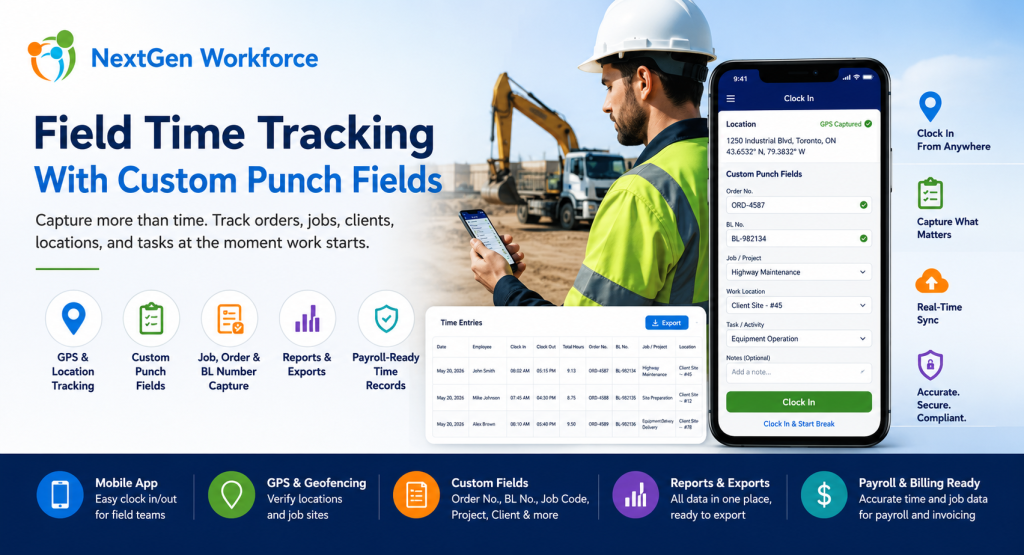
NextGen Workforce helps businesses capture this information directly during mobile clock-in, web kiosk punch, or attendance workflows — then include it in reports and exports with the employee’s time records.
Need Employees To Capture Job Data When They Clock In?
NextGen Workforce helps field teams capture custom punch fields such as Order No., BL No., job code, project, client, department, work location, task, and notes during clock-in or clock-out.
Track time, GPS location, custom fields, approvals, and payroll-ready records in one connected workflow.
What Are Custom Punch Fields In Time Tracking?
Quick answer: Custom punch fields are extra fields employees complete when they clock in, clock out, start a break, end a break, or submit time. These fields can capture business-specific details such as order numbers, BL numbers, job codes, project IDs, work locations, cost codes, task types, or notes.
Most time tracking systems focus on one question:
When did the employee work?
For field operations, that is not enough.
Businesses often need to know what the employee worked on, where the work happened, which client it belongs to, which order number applies, and how those hours should be reported or billed.
Custom punch fields solve this problem by collecting operational data at the source.
Instead of asking employees to write details on paper, send messages, update spreadsheets, or tell supervisors later, the required fields can be captured during the punch workflow.
Examples include:
- Order No.: Capture the work order or service order reference.
- BL No.: Capture bill of lading or delivery-related reference details.
- Job code: Track hours against a job, project, or cost center.
- Client name: Identify which customer the work belongs to.
- Work location: Record office, branch, client site, remote site, or field location.
- Task type: Capture the type of work performed.
- Department: Assign hours to the right team or division.
- Notes: Let employees explain exceptions or add job details.
Key takeaway: Custom punch fields turn a simple time clock into a field operations data capture tool.
Why Field Teams Need More Than Basic Clock-In And Clock-Out
Quick answer: Field teams need more than basic clock-in and clock-out because work often happens at customer locations, job sites, routes, branches, or remote locations. Payroll, billing, job costing, and operations may all need extra details connected to each time record.
A basic clock-in record tells payroll when work started.
However, it may not tell operations enough.
For example, it may not show which customer the employee visited, which job number should be charged, which order number was completed, or which BL number should appear in the export.
That creates manual work after the shift.
Supervisors may need to call employees. Payroll may need to check messages. Operations may need to match attendance records with job records. Finance may need to connect hours to billing or job costing.
As a result, the business loses time even though employees technically “clocked in.”
The issue is not only attendance.
The issue is missing context.
NextGen Workforce helps businesses capture that context at the time of punch, when the employee is closest to the work and the information is most accurate.
A Real-World Example: Field Employees Entering Order No. And BL No.
Quick answer: A field employee may receive an Order No. or BL No. only after reaching the client location. With NextGen Workforce, the employee can enter those details during mobile clock-in so the information stays connected to the time record.
Here is a common field workforce scenario.
An employee travels to a client location. After reaching the site, they receive the Order No. and BL No. from the customer or site contact. Before starting work, they need to record those values.
In a manual process, this usually means the employee writes the details down, sends a message, updates a sheet, or tells a supervisor later.
That creates risk.
The number may be entered incorrectly. The information may arrive late. Payroll may not see it. Operations may not be able to match hours with the correct order. Reports may need manual cleanup.
With NextGen Workforce, the workflow can be cleaner:
- The employee reaches the client location.
- The employee opens the NextGen Workforce mobile app.
- The app can capture GPS location if enabled.
- The employee enters or selects the required Order No. and BL No.
- The employee clocks in.
- The time record stores the punch time, employee, location, and custom field values.
- Managers and admins can review the record.
- Reports and exports can include the custom fields with the attendance data.
This is where NextGen Workforce becomes especially useful.
It helps field teams capture real operational data at the moment work begins.
How NextGen Workforce Mobile App Helps Field Employees
Quick answer: The NextGen Workforce mobile app helps field employees clock in from client locations, capture GPS details where enabled, complete custom punch fields, submit job-related information, and create cleaner time records for payroll and operations.
Mobile time tracking should be simple for employees and useful for the business.
Employees need a fast punch experience.
Managers need accurate details.
Payroll needs clean hours.
Operations needs job and order visibility.
NextGen Workforce helps connect these needs in one workflow.
Mobile Clock-In From Client Locations
Employees can clock in from a mobile device when working at customer locations, field sites, service routes, or remote work areas.
This helps companies move away from paper timesheets and delayed manual updates.
GPS Location Visibility
Where enabled, GPS information can help managers review where an employee clocked in.
This adds visibility for field teams, mobile workers, client-site employees, and route-based operations.
Geofencing For Approved Locations
Some businesses need stronger location control.
NextGen Workforce can support geofencing so businesses can validate or restrict clock-ins based on approved job sites, branches, customer locations, or work areas.
Custom Fields During Punch
This is the key differentiator for field operations.
Employees can complete required fields during the punch, such as Order No., BL No., project, job code, department, work location, task type, or notes.
Manager Review And Approvals
Managers can review time records, missing information, exceptions, and custom field values before payroll or reporting.
This reduces back-and-forth after the pay period closes.
Reports And Exports
Admins can generate reports and exports that include employee time records along with custom fields.
That means Order No., BL No., job code, project, or work location details can travel with the time record instead of living in a separate spreadsheet.
Have Field Data Your Current System Cannot Capture?
NextGen Workforce helps mobile teams capture Order No., BL No., project, job code, client location, task, department, and notes directly during clock-in.
If your team is still collecting these details manually, our team can review your workflow.
Why Standard HR Systems Often Cannot Handle This Workflow
Quick answer: Standard HR systems are often built for employee records, HR workflows, PTO, and basic workforce administration. Field operations may require more flexible time tracking, custom punch fields, GPS, geofencing, job codes, and export-ready attendance data.
Many HR systems are very useful for HR administration.
However, field time tracking is more operational.
A company may not only need to know who the employee is or whether they are active in the HR system. It may need to know which order they worked on, which BL number applies, which customer location they visited, and which job code should appear in the report.
That is a different type of workflow.
It connects attendance, field operations, reporting, payroll, billing, and customer service.
This is where NextGen Workforce is different.
NextGen Workforce is designed to support flexible attendance workflows, including mobile clock-in, GPS tracking, geofencing, custom punch fields, rules, approvals, and payroll-ready exports.
Instead of forcing every business into a fixed time tracking model, the platform can be configured around real operational requirements.
Field Time Tracking Data That Can Be Captured At Punch
Quick answer: Field time tracking can capture many types of custom data at punch, including order numbers, BL numbers, job codes, project IDs, client names, work locations, tasks, departments, cost centers, equipment references, safety confirmations, and notes.
Different industries need different fields.
A heavy machinery company may need Order No. and BL No.
A construction company may need project and cost code.
A service contractor may need customer and work order.
A logistics team may need delivery reference and route details.
A healthcare field team may need location and service type.
NextGen Workforce can help businesses configure the fields that matter to their workflow.
| Custom Field | Why It Matters | Who Uses It |
|---|---|---|
| Order No. | Connects time to a work order or service order | Field service, heavy machinery, operations |
| BL No. | Connects time to bill of lading or delivery reference | Logistics, transportation, machinery, delivery teams |
| Project or job code | Supports job costing and project reporting | Construction, manufacturing, field service |
| Client or customer | Identifies who the work was performed for | Service teams, contractors, cleaning, security |
| Work location | Shows where the employee worked | Multi-location and mobile teams |
| Task type | Explains what type of work was performed | Operations, supervisors, payroll |
| Department or cost center | Assigns hours to the right reporting category | Payroll, finance, department managers |
| Notes | Captures exceptions or job-specific context | Employees, managers, payroll reviewers |
Capturing this data during the punch reduces the need to chase it later.
It also gives the business cleaner reports and exports.
Reports And Exports: Turning Field Punches Into Usable Business Data
Quick answer: Reports and exports should include both time records and custom punch field values. This allows operations, payroll, billing, and management teams to review employee hours alongside order numbers, BL numbers, job codes, projects, and client details.
Capturing custom fields is only useful if the data can be reported.
That is why reporting and export flexibility matters.
NextGen Workforce can help businesses generate reports that show:
- employee name
- date
- clock-in and clock-out time
- total hours
- GPS or location details where enabled
- Order No.
- BL No.
- project or job code
- client or customer
- department or cost center
- approval status
- payroll-ready hours
This helps different teams use the same source data.
Payroll can review hours. Operations can review order details. Finance can connect time to jobs. Managers can review exceptions. Customers can receive cleaner supporting details when needed.
Key takeaway: The best field time tracking system does not only collect punches. It turns punches into usable reporting and export data.
Manual Field Time Tracking Vs. NextGen Workforce
Quick answer: Manual field time tracking depends on paper notes, employee messages, spreadsheets, and supervisor follow-up. NextGen Workforce helps capture time, location, custom fields, approvals, and export-ready records in one workflow.
| Field Tracking Need | Manual Process | NextGen Workforce Workflow |
|---|---|---|
| Clock-in time | Paper timesheet or manual entry | Mobile app clock-in |
| Client location | Supervisor confirmation | GPS or geofencing support |
| Order No. | Text message or handwritten note | Custom punch field |
| BL No. | Entered later in spreadsheet | Captured during clock-in |
| Job code | Payroll correction later | Selected at punch |
| Manager review | Email or verbal confirmation | Approval workflow |
| Reports | Manual spreadsheet cleanup | Time records with custom fields |
| Payroll readiness | Data rebuilt after the fact | Reviewed records before payroll |
The difference is simple.
Manual tracking collects information after the work happens. NextGen Workforce helps capture it when the work starts.
Who Needs Field Time Tracking With Custom Punch Fields?
Quick answer: Field time tracking with custom punch fields is useful for businesses with mobile employees, client-site work, job orders, project tracking, service routes, delivery references, and payroll or billing reports that need more than basic hours.
This workflow is especially useful for industries where employees work away from a fixed office.
Heavy Machinery And Equipment Services
Heavy machinery teams often work at client locations and may need to capture Order No., BL No., equipment details, service references, or customer job information during clock-in.
Construction And Trades
Construction teams need job codes, project IDs, cost centers, labor classifications, and location-based time records.
Logistics And Transportation
Drivers and delivery teams may need to capture delivery references, BL numbers, route details, customer locations, and job notes.
Field Service Companies
Technicians often work across customer sites and need to capture service order, task type, client, and time details.
Cleaning And Facility Services
Cleaning teams often work across multiple buildings or customer locations and need location-specific attendance and reporting.
Security Services
Security teams may work at different posts, patrol sites, or customer locations and need location and shift-specific tracking.
Manufacturing Support And Installation Teams
Installation and support teams may work at customer sites and need project, job, task, or customer information linked with time.
Managing Field Employees Across Client Locations?
NextGen Workforce helps field teams capture time, GPS location, geofencing, custom punch fields, approvals, job codes, order details, and export-ready reports.
What To Check Before Choosing Field Time Tracking Software
Quick answer: Before choosing field time tracking software, businesses should confirm whether the system supports mobile clock-in, GPS, geofencing, custom punch fields, job codes, approvals, reports, exports, payroll readiness, and customer-specific workflows.
Not every time tracking tool can support field operations well.
Before choosing a system, review these questions:
- Mobile clock-in: Can employees clock in from client locations?
- GPS visibility: Can managers review where the punch happened?
- Geofencing: Can clock-ins be validated or restricted by approved locations?
- Custom fields: Can employees enter Order No., BL No., job code, or project details?
- Required fields: Can some fields be mandatory before punch submission?
- Reports: Can custom fields appear in attendance reports?
- Exports: Can the data be exported for payroll, billing, or operations?
- Approvals: Can managers review exceptions before payroll?
- Rules: Can the system apply overtime, rounding, breaks, and payroll rules?
- Flexibility: Can the workflow be configured around your business process?
If the answer is no, the business may still end up doing manual cleanup.
That is what NextGen Workforce is designed to reduce.
Ready To Digitize Field Time Tracking?
NextGen Workforce helps businesses replace manual field timesheets with mobile clock-in, GPS tracking, geofencing, custom punch fields, approvals, reports, and payroll-ready exports.
If your employees need to capture order numbers, BL numbers, job codes, or client details at clock-in, our team can help review your workflow.
Frequently Asked Questions About Field Time Tracking With Custom Punch Fields
What Is Field Time Tracking?
Field time tracking allows employees to record work hours from job sites, client locations, routes, or remote work areas instead of only using an office time clock.
It is useful for mobile teams, service workers, construction crews, delivery teams, and field operations.
What Are Custom Punch Fields?
Custom punch fields are additional fields employees complete when submitting a punch.
They can capture information such as Order No., BL No., job code, project, customer, location, department, task, or notes.
Can Employees Enter Order No. Or BL No. During Clock-In?
Yes. NextGen Workforce can support custom fields that allow employees to enter or select Order No., BL No., project, job code, or other required information during clock-in or clock-out.
Can Custom Fields Be Required Before Punching?
Yes. Depending on the configuration, custom fields can be made required so employees must complete important information before submitting a punch.
Can Custom Punch Fields Appear In Reports?
Yes. Custom field values can be included in reports and exports with the employee’s time records, helping payroll, operations, billing, and management teams review the data together.
Does NextGen Workforce Support GPS And Geofencing?
Yes. NextGen Workforce supports mobile GPS tracking and geofencing workflows for field teams, job sites, branches, and customer locations.
Is This Useful For Heavy Machinery Companies?
Yes. Heavy machinery companies often need employees to capture client-site data such as Order No., BL No., job information, equipment references, and work location details during clock-in.
NextGen Workforce can help digitize that process.
Can This Replace Manual Timesheets?
Yes. NextGen Workforce can help businesses move away from manual field timesheets by capturing time, location, custom fields, approvals, and export-ready records digitally.
About The Author

The NGW Workforce team writes about HR tech, time tracking, scheduling, and workforce compliance.