Payroll-Ready Workforce Management Software for Complex Hourly Teams
You do not need another time clock. You need clean workforce data before payroll runs.
That is the real problem for many growing businesses.
Employees clock in. Managers adjust schedules. PTO gets approved. Overtime happens. Job codes change. Someone forgets a punch. A field employee clocks in from the wrong location. Then payroll day arrives, and the team has to clean everything manually.
Sound familiar?
Payroll-ready workforce management software helps businesses collect employee time, apply attendance rules, manage schedules, review exceptions, approve records, and prepare cleaner data before payroll processing.
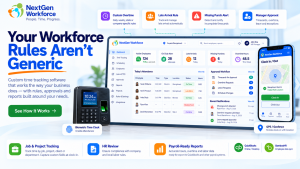
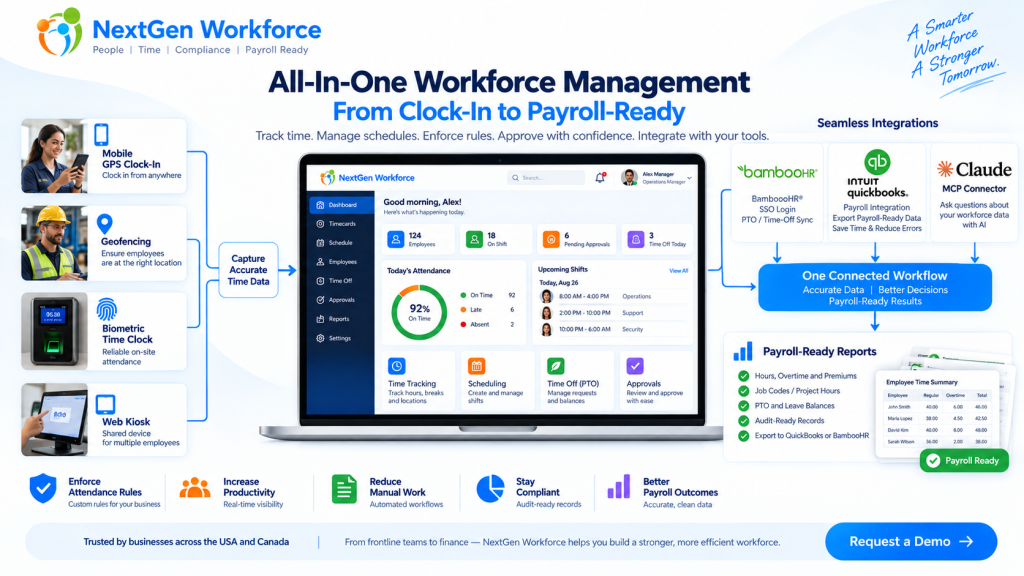
NextGen Workforce brings time tracking, attendance, scheduling, biometric clocks, mobile GPS, geofencing, PTO, approvals, custom rules, and payroll-ready reports into one connected workflow.
Still Cleaning Time Data Before Every Payroll?
NextGen Workforce helps your team capture accurate time, review exceptions, approve hours, and prepare payroll-ready reports before payroll runs.
What Is Payroll-Ready Workforce Management?
Quick answer: Payroll-ready workforce management connects the work that happens before payroll: time tracking, attendance, scheduling, PTO, overtime, approvals, job codes, and reporting.
A basic time clock records hours.
That is useful, but it is only the beginning.
Payroll needs more than a clock-in and clock-out time. It needs clean, reviewed, categorized, and approved workforce data.
That means payroll teams need to know:
- Did the employee work the scheduled shift?
- Are there missing punches?
- Was overtime approved?
- Was PTO already approved in the HR system?
- Did the employee work at the correct location?
- Which job, project, department, or client should the hours go to?
- Did the manager approve the timecard?
- Are the hours ready to send to payroll?
Payroll-ready workforce management is the system that helps answer those questions before payroll day.
For a business with simple office hours, this may not feel urgent. But for hourly teams, field employees, multi-location operations, manufacturing teams, hospitality groups, healthcare teams, construction crews, and businesses with custom rules, this can become a weekly problem.
Why Payroll Problems Usually Start Before Payroll
Quick answer: Payroll errors often start earlier in the workflow, when punches, schedules, PTO, overtime, approvals, and job data are incomplete or disconnected.
Payroll software can process payroll.
But it cannot magically fix messy attendance data.
If an employee forgot to clock out, payroll still needs someone to fix the record. If overtime was not approved, someone has to ask the manager. If PTO is approved in one system but not visible on the timesheet, payroll has to compare records manually.
Here is a simple example.
A field employee visits a client site. They clock in from mobile, work for six hours, and leave. Payroll later needs to know the employee’s hours, location, client, project, order number, and approval status.
If that information was not captured during the workday, someone has to reconstruct it later.
That is where time gets wasted.
Payroll cleanup is rarely just a payroll problem. It is usually a workforce data problem.
Why Time Tracking Alone Is Not Enough
Quick answer: Time tracking tells you when employees worked. Payroll-ready workforce management also tells you whether the work was scheduled, approved, categorized, compliant with company rules, and ready for payroll.
A time clock answers one question:
When did the employee work?
A payroll-ready workforce system answers a better question:
Is this record complete, correct, approved, and ready for payroll?
That is a big difference.
For example, a timecard may show 46 hours for the week. But before payroll processes those hours, the business may still need to review:
- regular hours
- overtime hours
- double-time rules where applicable
- holiday rules
- meal or break rules
- job codes
- department allocation
- project or client hours
- manager approval
- audit history
Without that review layer, payroll teams end up doing manual checking.
And manual checking does not scale well.
The Core Pieces of a Payroll-Ready Workforce System
Quick answer: A payroll-ready workforce system should connect time capture, scheduling, attendance rules, PTO, approvals, reporting, and payroll integrations.
Each part matters on its own.
But the real value comes when they work together.
1. Time Tracking
Employees need a reliable way to clock in and out.
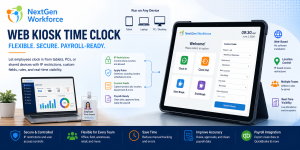
NextGen Workforce supports multiple time capture workflows, including web clock, kiosk, mobile app, and biometric time clock options.
This gives businesses flexibility. Office employees may use a web clock. Field employees may use mobile GPS. On-site teams may use biometric devices. Shared workstations may use kiosk workflows.
2. Attendance Management
Attendance is more than recording time.
Managers need visibility into late arrivals, early departures, missed punches, long shifts, exceptions, and incomplete records.
NextGen Workforce helps teams review attendance issues before they become payroll problems.
3. Employee Scheduling
Schedules help payroll and operations compare planned work with actual hours.
When scheduling and time tracking are disconnected, managers may not notice coverage gaps, unexpected overtime, or schedule mismatches until later.
NextGen Workforce connects schedules with attendance records so teams can review what was planned versus what actually happened.
4. PTO and Time-Off Visibility
PTO affects payroll, scheduling, coverage, and attendance review.
If PTO is approved but not visible in the timecard workflow, payroll has to check another system.
NextGen Workforce supports PTO and time-off workflows, including integrations such as BambooHR time-off sync where configured.
5. Custom Attendance Rules
Every business says, “Our rules are simple.”
Then payroll day comes.
One department has a different overtime rule. One location has holiday rules. One customer needs custom job codes. One policy requires manager approval before overtime becomes payable. Another team needs meal premium tracking or break deductions.
This is where many basic time tracking tools struggle.
NextGen Workforce is designed for configurable attendance rules, including overtime, breaks, rounding, holidays, premiums, exceptions, approval rules, and customer-specific workflows.
6. Approvals
Payroll should not have to guess whether time is approved.
A strong workflow should show whether the employee submitted the record, the manager approved it, and payroll can process it.
NextGen Workforce supports manager review and approval workflows so payroll can work from clearer records.
7. Payroll-Ready Reports and Exports
Payroll-ready does not mean “payroll is done automatically without review.”
It means the data is cleaner before payroll starts.
NextGen Workforce helps prepare reports and exports with reviewed hours, overtime, PTO, job codes, project/client details, approvals, and audit information where configured.
Where QuickBooks and BambooHR Fit
Quick answer: QuickBooks and BambooHR are important systems, but workforce data often needs to be cleaned and approved before it reaches payroll or HR workflows.
Many businesses use more than one system.
BambooHR may manage employee records and PTO. QuickBooks may support payroll or accounting workflows. Another tool may handle scheduling. A spreadsheet may still track corrections.
The gap sits in the middle.
That middle layer is workforce operations.
NextGen Workforce helps connect that layer by managing time tracking, scheduling, attendance rules, approvals, project/client hours, PTO visibility, geofencing, biometric time clocks, and payroll-ready reporting.
For QuickBooks Users
QuickBooks can process payroll workflows, but clean time data still matters before payroll begins.
NextGen Workforce helps businesses prepare approved, categorized, payroll-ready time records before sending or entering data into QuickBooks workflows.
This is especially useful when employees work overtime, switch jobs, use project codes, work at multiple locations, or need manager approval before payroll.
For BambooHR Users
BambooHR helps manage HR employee data.
NextGen Workforce extends that data into attendance, scheduling, PTO/time-off visibility, BambooHR SSO login, time tracking, approvals, and hours export back to BambooHR time tracking where configured.
For businesses using BambooHR and QuickBooks together, NextGen Workforce can help connect the operational workforce layer between HR records and payroll-ready hours.
Using QuickBooks or BambooHR?
NextGen Workforce helps connect employee data, time tracking, scheduling, PTO, approvals, and payroll-ready reports before payroll processing.
Custom Attendance Rules Are Where Payroll Gets Complicated
Quick answer: Custom attendance rules turn basic time tracking into a real payroll-readiness workflow because each business may handle overtime, breaks, holidays, PTO, and approvals differently.
Most payroll cleanup starts with rules.
Not because the rules are always complicated on paper, but because they are hard to apply consistently across employees, departments, locations, and pay periods.
For example:
- A company may require overtime approval before extra hours are paid.
- A location may need holiday premium handling.
- A field team may need project and client hours.
- A California customer may need meal premium review.
- A Canadian customer may calculate overtime based on a bi-weekly period.
- A business in the Bahamas may have custom Sunday, holiday, or sixth/seventh-day rules.
These are not edge cases for the businesses that deal with them.
They are payroll reality.
That is why “one-size-fits-all” time tracking often creates hidden manual work.
NextGen Workforce helps configure attendance rules around the way the business actually works.
Mobile GPS and Geofencing for Field Teams
Quick answer: Mobile GPS and geofencing help businesses review where employees clock in, whether they are near an approved site, and whether location exceptions need manager attention.
For field teams, time tracking is not only about the time.
Location matters too.
Did the employee clock in at the customer site? Were they outside the geofence? Did they leave the location shortly after clocking in? Was the GPS reading inaccurate and worth a retry instead of an automatic violation?
These details matter for operations and payroll.
NextGen Workforce supports mobile GPS clock-in and geofencing workflows so businesses can review location-based attendance activity with more context.
A relatable example: a technician reaches a client site, clocks in from mobile, selects the job, enters an order number, and records time against the correct client. Later, payroll does not need to ask, “Where was this person working?” The record already has the context.
Biometric Time Clock for On-Site Teams
Quick answer: Biometric time clocks help on-site teams improve attendance accuracy and reduce buddy punching by verifying the employee at the time of punch.
Some teams do not need mobile clock-in.
They need a reliable on-site time clock.
Manufacturing, warehouses, healthcare facilities, hospitality teams, retail locations, and large operational sites often need a more controlled punch process.
NextGen Workforce supports biometric time clock workflows such as fingerprint, face, RFID, HID, or supported clock device options depending on customer setup.
This gives businesses a practical way to capture on-site attendance and connect those records to scheduling, attendance rules, approvals, and payroll-ready reporting.
Payroll-Ready Reporting: What Should Be Reviewed Before Payroll?
Quick answer: Before payroll runs, teams should review missing punches, regular hours, overtime, PTO, holidays, job codes, location exceptions, manager approvals, and export readiness.
A payroll-ready report should help payroll answer one simple question:
Can we trust this data enough to process it?
Here is what the review layer should include.
| Area | What Payroll Should Review |
|---|---|
| Timecards | Clock-in/out records, missing punches, edited entries, total hours |
| Scheduling | Scheduled vs actual hours, shift mismatches, coverage gaps |
| Overtime | Approved overtime, pending overtime, rejected or exception hours |
| PTO / Leave | Approved time off, sick time, holidays, unpaid leave |
| Breaks | Meal breaks, unpaid breaks, skipped breaks, premium rules where configured |
| Location | GPS punches, geofence exceptions, site validation |
| Job Data | Department, job code, project, client, order number, custom fields |
| Approvals | Employee submission, manager approval, approval date, notes |
| Export Readiness | Records ready for QuickBooks, BambooHR, payroll reports, or custom export |
The goal is not to make payroll more complicated.
The goal is to catch problems earlier.
How NextGen Workforce Helps
Quick answer: NextGen Workforce helps businesses collect workforce data, apply rules, review exceptions, approve hours, and prepare payroll-ready reports from one connected platform.
NextGen Workforce is built for businesses where time tracking touches real operations.
That includes businesses with hourly employees, field staff, rotating schedules, multi-location teams, custom attendance policies, PTO workflows, job costing needs, and payroll integrations.
The platform supports:
- time tracking
- attendance management
- employee scheduling
- biometric time clocks
- mobile GPS clock-in
- geofencing
- PTO and time-off workflows
- overtime and custom attendance rules
- manager approvals
- custom punch fields
- job, project, client, and department tracking
- payroll-ready reports and exports
- QuickBooks and BambooHR workflows
- Claude MCP connector for approved AI-assisted workforce access
The memorable line is simple:
Payroll gets easier when the data is cleaned before payroll day.
Where the Claude MCP Connector Fits
Quick answer: The NextGen Workforce MCP connector for Claude helps approved customers ask workforce questions using connected NGW APIs, based on user access and permissions.
Workforce teams often need answers quickly.
Who is missing a punch? Which timecards are pending approval? Who is scheduled today? Which employees are on PTO? Are payroll records ready?
With the NextGen Workforce MCP connector for Claude, approved customers can connect Claude through a custom MCP connector and ask workforce questions using approved NGW APIs.
This does not replace the system of record.
NextGen Workforce remains the platform. Claude becomes a faster way to ask questions, summarize data, and review supported workflows where configured.
This is especially helpful for managers, HR teams, payroll teams, and operations leaders who need faster visibility without manually opening multiple reports.
Who Needs Payroll-Ready Workforce Management?
Quick answer: Payroll-ready workforce management is most useful for businesses with hourly teams, multiple locations, field employees, custom rules, approvals, PTO, job costing, or payroll integrations.
This type of system is a strong fit for:
- manufacturing companies
- field service teams
- construction crews
- healthcare and clinics
- retail and hospitality teams
- security and cleaning companies
- distribution and warehouse teams
- businesses using QuickBooks
- businesses using BambooHR
- companies with custom attendance rules
- teams that still clean payroll data manually
This may not be the right fit for a company with five salaried employees and no attendance complexity.
But if you manage hourly workers, shifts, PTO, overtime, locations, approvals, and payroll exports, then the value becomes much clearer.
Signs Your Business Has Outgrown Basic Time Tracking
Quick answer: You may have outgrown basic time tracking if payroll depends on manual corrections, manager follow-ups, spreadsheet checks, or repeated exception cleanup.
Here are common signs:
- Payroll waits for managers to approve timecards.
- Missing punches are found late.
- Overtime has to be reviewed manually.
- PTO is approved in one system but checked separately.
- Employees work across departments, sites, jobs, or clients.
- Field employees need GPS or geofence review.
- Schedules and actual hours do not match.
- Payroll exports need manual editing.
- Compliance or company rules are handled in spreadsheets.
- Managers ask the same attendance questions every pay period.
One or two issues may be manageable.
But when these issues happen every payroll cycle, they become an operational cost.
Payroll-Ready Workforce Management vs Basic Time Clock
Quick answer: A basic time clock captures hours. Payroll-ready workforce management captures hours, context, rules, approvals, and export-ready data.
| Basic Time Clock | Payroll-Ready Workforce Management |
|---|---|
| Captures clock-in and clock-out | Captures time, location, job data, and approvals |
| Shows total hours | Reviews regular hours, overtime, PTO, holidays, and exceptions |
| May require manual schedule comparison | Connects schedules with actual attendance |
| Often limited for custom rules | Supports configurable attendance rules |
| May not support field location workflows | Supports mobile GPS and geofencing workflows |
| Payroll may need cleanup | Payroll receives cleaner reviewed records |
Final Thought
Time tracking is not the finish line.
It is the start of payroll readiness.
The real value comes from connecting the full workflow: employees, schedules, punches, PTO, rules, approvals, locations, job details, reports, and payroll systems.
When those pieces are disconnected, payroll cleanup becomes normal.
But it should not be normal.
NextGen Workforce helps businesses move from basic time capture to payroll-ready workforce management, so teams can spend less time fixing records and more time running the business.
Ready To Make Workforce Data Payroll-Ready?
NextGen Workforce helps complex hourly teams manage time tracking, attendance, scheduling, PTO, biometric clocks, mobile GPS, geofencing, custom rules, approvals, and payroll-ready reporting.
Frequently Asked Questions
What is payroll-ready workforce management software?
Payroll-ready workforce management software helps businesses manage the data needed before payroll runs, including time tracking, attendance, schedules, PTO, overtime, approvals, job codes, and payroll-ready reports.
How is this different from a basic time clock?
A basic time clock records when employees clock in and out. Payroll-ready workforce management also helps review missing punches, apply attendance rules, manage approvals, track PTO, compare schedules, and prepare cleaner records for payroll.
Can NextGen Workforce support QuickBooks workflows?
Yes. NextGen Workforce helps businesses prepare approved and categorized workforce data before QuickBooks payroll or accounting workflows, depending on the customer setup.
Can NextGen Workforce support BambooHR workflows?
Yes. NextGen Workforce supports BambooHR workflows such as employee data sync, BambooHR SSO login, PTO/time-off sync, and approved hours export back to BambooHR time tracking where configured.
Does NextGen Workforce support biometric time clocks?
Yes. NextGen Workforce supports biometric time clock workflows such as fingerprint, face, RFID, HID, or supported clock device options depending on the customer setup.
Can field employees clock in using mobile GPS?
Yes. NextGen Workforce supports mobile GPS clock-in and geofencing workflows for field employees, mobile teams, and location-based attendance review.
Can businesses configure custom attendance rules?
Yes. NextGen Workforce is designed to support configurable attendance rules such as overtime, breaks, rounding, holidays, premiums, approvals, and customer-specific policies.
Can Claude access NextGen Workforce data?
Approved customers can use the NextGen Workforce MCP connector for Claude to ask workforce questions through approved NGW APIs, based on authentication, permissions, and enabled tools.
Who is this best for?
It is best for businesses with hourly employees, field teams, multiple locations, scheduling needs, PTO workflows, custom attendance rules, payroll exports, or repeated payroll cleanup issues.

The NGW Workforce team writes about HR tech, time tracking, scheduling, and workforce compliance.