
Payroll-Ready Workforce Management Software for Complex Hourly Teams
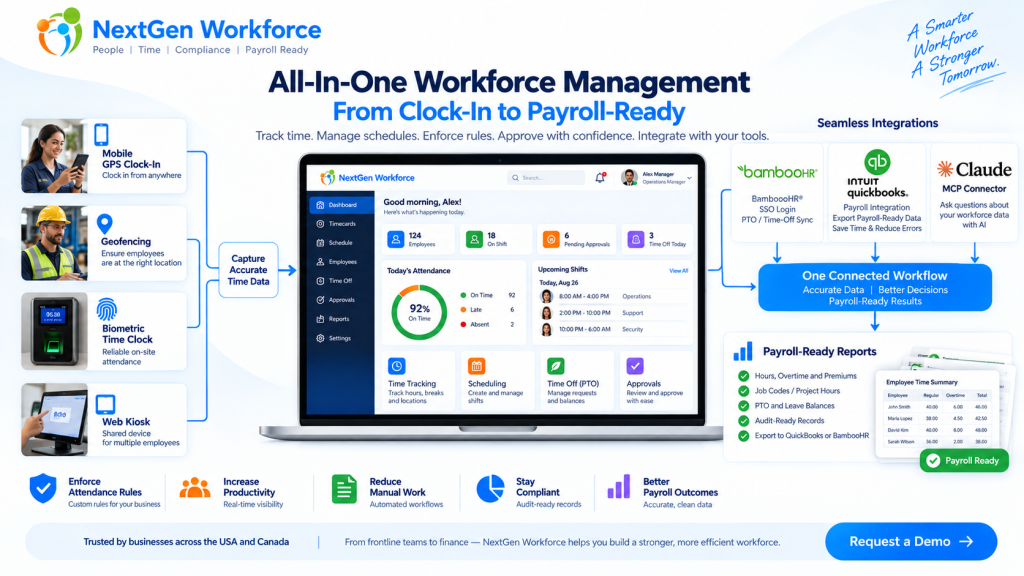
Payroll-Ready Workforce Management Software for Complex Hourly Teams You do not need another time clock. You need clean workforce data before payroll runs. That is the real problem for many growing businesses. Employees clock in. Managers adjust schedules. PTO gets approved. Overtime happens. Job codes change. Someone forgets a punch. A field employee clocks in from the wrong location. Then payroll day arrives, and the team has to clean everything manually. Sound familiar? Payroll-ready workforce management software helps businesses collect employee time, apply attendance rules, manage schedules, review exceptions, approve records, and prepare cleaner data before payroll processing. NextGen Workforce brings time tracking, attendance, scheduling, biometric clocks, mobile GPS, geofencing, PTO, approvals, custom rules, and payroll-ready reports into one connected workflow. Still Cleaning Time Data Before Every Payroll? NextGen Workforce helps your team capture accurate time, review exceptions, approve hours, and prepare payroll-ready reports before payroll runs. Talk To An Expert What Is Payroll-Ready Workforce Management? Quick answer: Payroll-ready workforce management connects the work that happens before payroll: time tracking, attendance, scheduling, PTO, overtime, approvals, job codes, and reporting. A basic time clock records hours. That is useful, but it is only the beginning. Payroll needs more than a clock-in and clock-out time. It needs clean, reviewed, categorized, and approved workforce data. That means payroll teams need to know: Did the employee work the scheduled shift? Are there missing punches? Was overtime approved? Was PTO already approved in the HR system? Did the employee work at the correct location? Which job, project, department, or client should the hours go to? Did the manager approve the timecard? Are the hours ready to send to payroll? Payroll-ready workforce management is the system that helps answer those questions before payroll day. For a business with simple office hours, this may not feel urgent. But for hourly teams, field employees, multi-location operations, manufacturing teams, hospitality groups, healthcare teams, construction crews, and businesses with custom rules, this can become a weekly problem. Why Payroll Problems Usually Start Before Payroll Quick answer: Payroll errors often start earlier in the workflow, when punches, schedules, PTO, overtime, approvals, and job data are incomplete or disconnected. Payroll software can process payroll. But it cannot magically fix messy attendance data. If an employee forgot to clock out, payroll still needs someone to fix the record. If overtime was not approved, someone has to ask the manager. If PTO is approved in one system but not visible on the timesheet, payroll has to compare records manually. Here is a simple example. A field employee visits a client site. They clock in from mobile, work for six hours, and leave. Payroll later needs to know the employee’s hours, location, client, project, order number, and approval status. If that information was not captured during the workday, someone has to reconstruct it later. That is where time gets wasted. Payroll cleanup is rarely just a payroll problem. It is usually a workforce data problem. Why Time Tracking Alone Is Not Enough Quick answer: Time tracking tells you when employees worked. Payroll-ready workforce management also tells you whether the work was scheduled, approved, categorized, compliant with company rules, and ready for payroll. A time clock answers one question: When did the employee work? A payroll-ready workforce system answers a better question: Is this record complete, correct, approved, and ready for payroll? That is a big difference. For example, a timecard may show 46 hours for the week. But before payroll processes those hours, the business may still need to review: regular hours overtime hours double-time rules where applicable holiday rules meal or break rules job codes department allocation project or client hours manager approval audit history Without that review layer, payroll teams end up doing manual checking. And manual checking does not scale well. The Core Pieces of a Payroll-Ready Workforce System Quick answer: A payroll-ready workforce system should connect time capture, scheduling, attendance rules, PTO, approvals, reporting, and payroll integrations. Each part matters on its own. But the real value comes when they work together. 1. Time Tracking Employees need a reliable way to clock in and out. NextGen Workforce supports multiple time capture workflows, including web clock, kiosk, mobile app, and biometric time clock options. This gives businesses flexibility. Office employees may use a web clock. Field employees may use mobile GPS. On-site teams may use biometric devices. Shared workstations may use kiosk workflows. 2. Attendance Management Attendance is more than recording time. Managers need visibility into late arrivals, early departures, missed punches, long shifts, exceptions, and incomplete records. NextGen Workforce helps teams review attendance issues before they become payroll problems. 3. Employee Scheduling Schedules help payroll and operations compare planned work with actual hours. When scheduling and time tracking are disconnected, managers may not notice coverage gaps, unexpected overtime, or schedule mismatches until later. NextGen Workforce connects schedules with attendance records so teams can review what was planned versus what actually happened. 4. PTO and Time-Off Visibility PTO affects payroll, scheduling, coverage, and attendance review. If PTO is approved but not visible in the timecard workflow, payroll has to check another system. NextGen Workforce supports PTO and time-off workflows, including integrations such as BambooHR time-off sync where configured. 5. Custom Attendance Rules Every business says, “Our rules are simple.” Then payroll day comes. One department has a different overtime rule. One location has holiday rules. One customer needs custom job codes. One policy requires manager approval before overtime becomes payable. Another team needs meal premium tracking or break deductions. This is where many basic time tracking tools struggle. NextGen Workforce is designed for configurable attendance rules, including overtime, breaks, rounding, holidays, premiums, exceptions, approval rules, and customer-specific workflows. 6. Approvals Payroll should not have to guess whether time is approved. A strong workflow should show whether the employee submitted the record, the manager approved it, and payroll can process it. NextGen Workforce supports manager review and approval workflows so payroll can work from clearer records. 7. Payroll-Ready Reports and Exports Payroll-ready
Why Payroll Errors Happen (And How to Prevent Them Before Payroll Runs)
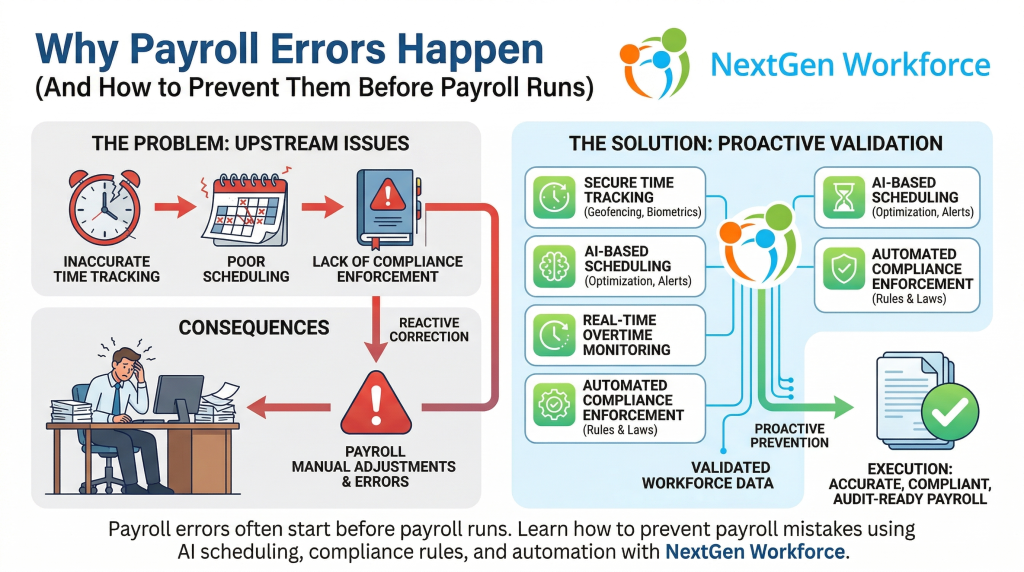
Summary Payroll errors are rarely caused by payroll software. Most payroll mistakes originate from inaccurate time tracking, poor scheduling, and lack of compliance enforcement. Businesses can prevent payroll errors by using systems that validate workforce data before payroll processing. NextGen Workforce combines time tracking, scheduling, compliance rules, and automation to ensure accurate and audit-ready payroll. Introduction Payroll is one of the most critical functions in any organization. But despite using modern payroll systems, many businesses still face: incorrect employee hours overtime miscalculations missed compliance rules manual adjustments during payroll processing The assumption is often that payroll software is the problem. In reality, payroll errors usually happen before payroll even begins. What Causes Payroll Errors? Payroll errors are typically the result of upstream issues. 1. Inaccurate Time Tracking If employee work hours are not captured accurately, payroll calculations will be wrong. Common issues include: missed clock-ins or clock-outs manual time edits buddy punching or proxy attendance lack of real-time validation When inaccurate data enters payroll, errors become unavoidable. 2. Poor Scheduling Practices Scheduling directly impacts payroll. Without proper scheduling controls: employees may exceed daily or weekly limits overtime may go unnoticed until payroll shifts may be assigned without considering compliance rules Scheduling mistakes lead to payroll corrections later. 3. Overtime Mismanagement Overtime is one of the biggest contributors to payroll errors. Businesses often struggle with: tracking weekly vs daily overtime identifying when employees cross thresholds managing unexpected overtime Without proactive monitoring, overtime issues surface during payroll processing. 4. Lack of Compliance Enforcement Labor laws vary by region and can include: overtime regulations meal and rest break requirements shift length rules If these rules are not enforced during scheduling and attendance tracking, payroll teams are left to fix issues manually. 5. Manual Adjustments During Payroll When systems do not validate data in advance, payroll teams must: review timesheets manually correct errors adjust hours verify compliance This increases processing time and creates room for human error. What Is the Real Problem? The real issue is not payroll software. It is the lack of data validation before payroll processing. Most businesses treat payroll as the point of correction. Instead, payroll should be the point of execution. How to Prevent Payroll Errors Before Payroll Runs To eliminate payroll errors, businesses must shift from reactive correction to proactive validation. 1. Use Accurate Time Tracking Systems Implement systems that ensure: real-time clock-in validation biometric or secure attendance tracking location-based verification (geofencing) automatic logging of work hours Accurate input leads to accurate payroll. 2. Optimize Scheduling Before Shifts Begin Scheduling should consider: employee availability labor rules overtime thresholds workload distribution Preventing issues at the scheduling stage reduces payroll corrections later. 3. Monitor Overtime in Real Time Instead of detecting overtime during payroll: track employee hours continuously receive alerts before thresholds are crossed adjust schedules proactively This helps control labor costs and avoid last-minute adjustments. 4. Enforce Compliance Automatically Use systems that apply labor rules automatically, such as: overtime calculations break requirements shift restrictions Automation reduces dependency on manual checks. 5. Integrate Scheduling, Attendance, and Payroll Disconnected systems create gaps. An integrated approach ensures: scheduling aligns with attendance attendance data flows into payroll accurately compliance rules are consistently applied This creates a single source of truth. What Is AI Employee Scheduling’s Role in Payroll Accuracy? AI employee scheduling helps prevent payroll issues before they occur. It does this by: analyzing workforce data identifying overtime risks optimizing shift assignments ensuring compliance during scheduling Instead of reacting to errors, businesses can avoid them entirely. How NextGen Workforce Helps Prevent Payroll Errors NextGen Workforce is designed to eliminate payroll errors at the source. The platform combines: AI-based employee scheduling biometric time tracking geofencing and real-time attendance validation automated compliance rules intelligent timesheet review payroll-ready data processing This ensures that by the time payroll runs: the data is already accurate, compliant, and validated. The Human Impact of Payroll Errors Behind every payroll error is a person. A payroll manager working late to fix discrepancies.An HR leader dealing with employee complaints.A business owner worrying about compliance penalties. Preventing payroll errors is not just about efficiency. It is about reducing stress, improving trust, and ensuring confidence in every payroll cycle. Final Thoughts Payroll errors are not a payroll problem. They are a workforce management problem. Businesses that focus on accurate time tracking, optimized scheduling, compliance automation, and integrated systems can eliminate most payroll issues before payroll runs. This is where modern workforce platforms like NextGen Workforce create real value. Frequently Asked Questions Why do payroll errors happen? Payroll errors usually happen due to inaccurate time tracking, poor scheduling, overtime mismanagement, and lack of compliance enforcement before payroll processing. Can scheduling impact payroll accuracy? Yes. Scheduling decisions directly affect employee hours, overtime, and compliance, which all influence payroll outcomes. How can businesses reduce payroll errors? Businesses can reduce payroll errors by using integrated systems that validate time tracking, scheduling, and compliance before payroll runs. What role does AI play in payroll accuracy? AI helps analyze workforce data, optimize scheduling, detect overtime risks, and ensure compliance, reducing errors before payroll processing.
AI Employee Scheduling Software
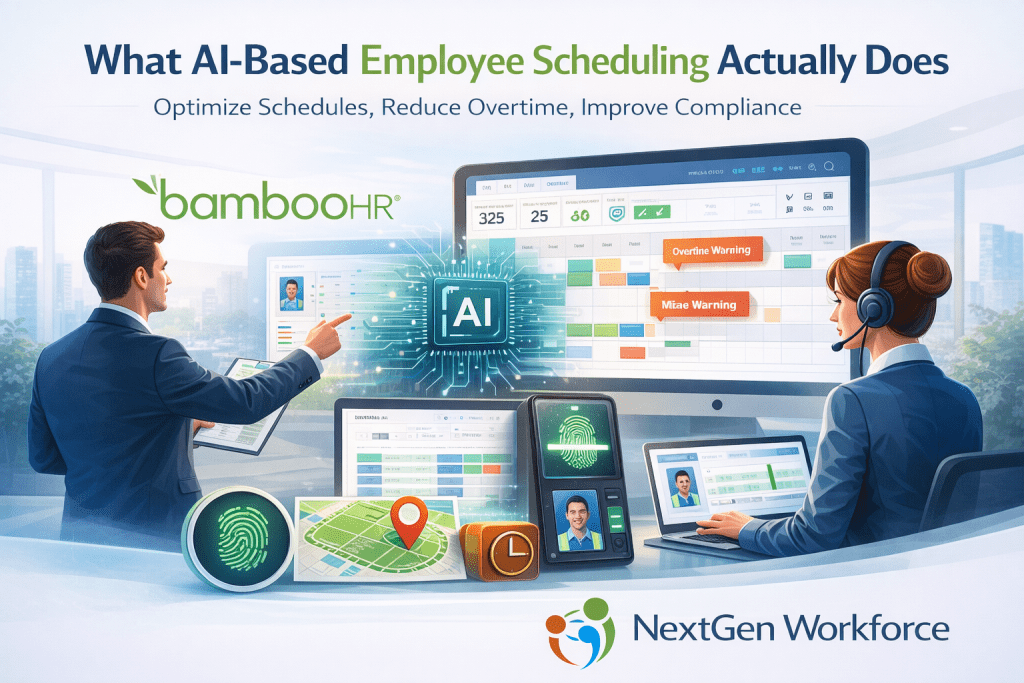
AI-based employee scheduling uses artificial intelligence to analyze workforce data and automatically generate optimized work schedules. It considers employee availability, labor laws, overtime thresholds, skill requirements, and business demand to create efficient schedules. AI scheduling helps organizations reduce overtime costs, prevent compliance violations, and improve workforce productivity. Platforms like NextGen Workforce combine AI scheduling with biometric time tracking, geofencing, and automated compliance monitoring to provide real-time workforce management. Why Traditional Scheduling Methods Fall Short Many organizations still rely on: spreadsheets basic scheduling software manual shift adjustments manager intuition While these methods work for small teams, they quickly become inefficient as workforce complexity grows. Managers often face challenges such as: uneven shift distribution overtime stacking last-minute coverage issues skill mismatches compliance violations These problems lead to higher labor costs, operational inefficiencies, and administrative stress. AI scheduling addresses these issues by using workforce data to guide scheduling decisions. What AI-Based Employee Scheduling Actually Does AI scheduling systems analyze workforce data continuously and help managers make smarter scheduling decisions. Instead of simply assigning shifts, the system evaluates multiple factors simultaneously, including: employee availability skill requirements overtime thresholds labor compliance rules shift coverage needs historical workforce patterns The result is a schedule optimized for efficiency, compliance, and fairness. This allows organizations to move from reactive scheduling to predictive workforce management. AI employee scheduling is a workforce management approach that uses artificial intelligence to automatically generate optimized work schedules. Instead of relying on manual planning, AI scheduling systems analyze employee availability, skills, compliance rules, overtime limits, and historical workforce data to create efficient schedules. This helps organizations reduce labor costs, improve compliance, and ensure the right employees are assigned to the right shifts. Intelligent Shift Optimization One of the most powerful features of AI scheduling is shift optimization. AI systems analyze operational demand and workforce capacity to recommend the best possible shift distribution. This helps organizations: avoid overstaffing prevent understaffing balance employee workloads reduce unnecessary overtime Managers can generate schedules faster while maintaining full operational coverage. Overtime Risk Detection Overtime costs can quickly escalate when schedules are created manually. AI scheduling tools monitor employee hours in real time and flag potential overtime risks before they occur. The system can detect patterns such as: employees approaching overtime thresholds inefficient shift overlaps extended shift durations Managers can then adjust schedules before the payroll impact occurs. This proactive approach helps control labor costs. Compliance Monitoring Labor compliance is becoming more complex across regions and industries. Scheduling systems must consider rules such as: overtime regulations meal break requirements rest period laws shift length limitations AI scheduling engines can apply these compliance rules automatically when generating schedules. This reduces the risk of violations and helps organizations maintain audit-ready workforce records. Workforce Demand Forecasting AI scheduling tools also use historical workforce data to predict future staffing needs. By analyzing past trends such as seasonal demand, attendance patterns, and shift coverage requirements, the system can forecast staffing levels. This allows organizations to: plan schedules more accurately reduce last-minute shift changes improve workforce stability Predictive planning helps managers stay ahead of operational demand. Integrating Scheduling With Attendance Data Scheduling becomes even more powerful when connected to real-time attendance tracking. NextGen Workforce integrates AI scheduling with biometric time clocks, geofencing, and real-time workforce monitoring. This integration ensures: scheduled shifts match actual worked hours attendance data is validated at clock-in overtime risks are detected early workforce visibility improves across locations Managers gain a complete view of workforce activity and scheduling performance. Benefits of AI-Based Employee Scheduling Organizations that adopt AI scheduling often see improvements in several areas: Reduced labor costsOptimized scheduling helps prevent unnecessary overtime and inefficient staffing. Improved complianceAutomated rule enforcement reduces the risk of labor law violations. Faster schedule creationManagers can generate optimized schedules in minutes instead of hours. Better employee satisfactionFair scheduling and predictable shifts improve workforce morale. Increased operational visibilityReal-time workforce insights help leaders make informed decisions. How NextGen Workforce Uses AI Scheduling NextGen Workforce provides AI-based employee scheduling designed for organizations managing complex workforce operations. The platform combines: AI scheduling optimization biometric time clocks geofencing attendance verification real-time workforce tracking automated compliance monitoring intelligent timesheet review This integrated approach allows businesses to manage scheduling, attendance, and compliance in one system. Final Thoughts Employee scheduling is no longer just an administrative task. It is a critical operational function that affects labor cost, workforce productivity, and regulatory compliance. AI-based employee scheduling enables organizations to create smarter schedules, reduce manual effort, and manage workforce complexity more effectively. Businesses that adopt intelligent scheduling tools gain a significant advantage in operational efficiency and workforce management.