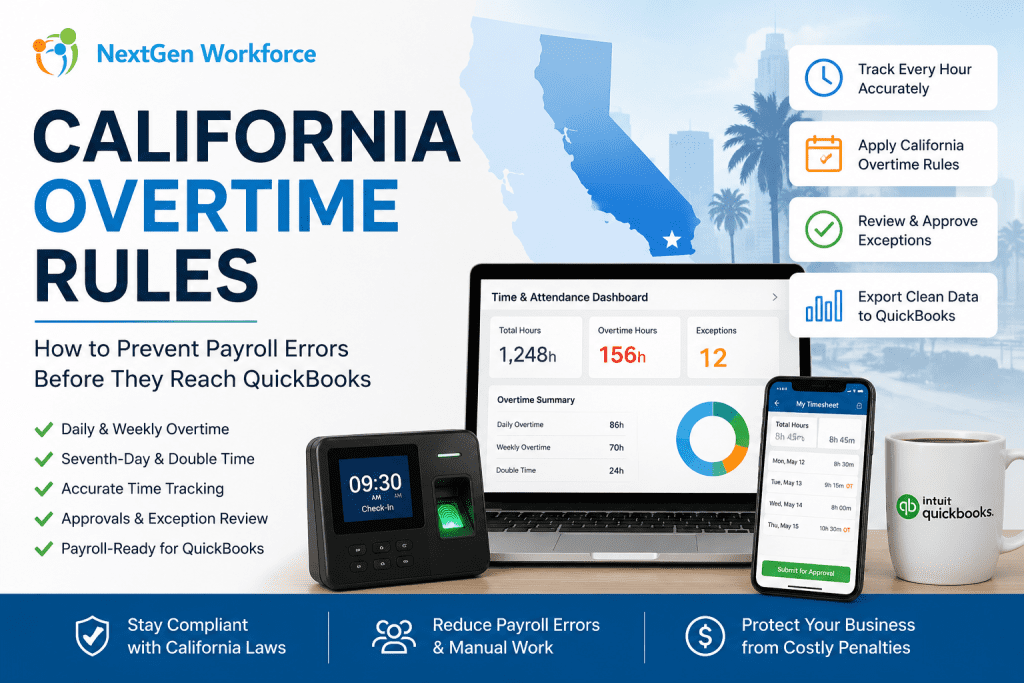
California Overtime Rules: How to Prevent Payroll Errors Before They Reach QuickBooks
California overtime rules can get expensive quickly.
California overtime rules require careful review of daily hours, weekly totals, seventh-day work, employee schedules, and payroll approvals. Businesses using QuickBooks need clean, payroll-ready time data before export so overtime, double time, PTO, and attendance exceptions are handled correctly.
For many California employers, payroll problems do not start inside QuickBooks.
They start earlier.
An employee clocks in early. A manager approves a schedule change verbally. A missed punch sits unresolved. A long shift crosses daily overtime. Then payroll arrives, and the team has to fix everything under pressure.
That is the real issue.
QuickBooks can process payroll, but it depends on the quality of the time data sent into it. If attendance, overtime, PTO, and approvals are not reviewed first, payroll can still become messy.
Managing California Overtime Manually?
NextGen Workforce helps businesses catch overtime issues before payroll runs.
Track time, compare schedules, apply overtime rules, review exceptions, approve timecards, and prepare cleaner payroll-ready data for QuickBooks.
What Are California Overtime Rules?
Quick answer: California overtime rules are more detailed than basic weekly overtime. Many nonexempt employees may qualify for daily overtime, weekly overtime, seventh-day overtime, and double time depending on hours worked and employee classification.
Under California guidance, overtime may apply when a nonexempt employee works more than 8 hours in a workday, more than 40 hours in a workweek, or works on the seventh consecutive day in a workweek.
California also recognizes double-time situations. This can apply when employees work more than 12 hours in a workday or more than 8 hours on the seventh consecutive day of work in a workweek.
That means payroll teams cannot only check weekly totals.
They must review daily hours, workweek totals, schedule changes, seventh-day work, and employee classifications. Exemptions and industry-specific rules may also apply, so employers should confirm details with legal counsel or official state guidance.
Why California Overtime Creates Payroll Risk
Quick answer: California overtime creates payroll risk because small attendance errors can affect regular time, overtime, double time, and payroll export accuracy. Missed punches, late approvals, and schedule changes can lead to incorrect pay categories if they are not reviewed before payroll.
California payroll becomes risky when time data is incomplete.
A missed clock-out may change daily totals. An early start may trigger overtime. A long shift may create double time. A seventh consecutive workday may need special review.
These are not small details for payroll.
They affect paychecks, labor cost, employee trust, and compliance exposure. They also create extra work for payroll managers who already have a deadline.
California enforcement activity shows why accurate payroll records matter. In 2024, the California Labor Commissioner’s Office announced a $1.7 million wage theft settlement involving more than 550 Wingstop employees in Kern County after an investigation involving wages, overtime, and meal breaks.
Manual review makes the problem harder.
Payroll teams may need to check spreadsheets, manager notes, timecards, schedules, PTO requests, and QuickBooks export files. When those records do not match, the team has to investigate before payroll can move forward.
Key takeaway: California overtime should be reviewed before payroll, not discovered during payroll.
What Payroll Teams Should Review Before Running California Payroll
Quick answer: Before running California payroll, teams should review missing punches, daily hours, weekly totals, seventh-day work, double-time triggers, PTO, holidays, schedule changes, and manager approvals. This helps reduce corrections before exporting time data to QuickBooks.
A strong overtime process starts before payroll day.
Payroll teams should not wait until the end of the pay period to discover exceptions. They need a workflow that identifies issues while managers still have time to review them.
Missing Punches
Missing punches can create incorrect daily totals.
If an employee forgets to clock out, the system may not know whether overtime applies. Payroll then has to chase the employee or manager for confirmation.
Daily Hours
California daily overtime makes daily review important.
Even when weekly hours look normal, a single long workday may still create overtime or double time. This is where basic weekly-only reviews can fail.
Weekly Totals
Weekly overtime still matters.
Payroll teams should review total workweek hours and confirm whether overtime categories are separated correctly before export.
Seventh-Day Work
Seventh-day work needs special attention.
If an employee works seven consecutive days in a workweek, payroll should review whether seventh-day overtime or double time applies based on the hours worked.
PTO And Holidays
PTO and holidays should match the timecard.
If approved time off does not appear correctly, payroll teams may have to manually compare records from HR, scheduling, and attendance systems.
Manager Approvals
Approvals should happen before payroll.
Payroll should not depend on emails, text messages, or verbal approval after the pay period closes. Manager review should be part of the timecard workflow.
Free Checklist: California Overtime Payroll Audit Checklist
Before sending hours to QuickBooks, use a simple checklist to review missing punches, daily overtime, weekly overtime, seventh-day work, PTO, approvals, and export readiness.
- Review punches: Find missing clock-ins and clock-outs.
- Check daily hours: Identify days over 8 and 12 hours.
- Check weekly totals: Review hours over 40 in the workweek.
- Review seventh-day work: Confirm consecutive-day rules.
- Confirm approvals: Make sure managers reviewed exceptions.
- Validate PTO: Match approved time off with timesheets.
- Prepare export: Confirm earning codes before QuickBooks.
How Manual Overtime Tracking Breaks Down
Quick answer: Manual overtime tracking breaks down when payroll teams rely on spreadsheets, manager memory, email approvals, and last-minute corrections. The risk grows when employees work across multiple locations, shifts, departments, or pay periods.
Manual overtime review looks manageable when the team is small.
Then the business grows. More employees clock in. More managers approve time. More sites open. More schedules change during the week.
That is when manual tracking starts to crack.
- Spreadsheets drift: One edit can change payroll totals.
- Emails get buried: Approval history becomes hard to prove.
- Schedules change: Payroll may not see the latest update.
- Managers vary: Each supervisor may review time differently.
- Payroll reacts: Corrections happen too late.
For CFOs and business owners, this also affects labor cost visibility.
If overtime is only discovered at payroll time, the business cannot manage it early. It can only explain it after the cost is already there.
California Overtime Workflow: From Punch To Payroll-Ready Timesheet
Quick answer: A safer California overtime workflow starts with accurate time capture, compares actual hours against schedules, applies overtime rules, routes exceptions for approval, and prepares payroll-ready timesheets before QuickBooks export.
California overtime compliance needs a repeatable workflow.
The goal is simple: catch payroll risks before payroll runs.
Step 1: Capture Accurate Employee Time
Start with reliable time capture.
NextGen Workforce time tracking software supports biometric time clocks, mobile clock-in, web clock, and kiosk options. This helps businesses collect employee attendance from different work environments without relying only on manual timesheets.
Step 2: Compare Actual Hours Against Schedules
Schedules create the payroll expectation.
Actual punches show what really happened. When those two records do not match, managers should see the exception before payroll starts.
NextGen Workforce helps connect employee scheduling software and attendance so early starts, late clock-outs, unscheduled work, and shift changes are easier to review.
Step 3: Apply Overtime Rules Before Payroll
Overtime should not be calculated only at the end.
NextGen Workforce can support configurable attendance and overtime rules, helping teams identify regular time, overtime, double time, and exceptions based on the customer’s policy setup.
This gives payroll a cleaner timecard before QuickBooks export.
Step 4: Route Exceptions For Approval
Managers should review exceptions while the details are fresh.
NextGen Workforce supports timecard approval workflows, so managers can review missing punches, overtime, PTO, and schedule exceptions before payroll is finalized.
Step 5: Export Cleaner Payroll Data To QuickBooks
QuickBooks works better with clean data.
When timecards are reviewed, categorized, and approved before export, payroll teams spend less time fixing errors and more time running payroll with confidence.
For businesses using QuickBooks, NextGen Workforce QuickBooks integration helps prepare cleaner workforce data before payroll processing.
Key takeaway: The best overtime workflow does not replace payroll. It prepares payroll-ready data before payroll begins.
How NextGen Workforce Helps California Employers Reduce Overtime Errors
Quick answer: NextGen Workforce helps California employers reduce overtime errors by connecting time tracking, scheduling, overtime rules, approval workflows, mobile attendance, and payroll-ready exports. Payroll teams can catch exceptions earlier instead of correcting them after payroll runs.
NextGen Workforce is built for workforce operations that need more than basic time tracking.
It helps HR, payroll, and operations teams manage the full time-to-payroll workflow.
| Payroll Problem | Manual Process | NextGen Workforce Workflow |
|---|---|---|
| Missing punches | Payroll follows up manually | Review exceptions before payroll |
| Daily overtime | Checked late in payroll | Apply configurable overtime rules |
| Schedule mismatch | Manager confirms by email | Compare schedule vs. actual hours |
| Unapproved overtime | Found after payroll review | Route timecards for approval |
| QuickBooks cleanup | Manual earning code edits | Prepare payroll-ready export data |
That workflow gives every team better visibility.
HR can see time-off and attendance patterns. Managers can approve exceptions. Payroll can export cleaner records. Owners can understand labor costs before they become payroll surprises.
California Vs. Federal Overtime: Why Configuration Matters
Quick answer: Federal overtime under the FLSA generally focuses on hours worked over 40 in a workweek for covered nonexempt employees. California may add daily overtime, double time, and seventh-day requirements, so employers need configurable rules by location and employee type.
This is where many multi-state employers struggle.
A company may have employees in California, Texas, Florida, Ontario, or British Columbia. Each location may have different payroll rules, approval expectations, and recordkeeping needs.
A weekly-only overtime workflow may work for some locations.
But California often requires closer daily review. That means your system should not force every employee into one generic overtime model.
NextGen Workforce supports configurable attendance rules, allowing businesses to manage different overtime and attendance workflows based on account setup, location, employee type, and policy requirements.
Employers should still review official rules and consult legal counsel where needed.
Software helps automate the workflow, but legal responsibility stays with the employer.
Who May Be Exempt From California Overtime?
Quick answer: Some employees may be exempt from California overtime rules depending on their duties, industry, classification, wage order, or legal exemption. Employers should not assume an employee is exempt based only on job title or salary.
This topic matters because overtime accuracy starts with classification.
If an employee is misclassified, even a perfect timecard workflow may produce the wrong payroll outcome. California exemptions can be specific and fact-dependent.
Examples may include certain executive, administrative, professional, outside sales, computer software, driver, agricultural, and industry-specific roles, depending on the facts and applicable rules.
Employers should review official exemption guidance and consult qualified counsel before deciding whether an employee is exempt from overtime.
Key takeaway: Do not treat overtime configuration as only a software setting. Employee classification must be reviewed first.
Who Needs Automated Overtime Tracking Most?
Quick answer: Automated overtime tracking is most useful for employers with hourly staff, shift-based teams, field workers, mobile employees, multi-location operations, and complex approval workflows. These businesses face more payroll risk when overtime is reviewed manually.
California overtime tracking becomes harder as workforce complexity increases.
The following industries often benefit from a more connected workflow.
Construction
Construction teams work across job sites, crews, and changing schedules.
Mobile time tracking, GPS punch validation, geofencing, and job-based attendance can help managers confirm where work happened and prepare cleaner payroll data.
Healthcare
Healthcare teams often manage long shifts, coverage changes, overtime, PTO, and manager approvals.
A connected workflow helps payroll teams review exceptions before the pay period closes.
Security
Security companies need visibility across posts, overnight shifts, and mobile teams.
GPS validation and geofencing can help confirm attendance while approval workflows support cleaner payroll records.
Retail And Hospitality
Retail and hospitality teams often deal with changing schedules, part-time employees, late clock-outs, and weekend work.
Connected scheduling and time tracking help reduce payroll surprises.
Cleaning And Field Service
Cleaning and field service employees often clock in from customer locations.
Mobile time clock tools with geofencing attendance can help confirm where attendance happened.
Managing California Hourly Teams Across Multiple Locations?
NextGen Workforce helps construction, healthcare, security, retail, hospitality, cleaning, and field service teams track time, review overtime, approve exceptions, and prepare payroll-ready data before QuickBooks export.
What To Check Before Exporting California Overtime To QuickBooks
Quick answer: Before exporting California overtime to QuickBooks, payroll teams should confirm regular hours, overtime, double time, PTO, holidays, approvals, employee mappings, earning codes, and unresolved exceptions. This helps reduce payroll corrections after export.
QuickBooks should receive reviewed data, not raw attendance problems.
Before export, review these items:
- Employee mapping: Confirm employees match payroll records.
- Regular hours: Check standard hours before overtime.
- Overtime hours: Review daily and weekly overtime.
- Double time: Confirm long-day and seventh-day triggers.
- PTO entries: Match approved requests with timesheets.
- Holiday entries: Confirm holiday rules are applied correctly.
- Manager approvals: Resolve pending timecards first.
- Earning codes: Confirm payroll categories before export.
This checklist saves time because payroll starts with better data.
It also gives managers and payroll teams a consistent process every pay period. If your team still uses spreadsheets for this review, a payroll-ready timesheet workflow can reduce manual cleanup before export.
Ready To Reduce California Overtime Payroll Errors?
NextGen Workforce helps businesses manage time tracking, scheduling, overtime rules, approvals, mobile attendance, and payroll-ready exports before payroll runs.
Give your payroll team cleaner overtime data before it reaches QuickBooks.
Frequently Asked Questions About California Overtime Rules
What Are California Overtime Rules?
California overtime rules generally require overtime review for eligible nonexempt employees who work more than 8 hours in a workday, more than 40 hours in a workweek, or certain hours on the seventh consecutive day in a workweek.
Double time may also apply in certain situations, such as hours over 12 in a workday or hours over 8 on the seventh consecutive workday. Employers should review official California guidance and consult counsel for specific cases.
Why Is California Overtime Harder To Track Manually?
California overtime is harder to track manually because payroll teams may need to review daily hours, weekly totals, seventh-day work, double time, schedules, PTO, and approvals together.
Spreadsheets and email approvals can miss important details when schedules change or punches are incomplete.
Can QuickBooks Calculate California Overtime?
QuickBooks can support payroll processing, but payroll accuracy depends on the data entered or imported into it.
If employee hours, overtime categories, PTO, and approvals are wrong before export, payroll may still require manual corrections.
How Does Time Tracking Software Reduce Overtime Errors?
Time tracking software reduces overtime errors by capturing employee hours, flagging missing punches, comparing schedules, applying overtime rules, and routing exceptions for manager review before payroll.
This gives payroll teams cleaner data before export.
Why Should Overtime Be Reviewed Before Payroll Export?
Overtime should be reviewed before payroll export because corrections become harder after payroll data is already sent.
Pre-payroll review helps managers confirm exceptions, payroll teams verify earning codes, and employees receive more accurate pay.
Can NextGen Workforce Support California Overtime Workflows?
Yes. NextGen Workforce supports configurable attendance rules, time tracking, scheduling, approval workflows, PTO handling, mobile attendance, geofencing, and payroll-ready exports.
This helps businesses prepare cleaner time data before payroll runs.
What Should Payroll Teams Check Before Exporting Time To QuickBooks?
Payroll teams should check missing punches, daily overtime, weekly overtime, double time, PTO, holidays, manager approvals, employee mappings, earning codes, and unresolved exceptions.
That review helps reduce payroll corrections after QuickBooks export.
About The Author
Official Sources And Legal Note
For current legal details, review the California Department of Industrial Relations overtime guidance, the California DIR overtime exemption guidance, and the U.S. Department of Labor overtime guidance.
This article is for general workforce management education only. It is not formal legal advice. California overtime rules may vary by employee classification, industry, wage order, schedule type, exemption status, and local circumstances. Employers should consult qualified counsel before making legal or payroll compliance decisions.

The NGW Workforce team writes about HR tech, time tracking, scheduling, and workforce compliance.