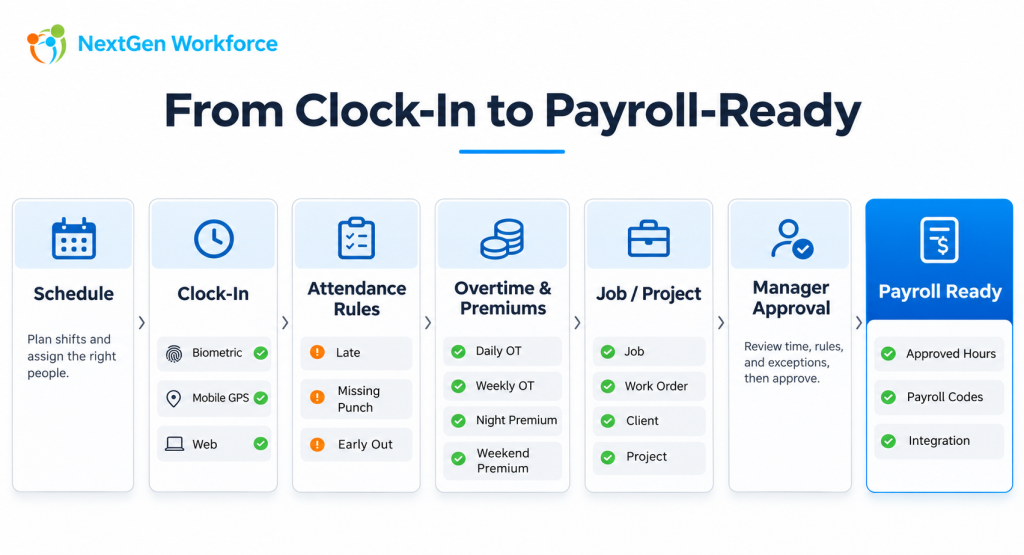
From Clock-In to Payroll: How Modern Workforce Management Connects Time, Scheduling, Job Costing, Approvals, and Payroll
Clocking in is the easy part.
The harder part is deciding what that punch means.
Was the employee scheduled? Were they late? Did overtime apply? Which job were they working on? Was there a night-shift premium? Did the manager approve the hours? Is the time ready for payroll?
For simple teams, a basic time clock may be enough.
For factories, field crews, industrial teams, multi-site employers, project-based businesses, and organizations with complex payroll rules, the workflow is much bigger.
NextGen Workforce connects the operational steps between the employee punch and payroll-ready data.
Still Fixing Time Before Payroll?
If your team is correcting overtime, missing punches, job allocations,
approvals, or schedules every pay period, we can review the workflow with you.
What Does Modern Workforce Management Actually Mean?
Modern workforce management brings together the systems and rules that determine how employee time is planned, captured, reviewed, categorized, approved, and prepared for payroll or billing.
That can include:
- Employee scheduling
- Biometric and mobile time capture
- GPS and geofencing
- Late and attendance rules
- Overtime calculations
- Shift premiums
- Job and project tracking
- Travel time
- Manager approvals
- HR or payroll review
- PTO and leave
- Payroll-ready reporting
The value is not in having more screens.
The value is in connecting the workflow so each step builds on the one before it.
The real goal is not to collect more punches. It is to produce cleaner workforce data.
The Workforce Workflow Starts Before the Employee Clocks In
Time tracking becomes more accurate when the system already knows what was expected.
That usually starts with the schedule.
A schedule can define:
- Expected start and end time
- Assigned shift
- Department
- Location
- Job or work assignment
- Required coverage
Once the employee clocks in, the system can compare the actual event with the planned work.
Without that context, a punch is simply a timestamp.
Scheduling and Attendance Should Work Together
When scheduling and attendance are connected, the system can identify more than just total hours.
It can help answer:
- Did the employee arrive on time?
- Was the shift missed?
- Did the employee leave early?
- Did they work outside the scheduled window?
- Was overtime created?
- Was coverage maintained?
This is especially important for organizations that operate nights, weekends, rotating shifts, or 24/7 coverage.
Complex Scheduling Is Not Just Dragging Shifts on a Calendar
A simple weekly calendar works for predictable teams.
Complex operations may need much more.
Examples include:
- 8-hour shifts
- 12-hour shifts
- Day and night rotations
- 14-day rotation patterns
- Weekend coverage
- On-call schedules
- Open shifts
- Shift swaps
- Employee unavailability
- Department-specific coverage requirements
A 24/7 factory does not have a calendar problem.
It has a coverage problem.
The scheduling system needs to help the business maintain coverage while respecting employee availability, work rules, and operational requirements.
Time Capture Should Match the Workforce
Not every employee should be forced to clock in the same way.
A fixed-site workforce may prefer a wall-mounted biometric terminal.
A field employee may need a mobile app with GPS.
A distributed team may use web clocking.
A flexible workforce platform may support several methods at the same time.
Biometric Time Clocks
Fingerprint and facial recognition terminals are useful for factories, warehouses, offices, and other fixed locations where employees report to a common site.
Biometric identification can help businesses create a more controlled clock-in process.
But the device is only the first step.
The real value comes from what happens to the punch afterward.
Mobile Time Tracking
Field workers may need to clock in from a phone while working at customer sites, projects, or temporary locations.
The mobile workflow may also need to capture:
- GPS coordinates
- Geofence validation
- Job or client
- Project
- Travel events
- Notes
NFC and Other Clocking Methods
Some environments may also use NFC, kiosk workflows, PINs, or other supported authentication methods depending on the operational need.
The important question is not which clock is the fanciest.
It is whether the time-capture method fits the workforce and feeds the same review and payroll workflow.
Geofencing Adds Location Context to the Punch
For field teams, time is often tied to place.
A business may need to know whether the employee clocked in:
- Inside an approved site
- Near a customer location
- Outside a permitted area
- At the correct job site
Geofencing allows a business to define a boundary around a work location and compare the employee’s location with that boundary.
Depending on the configured workflow, the system may allow the punch, flag it, reject it, or notify a manager.
Attendance Rules Turn Punches Into Useful Information
A punch by itself does not tell a manager whether there is a problem.
The system needs rules.
For example:
| Scheduled Start | Clock-In | Grace Period | Result |
|---|---|---|---|
| 7:00 AM | 7:03 AM | 5 minutes | Within tolerance |
| 7:00 AM | 7:09 AM | 5 minutes | Late |
Other rules may identify:
- Missing clock-in
- Missing clock-out
- Early departure
- No break
- Short meal period
- Unscheduled work
- Excessive hours
This lets managers focus on exceptions instead of reviewing every normal timecard line manually.
Automation Should Surface Exceptions, Not Create More Noise
A good workforce workflow should help managers pay attention to the records that actually need attention.
For example:
Scheduled Shift
      ↓
Employee Punch
      ↓
Rule Evaluation
      ↓
No Exception?
      ↓
Continue Normally

Exception Found?
      ↓
Notify / Flag
      ↓
Manager Reviews
This is more useful than asking supervisors to inspect every employee every day.
Overtime Calculation Becomes Complicated Quickly
Overtime is rarely just one checkbox.
Businesses may need to calculate:
- Daily overtime
- Weekly overtime
- Biweekly overtime
- Double time
- Weekend premiums
- Holiday premiums
- Night differentials
- Union or contract rules
- Location-specific rules
One employee may follow one policy while another follows something different.
A company operating in multiple provinces, states, or countries may need separate eligibility and rule groups.
The important part is that the calculation is applied consistently before payroll.
Automated Overtime Is Only Useful If the Right Rule Is Applied
Automation does not mean applying one rule everywhere.
A configurable workforce platform should be able to determine which employees belong to which rule set.
That may depend on:
- Location
- Department
- Employee group
- Pay period
- Job classification
- Contract
- Company entity
The system should apply the rule to the correct population and keep the result reviewable.
Shift Premiums and Differentials Need the Same Discipline
Night work, weekend work, or specific assignments may qualify for additional pay.
Examples include:
- Night-shift premium
- Weekend differential
- Holiday premium
- Special assignment rate
- Location premium
When these are calculated manually, they become another source of payroll cleanup.
When they are part of the workforce rule engine, the calculation can happen before approval.
Job and Project Tracking Connects Labor to the Work
Many businesses need to know more than how many hours an employee worked.
They also need to know what those hours were spent on.
That may include:
- Project
- Job
- Work order
- Client
- Contract
- Task
- Sub-task
- Cost center
- Funding source
This is where time tracking starts to become useful for operations, finance, billing, and job costing.
A Simple Job Costing Example
An employee works 9.5 hours in one day.
Without job tracking, the business sees:
Total Hours: 9.5
With job tracking, it may see:
| Job | Hours |
|---|---|
| Work Order 1042 | 4.0 |
| Work Order 2085 | 3.0 |
| Work Order 3140 | 2.5 |
Total time is still 9.5 hours.
But now the business knows where the labor was spent.
If labor belongs to a job, the time record should know which job.
Work Orders and Client Contracts Need the Same Labor Detail
Industrial repair, field service, construction, and maintenance businesses often need time tied to a work order or client contract.
The employee may select the work order when starting work, switch jobs during the shift, and continue the same attendance record.
This lets the company preserve both:
- Total employee time
- Labor allocation by job
Job Switching Should Not Break the Attendance Record
An employee may work one continuous shift while moving between several jobs.
For example:
7:00 AM – 10:30 AM   Job A
10:30 AM – 1:00 PM   Job B
1:00 PM – 4:30 PM    Job C
The employee should not necessarily have to clock out completely each time the work assignment changes.
An in-shift job change can preserve the attendance record while reallocating the labor to the correct job or project.
Travel Time Can Be Part of the Same Workflow
Field teams often need to track travel separately from normal productive work.
A workflow might include:
Work at Site A
      ↓
Travel Start
      ↓
Travel
      ↓
Travel End
      ↓
Work at Site B
Those events can be useful for payroll, billing, labor analysis, or internal reporting depending on the business.
Grant-Funded Organizations Have a Similar Problem
Grant-funded organizations may use a different vocabulary, but the data problem is similar.
Instead of:
Client
→ Job
→ Task
they may need:
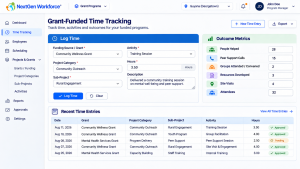
Funding Source
→ Project Category
→ Sub-Project
→ Activity
→ Outcome Metrics
The system still needs to connect employee time with the dimension that matters to reporting.
Manager Approval Should Focus on Exceptions
Managers should not have to manually reconstruct every employee’s week.
A more efficient approval workflow presents:
- Total hours
- Overtime
- Late arrivals
- Missing punches
- Job allocations
- Exceptions
- Notes
The manager can review the important information and approve or reject the record.
One Approval Level Is Not Always Enough
Some businesses need a simple manager sign-off.
Others may need:
Employee Time
      ↓
Supervisor Review
      ↓
Manager Approval
      ↓
HR Review
      ↓
Payroll Ready
That is especially useful when overtime, premiums, or unusual time records require additional control before payroll.
Audit History Matters
When time changes after the initial punch, businesses may need to know:
- Who changed it?
- What changed?
- When was it changed?
- Who approved it?
- What was the final payroll-ready value?
That makes audit history an important part of workforce management, especially where approvals and payroll adjustments are involved.
Emergency Roll-Call Is Another Workforce Use Case
Time and attendance data can also support operational safety workflows.
During an evacuation, an organization may need to know:
- Who was on site?
- Who has reached the muster point?
- Who is still unaccounted for?
A QR-based emergency roll-call workflow can allow designated personnel to scan employees or confirm status at the muster point and compare the result with recent attendance records.
This turns workforce data into something useful beyond payroll.
Payroll-Ready Time Means More Than Exporting Hours
A payroll export is only valuable if the information is correct.
Payroll-ready data may include:
- Regular hours
- Overtime
- Double time
- Shift premiums
- Leave
- Approved corrections
- Job or project allocation
- Manager approvals
The goal is to complete as much validation as possible before the data reaches payroll.
Payroll problems often start before payroll.
Integrations Should Remove Work, Not Move It Somewhere Else
A useful integration should reduce manual re-entry.
Depending on the customer environment, NextGen Workforce can support workflows involving systems such as:
- QuickBooks
- BambooHR
- Sage
- ISL Payroll
- Custom payroll systems
- API-based integrations
- Customer-specific exports
The exact integration depends on the system and customer requirements.
The goal remains consistent:
Move reviewed workforce data downstream without rebuilding the timesheet manually.
Where BambooHR Can Fit
Some organizations already use BambooHR for employee records, HR data, or PTO.
In those environments, NextGen Workforce can handle more detailed operational workflows such as:
- Time tracking
- Scheduling
- Biometric clocking
- Mobile GPS
- Overtime
- Job and project dimensions
- Approval workflows
- Payroll-ready reporting
The organization does not necessarily need to replace the HR system.
It may simply need more depth around workforce operations.
Where QuickBooks Can Fit
Businesses using QuickBooks may need approved employee time prepared for their accounting or payroll workflow.
That is where the process before the integration matters.
The time should ideally already be:
- Reviewed
- Approved
- Categorized
- Corrected
- Mapped to the appropriate payroll or labor categories
Sending raw punches faster does not solve a bad approval process.
Different Businesses Need Different Workforce Models
A flexible platform should not force every company into one operating model.
Small Business With Wall-Mounted Time Clocks
Biometric Punch
      ↓
Supervisor Review
      ↓
Approved Hours
      ↓
Payroll
24/7 Factory
Rotating Schedule
      ↓
Biometric Attendance
      ↓
Shift Premium
      ↓
Overtime
      ↓
Supervisor Approval
      ↓
Payroll
Field Service Company
Mobile Clock-In
      ↓
GPS / Geofence
      ↓
Work Order
      ↓
Travel
      ↓
Job Costing
      ↓
Approval
Grant-Funded Organization
Funding Source
      ↓
Project
      ↓
Sub-Project
      ↓
Activity
      ↓
Hours + Outcomes
Multi-Site Employer
Employee Location
      ↓
Local Schedule
      ↓
Applicable Attendance Rules
      ↓
Overtime / Premium Rules
      ↓
Approval
      ↓
Payroll-Ready Data
The technology should support the workflow, not force the business to redesign itself around the software.
Signs Your Workforce Process Needs More Than a Basic Time Clock
You may need a more configurable system if:
- Payroll regularly fixes timecards.
- Managers approve overtime through email.
- Different locations use different rules.
- Shift premiums are calculated manually.
- Job hours are reconstructed after the work is completed.
- Field staff use a separate process from office staff.
- Missing punches are discovered at payroll time.
- Schedules are managed in spreadsheets.
- Biometric punches are disconnected from approvals.
- Payroll exports require significant editing.
If the same manual correction happens every pay period, it is probably not an exception anymore.
It is part of the workflow.
What to Look for in Workforce Management Software
Before choosing a platform, look beyond the feature list.
Ask whether the system can support:
- Biometric, mobile, web, and kiosk time capture
- GPS and geofencing
- Fixed and rotating schedules
- 24/7 coverage
- Custom attendance rules
- Overtime and double time
- Shift premiums
- Multiple pay rates
- Projects and jobs
- Work orders
- Client contracts
- Travel events
- PTO and leave
- Manager and HR approvals
- Audit history
- Payroll-ready reporting
- Integrations
Then ask the more important question:
Can the platform represent how our workforce actually operates?
How NextGen Workforce Fits
NextGen Workforce is built for organizations that need more control over what happens between employee work and payroll.
The platform supports time and attendance, scheduling, biometric and mobile capture, overtime rules, location controls, project and job tracking, approvals, PTO, reporting, and payroll-ready workflows.
It can operate as a standalone workforce platform or connect with the HR, accounting, and payroll systems already in use.
The exact configuration depends on the business.
That is intentional.
Your workforce rules aren’t generic. Your workforce software shouldn’t assume they are.
Have a Workforce Workflow Your Current System Can’t Handle?
Tell us how your employees work today — schedules, time clocks, jobs,
overtime, approvals, locations, and payroll. We can review how the workflow
could be handled in NextGen Workforce.
Frequently Asked Questions
What is workforce management software?
Workforce management software helps businesses manage scheduling, employee time, attendance, overtime, leave, labor allocation, approvals, and payroll-ready workforce data.
Can workforce management software support biometric time clocks?
Yes. A workforce platform can receive employee punches from supported fingerprint, facial-recognition, kiosk, mobile, or other time-capture methods and process those records through attendance and approval workflows.
Can mobile employees clock in with GPS?
Yes. Mobile time-tracking workflows can capture location information and use geofencing where required to validate or review clock-in location.
Can the same platform manage scheduling and attendance?
Yes. Connecting schedules with attendance allows the system to compare expected work with actual punches and identify issues such as late arrivals, missed shifts, early departures, and overtime.
Can overtime be calculated automatically?
Yes. Overtime workflows can be configured around applicable daily, weekly, biweekly, premium, or employee-group rules where required.
Can employees track projects, jobs, and work orders?
Yes. Employee time can be associated with projects, jobs, work orders, clients, tasks, contracts, funding sources, or other configured labor dimensions.
Can managers approve employee time before payroll?
Yes. Approval workflows can include supervisor, manager, HR, or other review stages before time is considered payroll-ready.
Can NextGen Workforce work without BambooHR?
Yes. NextGen Workforce can operate as a standalone workforce management platform. BambooHR is one possible integration for organizations that already use it.
Can NextGen Workforce work with QuickBooks?
NextGen Workforce can support QuickBooks-related time and payroll workflows depending on the customer’s QuickBooks environment, required mappings, and integration setup.
Can the system support multi-site workforces?
Yes. Different sites, departments, employee groups, schedules, and rule sets can be handled through configurable workforce workflows.
Can workforce management support job costing?
Yes. When employee time is tied to jobs, projects, work orders, or contracts, that labor data can be used for job-costing and operational reporting.
Employment, overtime, payroll, union, and workforce requirements vary by jurisdiction, employee classification, contract, and company policy. Businesses should confirm applicable requirements with the relevant government authority, payroll provider, or professional advisor.
FAQ Schema

The NGW Workforce team writes about HR tech, time tracking, scheduling, and workforce compliance.