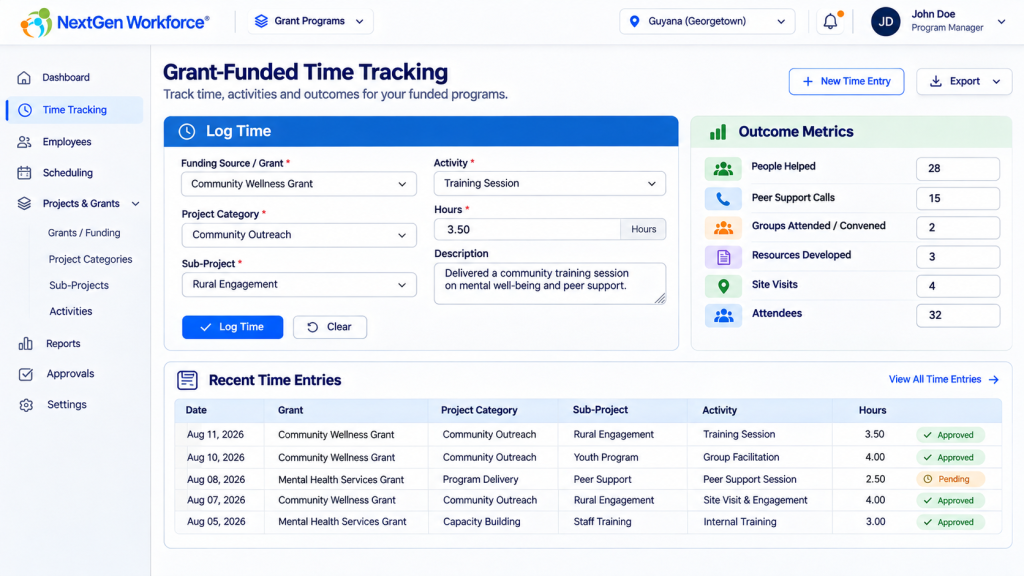
Grant Time Tracking Software for Multi-Level Funding, Projects, Activities, and Outcomes
Grant-funded organizations rarely need to track time at only one level.
An employee may need to select a funding source, then a project category, then a sub-project, then an activity. On top of that, the organization may need to record outcomes such as people helped, site visits, support calls, resources developed, or groups attended.
That creates a very different time-tracking problem from a simple project-and-task setup.
The question is no longer just:
How many hours did this employee work?
It becomes:
- Which grant funded the time?
- Which project category did the work belong to?
- Which sub-project was involved?
- What activity was performed?
- What outcomes were produced?
- Can the same activity be reported across multiple grants?
- Can the organization still see the original funding source behind every hour?
NextGen Workforce is designed for organizations that need more flexibility in how workforce time is structured, captured, and reported.
Tracking Grant Hours Across More Than Project and Task?
Show us how your grants, projects, activities, and outcomes are structured. We can review whether NextGen Workforce can support the reporting model you need.
What Is Grant Time Tracking Software?
Grant time tracking software helps organizations record employee labor against the funding source or program that supported the work.
For a simple organization, that might mean choosing one grant and entering hours.
For a more complex organization, the structure may look like this:
Funding Source / Grant ↓ Project Category ↓ Sub-Project ↓ Activity ↓ Hours ↓ Outcome Metrics
Each level adds reporting context.
The funding source explains where the money came from.
The project category explains the broader area of work.
The sub-project identifies the specific initiative.
The activity explains what the employee actually did.
The outcome metrics show what that work produced.
Grant reporting becomes much easier when the hours and the outcomes live in the same reporting structure.
Why Project and Task May Not Be Enough
Many time-tracking systems are built around a simple hierarchy:
Project ↓ Task ↓ Hours
That works well for many businesses.
But grant-funded organizations may have several layers between the funding source and the work being performed.
For example:
Grant ↓ Project Category ↓ Sub-Project ↓ Activity ↓ Outcome
If the software only supports project and task, the organization may end up flattening its structure or maintaining additional information somewhere else.
That usually creates one of two problems:
- The time entry loses important grant-reporting detail.
- The additional detail is stored separately and is no longer directly connected to the hours.
The second problem is especially important.
If outcome information is entered in a separate table or system, the organization may know that 25 people were helped and separately know that 3.5 hours were worked, but still have to reconstruct the relationship between the two when preparing a report.
A Practical Multi-Level Grant Tracking Example
Consider this time entry:
| Funding Source / Grant | B-101 – Community Wellness Grant |
|---|---|
| Project Category | Community Outreach |
| Sub-Project | Rural Engagement |
| Activity | Training Session |
| Hours | 3.50 |
The organization may also want to capture outcomes for the same entry:
| Outcome Metric | Value |
|---|---|
| People Helped | 25 |
| Peer Support Calls | 4 |
| State and Local Groups Attended or Convened | 2 |
| Resources Developed | 1 |
| Site Visits | 2 |
| Peer Support Call Attendees | 18 |
Now the organization can answer a much more useful question:
What work was performed, under which grant, for how long, and what did that work produce?
Track Funding Sources Without Duplicating the Whole Reporting Model
One of the harder grant-reporting problems appears when the same activity exists under multiple grants.
Imagine this:
Grant A ↓ Community Outreach ↓ Rural Engagement ↓ Training Session Grant B ↓ Community Outreach ↓ Rural Engagement ↓ Training Session
The organization still needs the grant-specific allocation.
But it may also need to know:
How many total hours did we spend on Training Sessions across all grants?
If every activity is treated as an isolated value under each grant, reporting that answer can become awkward.
A more flexible model treats the activity as a shared reporting dimension while preserving the funding source behind each time entry.
That makes both views possible:
- Hours by grant
- Hours by activity across all grants
Can You Report the Same Activity Across Multiple Grants?
Yes, if the reporting model separates the funding source from the activity dimension.
For example:
| Grant | Activity | Hours |
|---|---|---|
| Grant A | Peer Support Call | 12 |
| Grant B | Peer Support Call | 18 |
| Grant C | Peer Support Call | 9 |
The organization can still report each grant separately.
But it can also report:
Peer Support Call = 39 total hours across all grants.
This is a small modeling decision with a big reporting impact.
Why Shared Activities Matter
Grant structures often repeat the same kinds of work.
For example:
- Training Session
- Community Outreach
- Peer Support Call
- Site Visit
- Group Meeting
- Resource Development
- Policy and Advocacy
If those activities are recreated separately under every funding source, the organization may eventually have dozens of duplicated values that all mean the same thing.
That makes reporting harder than it needs to be.
Using shared activity codes can make it easier to answer questions such as:
- How much time was spent on peer support across the organization?
- How many hours went into training sessions this quarter?
- Which grants funded site visits?
- How much labor was allocated to community outreach?
Outcome Metrics Should Be Tied to the Work
Grant reporting often goes beyond labor hours.
A funder may want to understand what happened because of those hours.
That can include metrics such as:
- People helped
- Participants served
- Peer support calls
- Groups attended
- Groups convened
- Resources developed
- Site visits
- Training sessions
- Attendees
- Other program-specific outcomes
When those metrics are connected to the time entry, the organization can report labor and program outcomes together.
That is much more useful than maintaining one system for hours and another table for outcomes.
Example: Hours and Outcomes in One Record
A single record might contain:
Date: April 16 Grant: Community Wellness Grant Project Category: Community Outreach Sub-Project: Rural Engagement Activity: Training Session Hours: 3.50 Description: Facilitated peer support training for community partners. People Helped: 25 Peer Support Calls: 4 Groups Attended / Convened: 2 Resources Developed: 1 Site Visits: 2 Peer Support Attendees: 18
That creates a much stronger reporting record than an isolated 3.5-hour time entry.
Outcome Fields Do Not Have to Be the Same for Every Activity
Another useful design option is to make outcome metrics configurable.
A site visit may need different metrics from a peer support call.
A training session may need attendance counts.
A resource-development activity may need the number of materials produced.
That means the system should not necessarily force every employee to complete every outcome field.
Instead, the applicable metrics can be associated with the activity or reporting structure where appropriate.
This keeps time entry usable while still collecting the data needed for grant reporting.
Employee Time Entry Should Still Be Simple
A complex reporting model should not create a complex employee experience.
The employee should only see the options that make sense for the selection they have already made.
For example:
Select Grant ↓ Show Valid Project Categories ↓ Select Project Category ↓ Show Valid Sub-Projects ↓ Select Sub-Project ↓ Show Valid Activities ↓ Enter Hours ↓ Enter Applicable Outcome Metrics
This is often called a dependent or cascading selection workflow.
It gives administrators a detailed hierarchy without making employees search through every possible combination.
How Multi-Level Grant Reporting Can Work
Once time is stored with each reporting dimension, the organization can report at several levels.
Report by Funding Source
Show all employee hours charged to a specific grant.
Report by Project Category
Compare total time across program areas such as community outreach, direct services, advocacy, or resource development.
Report by Sub-Project
See labor dedicated to a specific initiative regardless of who performed the work.
Report by Activity
See the same activity across multiple grants.
Report by Employee
See how one employee’s time was distributed across funding sources and activities.
Report by Outcome
Summarize people helped, calls completed, site visits, attendees, or other program metrics.
Report Hours and Outcomes Together
Combine labor and output data for a fuller view of funded work.
Example Cross-Grant Activity Report
| Activity | Grant A | Grant B | Grant C | Total Hours |
|---|---|---|---|---|
| Peer Support Call | 12 | 18 | 9 | 39 |
| Training Session | 14 | 8 | 10 | 32 |
| Site Visit | 6 | 11 | 4 | 21 |
The same report could then be filtered by:
- Date range
- Employee
- Department
- Funding source
- Project category
- Sub-project
- Activity
Grant Time Tracking Is Also a Labor Allocation Problem
For many organizations, grant reporting is fundamentally about labor allocation.
An employee may work eight hours in one day but distribute those hours across several funding sources.
For example:
| Funding Source | Activity | Hours |
|---|---|---|
| Grant A | Community Outreach | 3.0 |
| Grant B | Training Session | 2.5 |
| Grant C | Resource Development | 2.5 |
Total employee hours remain eight.
But the organization now knows exactly where those eight hours were allocated.
That distinction matters for internal reporting, grant reporting, billing, and financial review.
Keep Your HR System and Add Deeper Grant Time Tracking
An organization may already have an HR system that works well for employee records, onboarding, PTO, benefits, or other HR functions.
That does not mean the HR platform has to solve every operational reporting requirement.
The gap may be specifically in:
- Grant labor allocation
- Multi-level project structures
- Activity reporting
- Outcome metrics
- Cross-grant reporting
- Customer-specific exports
In that situation, the organization can keep its HR system and use NextGen Workforce for the more detailed time and workforce reporting workflow.
Keep the HR system that works. Add the reporting depth your grants require.
What to Look for in Grant Time Tracking Software
If your organization has a complex grant structure, ask whether the platform can support:
- Multiple funding sources
- Project categories under each grant
- Sub-projects
- Shared activity codes
- Dependent selection lists
- Employee hour entry
- Descriptions and notes
- Outcome metrics
- Activity-level reporting across grants
- Grant-specific reporting
- Employee allocation reports
- Date-range reporting
- Department reporting
- Custom exports
- Audit history
The most important question is:
Can the system represent the way our funding and program structure actually works without forcing us to rebuild reports manually?
How NextGen Workforce Can Support Complex Grant Tracking
NextGen Workforce can be configured around multiple labor and reporting dimensions rather than limiting time entry to one simple project field.
A grant-funded workflow can be designed around dimensions such as:
- Funding Source / Grant
- Project Category
- Sub-Project
- Activity
- Employee
- Department
- Date
- Hours
- Description
- Outcome Metrics
The exact hierarchy depends on the organization.
That flexibility is important because not every grant-funded organization uses the same terminology or reporting structure.
A Better Way to Think About Grant Time Tracking
The goal is not to add as many dropdowns as possible.
The goal is to capture the minimum information needed to answer the organization’s reporting questions later.
A well-designed structure should let you answer questions like:
- How many hours were charged to Grant A?
- Which employees worked on Grant B?
- How many total hours did we spend on peer support across every grant?
- Which project category used the most labor?
- How many people were helped by activities funded under a specific grant?
- How many site visits occurred this quarter?
- How much staff time was associated with those site visits?
If the time-entry structure cannot answer those questions, the organization will probably have to rebuild the information later.
When Should You Consider a More Configurable System?
You may have outgrown basic project time tracking if:
- You maintain separate spreadsheets for grant allocations.
- Your HR system only captures part of the hierarchy you need.
- Outcome data is stored separately from employee hours.
- The same activity is duplicated under every grant.
- You cannot easily report one activity across multiple funding sources.
- Employees have to remember which version of the same task to select.
- Grant reports require significant manual cleanup.
- You repeatedly combine exports from multiple systems.
Those are not just reporting inconveniences.
They are signs that the data model does not match the way the organization actually operates.
Have a Grant Tracking Structure Your Current System Can’t Represent?
Share your funding sources, project hierarchy, activities, outcome metrics, and reporting requirements. We can review how the workflow could be modeled in NextGen Workforce.
Frequently Asked Questions
What is grant time tracking software?
Grant time tracking software records employee labor against funding sources, projects, activities, or other grant-related dimensions so organizations can understand how staff time was allocated and report it accurately.
Can employees track time across multiple grants?
Yes. Employees can allocate hours to different funding sources while keeping their total worked hours intact.
Can grant time tracking have more than project and task?
Yes. A configurable model can include additional dimensions such as funding source, project category, sub-project, activity, department, client-defined fields, and outcome metrics.
Can the same activity be used under multiple grants?
Yes. Shared activity codes can be used across funding sources so the organization can preserve grant-specific allocation while also reporting total hours for the same activity across all grants.
Can we report one activity across every grant?
Yes. If activity is stored as a shared reporting dimension, the organization can report total hours for that activity across multiple grants without losing the underlying funding-source detail.
Can outcome metrics be tied to grant hours?
Yes. Outcome metrics such as people helped, support calls, site visits, attendees, or resources developed can be associated with the same work record where the workflow requires it.
Do all activities need the same outcome fields?
No. Outcome fields can be configured according to the reporting needs of the activity or program where appropriate.
Can grant managers report by employee?
Yes. Reports can be structured to show how an employee’s hours were distributed across grants, project categories, sub-projects, or activities.
Can NextGen Workforce work alongside an existing HR system?
Yes. Organizations can keep their existing HR platform and use NextGen Workforce for more detailed time allocation, grant hierarchy, activity, outcome, and reporting workflows.
Can grant reports be exported?
Yes. Reporting and export requirements can be configured based on the organization’s required fields and reporting structure.
The examples on this page illustrate configurable grant time-tracking and reporting workflows. Grant, funding, accounting, and compliance requirements vary by organization, funder, contract, and jurisdiction. Organizations should confirm their reporting obligations with their funder, finance team, grant administrator, or professional advisor.

The NGW Workforce team writes about HR tech, time tracking, scheduling, and workforce compliance.