From Clock-In to Payroll: How Modern Workforce Management Connects Time, Scheduling, Job Costing, Approvals, and Payroll
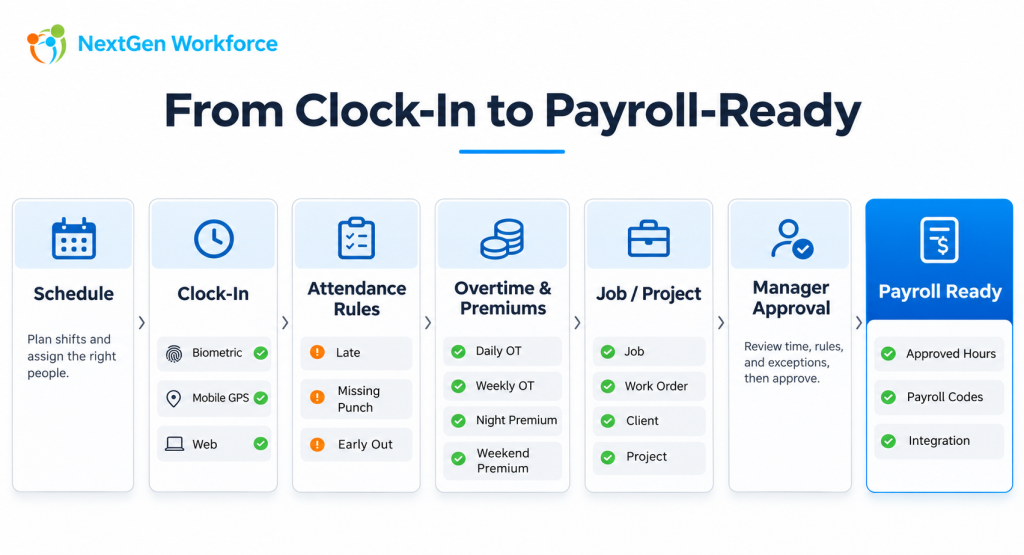
From Clock-In to Payroll: How Modern Workforce Management Connects Time, Scheduling, Job Costing, Approvals, and Payroll Clocking in is the easy part. The harder part is deciding what that punch means. Was the employee scheduled? Were they late? Did overtime apply? Which job were they working on? Was there a night-shift premium? Did the manager approve the hours? Is the time ready for payroll? For simple teams, a basic time clock may be enough. For factories, field crews, industrial teams, multi-site employers, project-based businesses, and organizations with complex payroll rules, the workflow is much bigger. NextGen Workforce connects the operational steps between the employee punch and payroll-ready data. Still Fixing Time Before Payroll? If your team is correcting overtime, missing punches, job allocations, approvals, or schedules every pay period, we can review the workflow with you. Review Your Workforce Workflow What Does Modern Workforce Management Actually Mean? Modern workforce management brings together the systems and rules that determine how employee time is planned, captured, reviewed, categorized, approved, and prepared for payroll or billing. That can include: Employee scheduling Biometric and mobile time capture GPS and geofencing Late and attendance rules Overtime calculations Shift premiums Job and project tracking Travel time Manager approvals HR or payroll review PTO and leave Payroll-ready reporting The value is not in having more screens. The value is in connecting the workflow so each step builds on the one before it. The real goal is not to collect more punches. It is to produce cleaner workforce data. The Workforce Workflow Starts Before the Employee Clocks In Time tracking becomes more accurate when the system already knows what was expected. That usually starts with the schedule. A schedule can define: Expected start and end time Assigned shift Department Location Job or work assignment Required coverage Once the employee clocks in, the system can compare the actual event with the planned work. Without that context, a punch is simply a timestamp. Scheduling and Attendance Should Work Together When scheduling and attendance are connected, the system can identify more than just total hours. It can help answer: Did the employee arrive on time? Was the shift missed? Did the employee leave early? Did they work outside the scheduled window? Was overtime created? Was coverage maintained? This is especially important for organizations that operate nights, weekends, rotating shifts, or 24/7 coverage. Complex Scheduling Is Not Just Dragging Shifts on a Calendar A simple weekly calendar works for predictable teams. Complex operations may need much more. Examples include: 8-hour shifts 12-hour shifts Day and night rotations 14-day rotation patterns Weekend coverage On-call schedules Open shifts Shift swaps Employee unavailability Department-specific coverage requirements A 24/7 factory does not have a calendar problem. It has a coverage problem. The scheduling system needs to help the business maintain coverage while respecting employee availability, work rules, and operational requirements. Time Capture Should Match the Workforce Not every employee should be forced to clock in the same way. A fixed-site workforce may prefer a wall-mounted biometric terminal. A field employee may need a mobile app with GPS. A distributed team may use web clocking. A flexible workforce platform may support several methods at the same time. Biometric Time Clocks Fingerprint and facial recognition terminals are useful for factories, warehouses, offices, and other fixed locations where employees report to a common site. Biometric identification can help businesses create a more controlled clock-in process. But the device is only the first step. The real value comes from what happens to the punch afterward. Mobile Time Tracking Field workers may need to clock in from a phone while working at customer sites, projects, or temporary locations. The mobile workflow may also need to capture: GPS coordinates Geofence validation Job or client Project Travel events Notes NFC and Other Clocking Methods Some environments may also use NFC, kiosk workflows, PINs, or other supported authentication methods depending on the operational need. The important question is not which clock is the fanciest. It is whether the time-capture method fits the workforce and feeds the same review and payroll workflow. Geofencing Adds Location Context to the Punch For field teams, time is often tied to place. A business may need to know whether the employee clocked in: Inside an approved site Near a customer location Outside a permitted area At the correct job site Geofencing allows a business to define a boundary around a work location and compare the employee’s location with that boundary. Depending on the configured workflow, the system may allow the punch, flag it, reject it, or notify a manager. Attendance Rules Turn Punches Into Useful Information A punch by itself does not tell a manager whether there is a problem. The system needs rules. For example: Scheduled Start Clock-In Grace Period Result 7:00 AM 7:03 AM 5 minutes Within tolerance 7:00 AM 7:09 AM 5 minutes Late Other rules may identify: Missing clock-in Missing clock-out Early departure No break Short meal period Unscheduled work Excessive hours This lets managers focus on exceptions instead of reviewing every normal timecard line manually. Automation Should Surface Exceptions, Not Create More Noise A good workforce workflow should help managers pay attention to the records that actually need attention. For example: Scheduled Shift ↓ Employee Punch ↓ Rule Evaluation ↓ No Exception? ↓ Continue Normally Exception Found? ↓ Notify / Flag ↓ Manager Reviews This is more useful than asking supervisors to inspect every employee every day. Overtime Calculation Becomes Complicated Quickly Overtime is rarely just one checkbox. Businesses may need to calculate: Daily overtime Weekly overtime Biweekly overtime Double time Weekend premiums Holiday premiums Night differentials Union or contract rules Location-specific rules One employee may follow one policy while another follows something different. A company operating in multiple provinces, states, or countries may need separate eligibility and rule groups. The important part is that the calculation is applied consistently before payroll. Automated Overtime Is Only Useful If the Right Rule Is Applied Automation does not mean applying one rule everywhere. A configurable