Massachusetts Sick Leave Law: How to Track Earned Sick Time Without Manual Payroll Errors
Massachusetts sick leave tracking looks simple until payroll has to calculate it every pay period.
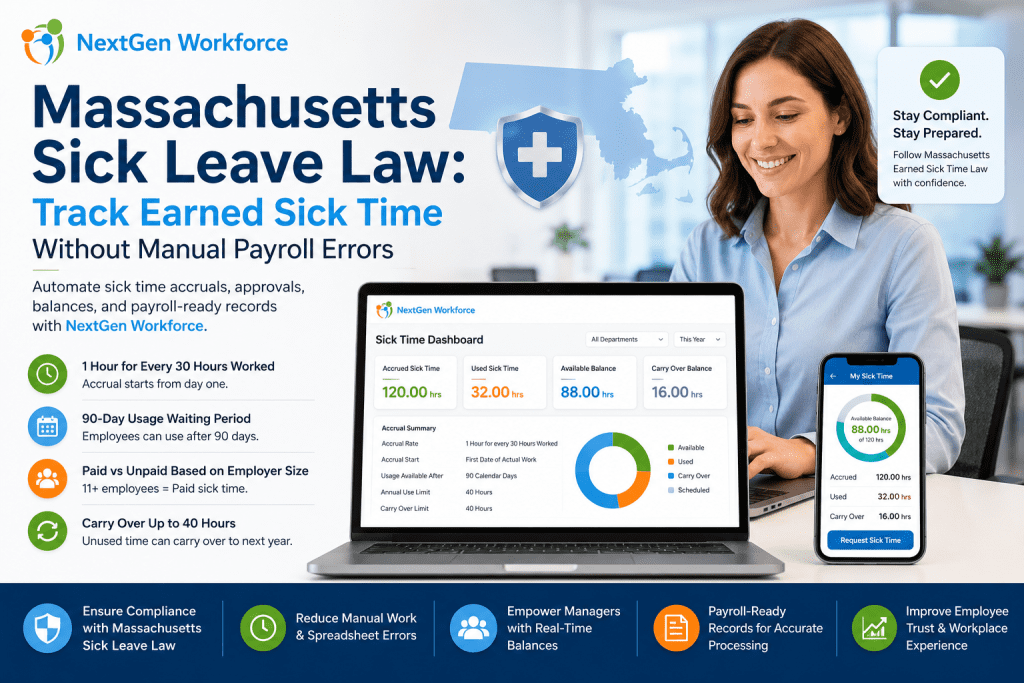
Massachusetts sick leave law requires most employers to provide earned sick time, up to 40 hours per year. Employees generally accrue 1 hour of sick time for every 30 hours worked, and whether that time is paid or unpaid depends on employer headcount.
The rule is easy to explain.
The tracking is where HR and payroll teams struggle.
Part-time employees work different hours. Seasonal employees come and go. New hires start accruing from day one but may not be able to use sick time until later. Carryover needs year-end review. Payroll needs the correct paid or unpaid sick time category.
When all of that lives in spreadsheets, email approvals, and manual balance updates, payroll errors become much easier to miss.
That is where NextGen Workforce helps.
NextGen Workforce connects time tracking, sick time accruals, leave requests, approvals, balance history, and payroll-ready reporting so businesses can manage earned sick time with less manual work.
Still Tracking Massachusetts Sick Time Manually?
NextGen Workforce helps businesses automate sick time accruals, requests, approvals, balances, and payroll-ready records.
Track hours worked, calculate earned sick time, manage eligibility, approve requests, and prepare cleaner payroll records without spreadsheet cleanup.
What Is The Massachusetts Sick Leave Law?
Quick answer: The Massachusetts Earned Sick Time Law gives most workers the right to earn and use job-protected sick time. Employers with 11 or more employees generally must provide paid sick time, while smaller employers must provide sick time that may be unpaid.
Massachusetts sick leave law applies broadly to eligible workers whose primary place of work is in Massachusetts.
This can include full-time, part-time, seasonal, and temporary employees.
For HR teams, the main issue is not only writing the policy. The real work is tracking earned sick time correctly for every employee type.
A full-time employee may reach the annual limit quickly. A part-time employee may accrue slowly. A seasonal employee may leave and return. A temporary employee may still count toward employer size calculations depending on the situation.
That is why Massachusetts sick leave compliance becomes a workflow problem.
You need accurate hours, clear balances, eligibility rules, approval history, and payroll-ready sick time records.
How Massachusetts Earned Sick Time Accrual Works
Quick answer: Employees generally earn 1 hour of sick time for every 30 hours worked, up to 40 hours per benefit year. Accrual starts on the first date of actual work, but employees generally may begin using accrued sick time after 90 days.
Massachusetts sick time accrual depends on hours worked.
That means payroll and HR need accurate time records before they can trust the sick leave balance.
Accrual Rate
Employees generally accrue 1 hour of earned sick time for every 30 hours worked.
This includes hours worked toward accrual, and regulations also address different work arrangements such as exempt employees, piece work, and fee-for-service situations.
Annual Limit
Employees can generally earn and use up to 40 hours of earned sick time per benefit year if they work enough hours.
This annual limit matters because payroll should not allow sick time usage beyond the employer’s configured policy and legal requirements.
90-Day Usage Waiting Period
Employees generally begin accruing earned sick time from the first date of actual work.
However, they may generally begin using accrued earned sick time 90 days after their first date of actual work.
Carryover
Unused earned sick time may carry over to the next benefit year, up to 40 hours.
Employers may still limit annual use to 40 hours, depending on the applicable rules and policy setup.
Key takeaway: Massachusetts sick time accrual depends on accurate hours worked. If time tracking is wrong, leave balances can be wrong too.
Why Massachusetts Sick Leave Tracking Creates Payroll Risk
Quick answer: Massachusetts sick leave tracking creates payroll risk when hours worked, accrual balances, paid or unpaid status, waiting periods, usage limits, and carryover are managed manually. Small tracking errors can turn into payroll corrections and employee disputes.
Many businesses understand the law but still struggle with the process.
The problem is usually not the policy document. It is the day-to-day tracking.
Payroll teams need to know how many hours an employee worked. HR needs to know how much sick time the employee earned. Managers need to know whether the employee has a usable balance. Employees expect their balance to be correct.
If those records live in different places, the process breaks down.
A sick time request may be approved before eligibility is checked. A part-time employee’s accrual may be miscalculated. A carryover balance may be updated late. Payroll may receive the wrong sick time category.
That creates unnecessary manual work.
It also creates employee trust issues. Sick time is personal, and employees expect their balance to be accurate when they need it.
What HR And Payroll Teams Must Track Manually
Quick answer: To manage Massachusetts earned sick time manually, HR and payroll teams must track hire dates, hours worked, accrual earned, usage eligibility, paid or unpaid status, time used, remaining balance, carryover, and payroll categories.
This is where spreadsheets become risky.
One spreadsheet may track hours. Another may track PTO. A manager may approve time off by email. Payroll may enter the sick time manually later.
Each handoff creates room for error.
- Employer size: Determines paid or unpaid sick time.
- Employee hire date: Supports the 90-day usage waiting period.
- Hours worked: Drives sick time accrual.
- Accrual earned: Shows available sick time.
- Sick time used: Reduces the employee balance.
- Remaining balance: Helps managers approve requests.
- Carryover balance: Supports year-end tracking.
- Paid or unpaid status: Affects payroll processing.
- Documentation rules: Helps HR apply policy consistently.
- Payroll category: Ensures the correct earning code is used.
If even one item is tracked separately, payroll may receive the wrong information.
NextGen Workforce helps reduce that risk by connecting the workflow from time tracking to sick leave balances and payroll-ready reporting.
Free Checklist: Massachusetts Sick Time Payroll Readiness Checklist
Use this checklist before approving or processing sick time to reduce balance errors, payroll corrections, and manual follow-up.
- Confirm headcount: Verify paid or unpaid sick time status.
- Check hire date: Review 90-day usage eligibility.
- Review hours worked: Confirm accrual is based on actual hours.
- Calculate accrual: Apply 1 hour per 30 hours worked.
- Check usage: Review sick time already used this year.
- Review carryover: Confirm unused balance rules.
- Validate payroll: Confirm the right sick time earning code.
How Manual Sick Leave Tracking Breaks Down
Quick answer: Manual sick leave tracking breaks down when accruals are calculated separately from employee hours. This creates balance errors, approval delays, payroll corrections, and confusion for employees and managers.
Manual tracking may work for a very small team.
But it becomes harder as the workforce changes.
Hourly teams rarely work the exact same schedule every week. Part-time employees may pick up extra shifts. Seasonal employees may leave and return. Temporary workers may still need to be counted in certain ways.
Spreadsheets do not handle those changes well.
- Formula errors: One broken cell changes balances.
- Late updates: Payroll sees outdated sick time data.
- Missed employees: Seasonal or temporary staff get overlooked.
- Approval gaps: Managers approve without balance visibility.
- Carryover confusion: Year-end balances require manual cleanup.
- Payroll corrections: Sick time is fixed after payroll review.
This creates stress for HR and payroll teams.
It also slows down managers who need a simple answer: does this employee have available sick time or not?
Massachusetts Sick Leave Workflow: From Hours Worked To Payroll-Ready Balance
Quick answer: A reliable Massachusetts sick leave workflow starts with accurate time tracking, calculates accruals from hours worked, applies waiting periods and usage limits, routes requests for approval, and prepares payroll-ready records.
The best process does not wait until payroll day.
It keeps sick time accurate throughout the pay period.
Step 1: Capture Employee Hours Accurately
Sick time accrual depends on hours worked.
NextGen Workforce supports time tracking through mobile clock-in, web clock, kiosk, biometric clocks, and attendance records. This helps employers collect accurate time data before calculating earned sick time.
Step 2: Calculate Accrual From Actual Hours
Manual accrual math is easy to get wrong.
NextGen Workforce can help calculate sick time accrual based on tracked hours worked, such as 1 hour earned for every 30 hours worked, according to the employer’s configured policy.
Step 3: Track The 90-Day Usage Waiting Period
Eligibility depends on dates.
NextGen Workforce can help HR track employee hire dates and usage eligibility so managers are not approving sick time before the employee becomes eligible to use it.
Step 4: Manage Requests And Approvals
Sick time requests should not live in email threads.
Employees can request sick time, while managers or HR review available balances and approve requests through a clear workflow.
Step 5: Keep Payroll-Ready Sick Time Records
Payroll needs clean records.
Approved sick time should show clearly for payroll review, reporting, and export. NextGen Workforce helps prepare payroll-ready records so payroll teams spend less time fixing balances manually.
Key takeaway: Sick leave compliance is easier when accruals, approvals, balances, and payroll records are connected.
Manual Sick Leave Tracking Vs. NextGen Workforce
Quick answer: Manual sick leave tracking depends on spreadsheets, manager follow-up, and payroll corrections. NextGen Workforce helps automate the workflow by connecting time tracking, accruals, requests, approvals, balances, and payroll-ready reporting.
| Sick Leave Task | Manual Process | NextGen Workforce |
|---|---|---|
| Accrual calculation | Spreadsheet formula | Based on tracked hours |
| 90-day waiting period | HR checks hire date manually | Eligibility date tracking |
| Part-time employees | Manual weekly review | Hours-based accrual |
| Sick time requests | Email or paper form | Digital request workflow |
| Manager approvals | Verbal or email approval | Approval history |
| Carryover | Year-end manual update | Balance tracking |
| Payroll reporting | Manual entry | Payroll-ready records |
The difference is control.
Manual tracking forces HR to rebuild the truth every pay period. NextGen Workforce keeps the workflow connected, so payroll starts with cleaner information.
How NextGen Workforce Helps Track Massachusetts Sick Time
Quick answer: NextGen Workforce helps employers connect hours worked, sick time accruals, employee requests, approvals, balances, and payroll-ready reporting. This reduces manual calculations and gives HR and payroll teams clearer records before payroll runs.
NextGen Workforce is built for businesses that need more than basic time tracking.
It supports the full workflow from attendance to payroll-ready records.
- Time tracking: Capture hours through mobile, web, kiosk, or biometric clocks.
- Accrual rules: Configure sick time accrual based on worked hours.
- Eligibility tracking: Track hire date and usage waiting periods.
- Leave requests: Let employees submit sick time requests digitally.
- Approval workflows: Route requests to managers or HR.
- Balance history: Keep a clear record of earned, used, and remaining time.
- Carryover support: Help manage year-end balance rules.
- Payroll readiness: Prepare cleaner sick time records for payroll review.
This helps HR spend less time calculating balances manually.
It also helps payroll avoid last-minute corrections before running payroll.
Massachusetts Sick Leave And QuickBooks Payroll Readiness
Quick answer: Sick leave tracking should be accurate before payroll begins. Businesses using QuickBooks need reviewed sick time balances, approved usage, paid or unpaid status, and correct payroll categories before exporting or entering payroll data.
QuickBooks can process payroll data.
But it cannot fix sick time data that was tracked incorrectly before payroll.
If the sick time balance is wrong, payroll may be wrong. If paid and unpaid sick time are mixed up, payroll may need correction. If approvals are missing, payroll may wait while managers review old requests.
That is why sick leave tracking should connect to payroll readiness.
NextGen Workforce helps prepare cleaner sick time records before payroll teams process the data. This is especially useful for companies already using QuickBooks or payroll export workflows.
Ready To Stop Managing Sick Leave In Spreadsheets?
NextGen Workforce helps HR and payroll teams automate Massachusetts sick time accruals, requests, approvals, balances, and payroll-ready records.
Give your team a cleaner workflow from hours worked to payroll-ready sick time.
Who Benefits Most From Automated Sick Leave Tracking?
Quick answer: Automated sick leave tracking is most useful for Massachusetts employers with hourly, part-time, seasonal, temporary, multi-location, or shift-based employees. Variable schedules make manual accrual tracking harder.
The more variable your workforce, the harder manual sick leave tracking becomes.
These industries often benefit from automated workflows.
Healthcare
Healthcare teams often manage shift coverage, part-time employees, overtime, and urgent schedule changes.
Automated sick leave tracking helps managers see balances before approving time away.
Retail And Hospitality
Retail and hospitality teams often have part-time employees, seasonal hiring, and changing schedules.
Accruals should follow actual hours worked, not rough estimates.
Cleaning And Field Service
Cleaning and field service employees may work across multiple locations and customer sites.
Connected time tracking helps create cleaner sick time balances and payroll records.
Security
Security teams often work posts, overnight shifts, and rotating schedules.
Managers need a reliable way to review sick time balances before coverage is affected.
Construction
Construction crews may work changing hours across job sites.
Accurate time tracking helps sick leave accrual stay tied to actual work hours.
BPO And Call Centers
BPO and call center teams often manage large hourly teams with attendance-sensitive operations.
Automated sick leave tracking helps reduce manual follow-up for HR and payroll.
Managing Massachusetts Hourly Teams?
NextGen Workforce helps businesses track sick time accruals, approvals, balances, and payroll-ready records across hourly, part-time, seasonal, and multi-location teams.
What To Check Before Processing Massachusetts Sick Time In Payroll
Quick answer: Before processing Massachusetts sick time in payroll, teams should confirm employer size, employee eligibility, hours worked, accrued balance, sick time used, remaining balance, carryover, approval status, and payroll category.
Payroll should not receive incomplete sick leave records.
Before processing sick time, review these items:
- Employer size: Confirm paid or unpaid sick time status.
- Employee eligibility: Check primary work location and hire date.
- Hours worked: Confirm accrual is based on actual time worked.
- Accrued balance: Review earned sick time available.
- Usage history: Check sick time already used.
- Carryover: Confirm year-end balance handling.
- Approval status: Resolve pending sick time requests.
- Payroll category: Confirm paid or unpaid sick time code.
This review gives payroll a better starting point.
It also gives employees more confidence that their sick time balance is being handled correctly.
Frequently Asked Questions About Massachusetts Sick Leave Law
What Is The Massachusetts Earned Sick Time Law?
The Massachusetts Earned Sick Time Law gives most eligible workers the right to earn and use sick time for qualifying reasons.
Most workers can earn up to 40 hours of job-protected sick time per year.
Do Massachusetts Employers Have To Provide Paid Sick Leave?
Employers with 11 or more employees generally must provide paid earned sick time to eligible employees.
Employers with fewer than 11 employees must generally provide earned sick time, but it may be unpaid.
How Does Sick Time Accrue In Massachusetts?
Employees generally accrue 1 hour of earned sick time for every 30 hours worked, up to 40 hours per benefit year.
Accrual depends on hours worked, which makes accurate time tracking important.
When Can Employees Start Using Earned Sick Time?
Employees generally begin accruing earned sick time on the first date of actual work.
They may generally begin using accrued earned sick time 90 days after their first date of actual work.
Can Unused Sick Time Carry Over?
Unused earned sick time may generally carry over to the next benefit year, up to 40 hours.
Employers may still limit annual use based on the applicable rules and policy setup.
Can Employers Request A Doctor’s Note?
Employers may request documentation in certain situations, such as when sick time covers more than 3 consecutive workdays.
Employers should review Massachusetts rules carefully before requiring documentation.
How Can Software Help Track Massachusetts Sick Time?
Software can help by connecting hours worked, accrual calculations, eligibility dates, requests, approvals, balance history, carryover, and payroll-ready records.
This reduces the need for spreadsheets and manual payroll corrections.
Can NextGen Workforce Support Massachusetts Sick Leave Workflows?
Yes. NextGen Workforce helps businesses track time worked, configure sick time accruals, manage employee requests, route approvals, maintain balances, and prepare payroll-ready records.
This helps HR and payroll teams reduce manual work before payroll runs.
About The Author
Official Sources And Legal Note
For current legal details, review the Massachusetts Earned Sick Time guidance, Massachusetts General Laws Chapter 149, Section 148C, and 940 CMR 33.00 Earned Sick Time regulations.
This article is for general workforce management education only. It is not formal legal advice. Massachusetts sick leave requirements may vary based on employee eligibility, employer size, policy setup, benefit year, collective bargaining agreements, and specific circumstances. Employers should consult qualified counsel before making legal or payroll compliance decisions.

The NGW Workforce team writes about HR tech, time tracking, scheduling, and workforce compliance.