How Biometric Time Tracking Solved Workforce Challenges
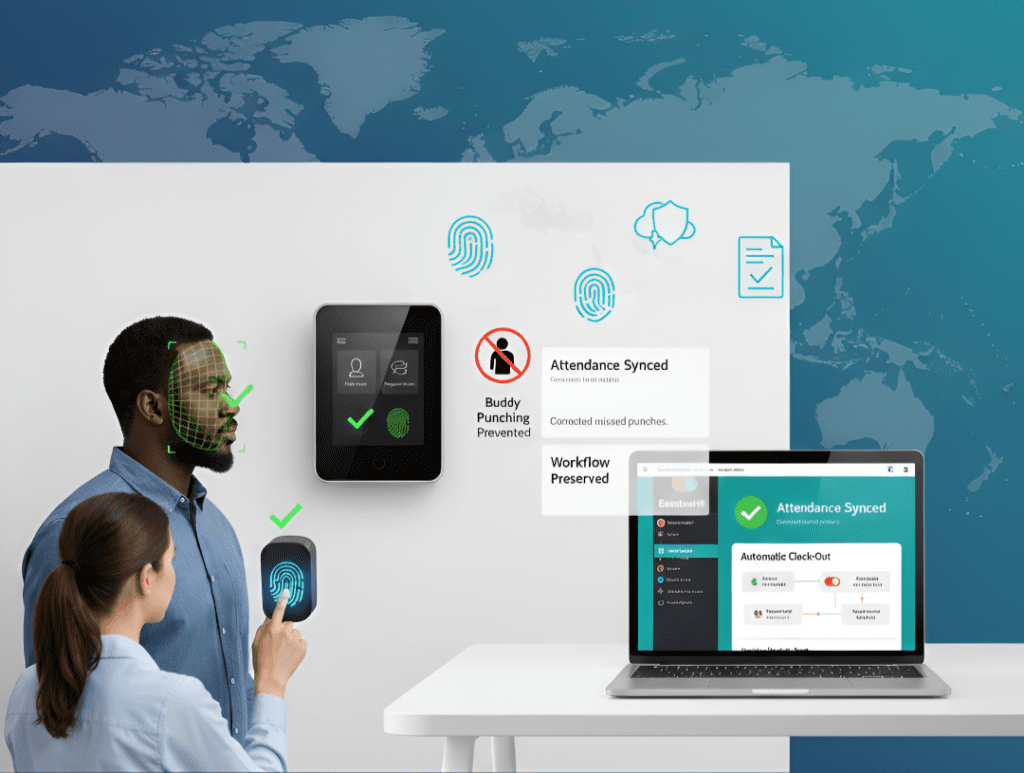
Executive Summary Inaccurate time tracking is one of the biggest hidden costs in workforce management. From payroll disputes to inflated labor costs, traditional methods often fail to capture the truth. A leading construction company faced these challenges head-on—struggling with buddy punching, manual entry errors, and missed clock-outs. By adopting NextGen’s Biometric Time Tracking System, the company eliminated inaccuracies, streamlined payroll, and gained better control over its hybrid workforce—all while keeping its existing BambooHR workflows intact. Why Traditional Time Tracking Fails Many businesses, especially those with field staff, struggle with: Buddy Punching: Employees clocking in for each other, driving up labor costs. Manual Errors: Incorrect entries by staff that require corrections later. Missed Clock-Outs: Inflated hours leading to payroll discrepancies. Limited HR Integration: Systems like BambooHR manage salaried employees well but fall short for distributed, shift-based teams. These challenges don’t just affect payroll—they damage compliance, accountability, and trust within the organization. The Solution: Biometric Time Tracking NextGen Workforce delivered a biometric time tracking system built to stop these issues at the root. The solution included: Biometric Verification Facial recognition and fingerprint scans ensured only the right employees could clock in or out, eliminating buddy punching. Real-Time Sync with BambooHR Every punch updated instantly, giving managers accurate and current attendance data. Automatic Clock-Outs If employees forgot to clock out, the system corrected it automatically to prevent over-reported hours. Preserved HR Workflows Salaried employees stayed on BambooHR approval flows, while field workers gained accountability with live biometric tracking. This combination meant better oversight without disrupting existing processes. The Results: Payroll Accuracy and Accountability The benefits were immediate: Payroll matched reality—no more inflated hours. Buddy punching disappeared—biometrics closed the loophole. HR efficiency improved—no manual corrections, fewer disputes. Better workforce visibility—managers tracked field staff with confidence. By integrating directly with BambooHR, the company kept its familiar HR system but gained the accuracy and accountability it was missing. Why Biometric Time Tracking Matters for Every Business Whether in construction, healthcare, logistics, or retail, the challenges are the same: Costly payroll errors. Compliance risks from inaccurate records. Difficulty managing hybrid or distributed teams. Biometric time tracking provides a single source of truth—accurate, real-time, and tamper-proof. Ready to Fix Your Time Tracking Challenges? If your organization struggles with inaccurate timesheets, payroll disputes, or accountability gaps, it’s time to rethink your approach. With NextGen’s Biometric Time Tracking, you can: Automate attendance. Stop time theft. Simplify payroll. Improve compliance. [Request a Demo Today] and see how NextGen can transform your workforce management.
5 Time Tracking Features for Effortless Attendance Management
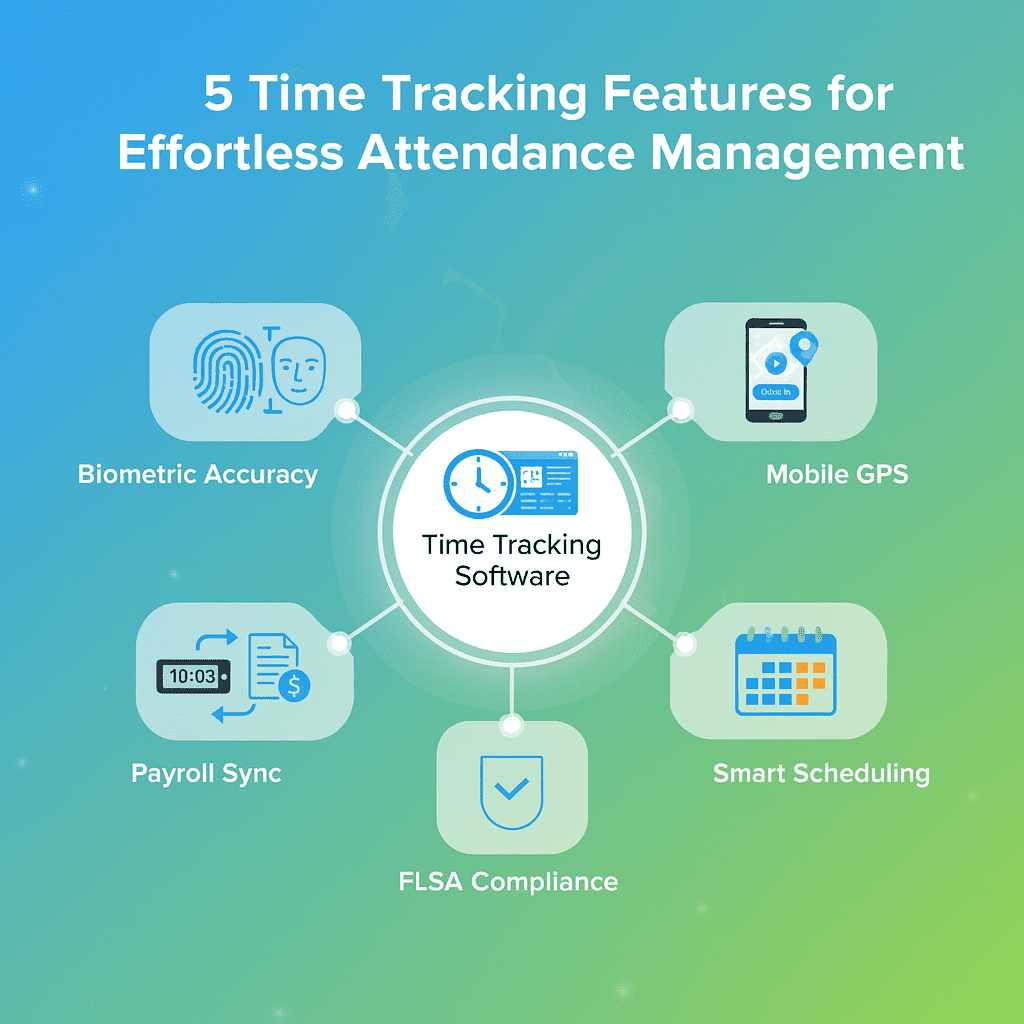
Introduction Managing attendance is one of the biggest operational challenges for any organization. Manual timesheets, inaccurate payroll data, and buddy punching not only drain productivity but also increase compliance risks. The solution? Automated time tracking software. By combining biometric systems, mobile apps, payroll integration, scheduling, and compliance features, businesses can eliminate errors and focus on efficiency. Here are five essential features every modern business should look for in a time tracking solution. 1. Biometric Systems: Stop Time Theft Before It Starts The problem: Manual timesheets and swipe cards are easy to manipulate, leading to buddy punching and inflated labor costs. The solution:Biometric time clocks verify attendance using fingerprints, facial recognition, RFID cards, or PIN codes. This ensures that only the right person can clock in or out. Why it matters: Prevents time theft and inaccurate reporting. Enables automatic payroll calculations. Increases accountability and trust across the workforce. 2. Mobile Apps: Track Remote and Field Teams The problem: With hybrid and field staff, managers struggle to track attendance beyond the office. The solution:A mobile-based attendance system allows employees to clock in/out directly from their phones. GPS and geofencing ensure punches happen only in designated work locations. Why it matters: Managers can see who is working where in real time. Employees get daily, weekly, and monthly timesheets in their app. Remote workforce tracking becomes as seamless as on-site monitoring. 3. Payroll Integration: Eliminate Errors and Save Hours The problem: HR teams waste hours reconciling timesheets with payroll systems, leading to delays and human errors. The solution:Integration between time tracking and payroll software (QuickBooks, BambooHR, etc.) syncs data automatically. Hours, overtime, PTO, and job codes flow straight into payroll without manual entry. Why it matters: Payroll runs faster with fewer disputes. HR staff focus on strategy, not corrections. Businesses save costs by reducing payroll errors. 4. Scheduling Tools: Plan Smarter, Work Smarter The problem: Without proper scheduling, companies face overstaffing, understaffing, and wasted hours. The solution:Built-in scheduling tools help managers create optimized rosters—assigning the right people to the right shifts. Why it matters: Cuts down unproductive time. Reduces conflicts by aligning staff availability with workload. Improves morale when schedules are fair and predictable. 5. FLSA Compliance: Avoid Costly Penalties The problem: Labor law compliance—especially FLSA requirements in the U.S.—is difficult to manage manually. The solution:Automated systems generate detailed, accurate timesheets that track daily and weekly hours, overtime, and breaks while storing records securely. Why it matters: Ensures compliance with FLSA regulations. Reduces risk of audits or penalties. Protects employees’ rights while keeping businesses legally safe. Finding the Right Time Tracking Solution Not all time tracking tools are created equal. The right system should: Be easy to use for both managers and employees. Offer robust validation rules to ensure accuracy. Push data seamlessly into payroll and HR systems. NextGen Workforce’s cloud-based time tracking solution combines all these features in one platform—making attendance effortless from clock-in to payroll. Looking for a solution that fits your business needs? [Schedule a Demo Today]
Biometric Time Clocks Systems for Automated Attendance Management

Managing attendance shouldn’t mean chasing timesheets, fixing payroll errors, or dealing with “buddy punching.” Businesses today need fast, accurate, and tamper-proof solutions—and that’s where biometric time clocks step in. By using unique employee identifiers such as fingerprints or facial scans, biometric systems automate attendance tracking and eliminate errors that manual methods can’t avoid. According to Nucleus Research, automating time and attendance with biometrics not only reduces payroll errors but also boosts productivity across organizations. What Are Biometric Time Clocks? A biometric time clock is a device that verifies employees when they clock in or out by scanning unique physical traits such as fingerprints, facial features, or irises. Each employee’s scan (fingerprint or face) is securely stored in the system. When they clock in, the system validates the scan instantly. The process is fast, accurate, and fully automated. Unlike manual sign-ins or swipe cards, biometric systems cannot be shared or faked—making them a trusted option for industries where accuracy and compliance matter. Types of Biometric Time Clocks Organizations can choose from multiple biometric devices based on convenience and compliance needs: 1. Fingerprint Reader Time Clocks Fingerprint-based systems use unique patterns in an employee’s fingerprint to confirm identity. While widely adopted, fingerprint readers have some limitations: Potential hygiene concerns (touch-based systems can spread germs). Reduced accuracy if employees have worn, dirty, or injured fingertips. Post-pandemic trend: More companies are shifting away from fingerprint systems toward touchless options. 2. Face Recognition Time Clocks Facial recognition systems use facial templates for verification. They’ve proven reliable even with changes like facial hair, glasses, or aging. Key benefits include: No-touch clocking – hygienic and safe. High accuracy – works even in large organizations with diverse workforces. Fast verification – employees clock in within seconds. For modern workplaces, face recognition is emerging as the preferred biometric system. Benefits of Biometric Attendance Tracking Adopting biometric attendance systems helps businesses go beyond simple time tracking: Eliminates Manual Data EntryNo more spreadsheets or paper timesheets. Biometric systems sync directly with your time and attendance software, saving HR and payroll teams countless hours. Improves AccuracyAutomated records mean fewer payroll disputes, no rounding errors, and clear visibility of actual working hours. Prevents Buddy PunchingSince biometric traits are unique, employees cannot clock in for each other—ending time theft and improving accountability. Enhances ComplianceWith real-time tracking, organizations can better comply with labor laws around breaks, overtime, and shift lengths. Boosts ProductivityManagers spend less time fixing errors, and employees trust the system for fair pay. Why Biometric Attendance Is the Future of Workforce Management From factories to retail to corporate offices, organizations are turning to biometrics because they: Offer a touch-free, accurate, and secure way to track attendance. Integrate seamlessly with payroll and scheduling platforms like NextGen Workforce. Reduce compliance risks while improving employee trust. As workplaces embrace hybrid models, biometrics ensure attendance is reliable whether employees work onsite, across shifts, or in large teams. Final Thoughts Biometric attendance isn’t just about clocking in and out—it’s about building a workforce culture based on accuracy, trust, and compliance. With NextGen Workforce’s Biometric Attendance solutions, businesses can integrate face or fingerprint recognition directly into their time tracking system, ensuring every punch is accurate, secure, and legally compliant. Ready to move beyond outdated timesheets? [Book a Demo Today]
Advantages of Integrating Biometric Timeclocks with QuickBooks
5 most Common Employee Time Tracking Challenges

Employee Time tracking and attendance management solutions play a vital role in resource planning, project budgeting, and optimizing productivity. The main objective of companies developing and implementing time Tracking solutions is to help people become more efficient at work not only does it increase productivity but it also helps to understand and optimize the way things work in an organization and resource planning. These solutions often include methods that allow solving attendance management problems, increase participation from employees, and remove the risk of inaccurate time tracking. The right time tracking software can not only eliminate the extra time spent on administrative tasks but also helps the organizations to be more proactively react in addressing the challenges. With employee time tracking, you get a deeper, objective look into your organization to act upon the challenges and it consequently saves the extra time and efforts spent on administrative tasks which can be utilized in more productive work. However, achieving these benefits can only be easier if the implementation of the Time tracking solution is properly planned. There are several challenges that can impede employee attendance management but fortunately, a proper analysis of operational requirements and selecting the right time tracking solution can address them successfully. Here are the five most common time tracking challenges with their solutions Time theft and Buddy Punching:- The practice of Time theft and buddy punching helps employees sneak a few minutes here and there on time cards which can consequently add thousands of unearned dollars to companies’ payroll costs each year. Time theft and Buddy punching is a common problem in companies with uses traditional time tracking methods like Paper timesheets proximity cards and badges. These kinds of outdated clock-in and clock-out methods are easy to manipulate and make it easy pie for employees to earn for the hours which they haven’t worked. Here are some measures that can help your business to tackle time theft effectively: Tracking Remote and Mobile Workforce:- Traditional work culture is significantly replaced by hybrid work culture after this pandemic making it difficult for organizations to track their employee’s hours which still rely on conventional time tracking methods. Tracking remote and mobile employees is a need of hours nowadays. One of the best practices in managing remote employees is identifying and providing the right time tracking tools. Here are some ways to track and manage remote employees and get most of their time. Time tracking Compliance:- Getting a hybrid time tracking solution that meets the compliance, as well as operational requirements, is the biggest challenge The time tracking system must ensure that your company follows all government rules and regulations. In addition, it should comprise all the features required for an efficient and seamless attendance management. There is no shortage of time tracking solutions ranging from mobile apps to portable biometric systems with payroll system integration. Though choosing the right one for your business can be challenging, it’s not just about matching your business needs with a solution it should also address the compliance requirements. The time tracking systems are well equipped nowadays and include a variety of features and abilities, aimed at making it easier for your employees to accurately report work hours, and easier for you to monitor and manage attendance and efficiency with compliance. Any timekeeping solution is acceptable as long as it comprises the basic compliance features likes Integration with Employee Management and Payroll Processing Tools:- There is a small chunk of business that still follows the traditional time tracking practices and potentially harmful manual processes for time tracking and employee payroll. The manual time logging and payroll process through spreadsheets always involved a risk of human errors. The ideal time tracking solution should provide a comprehensive approach to employee management and payroll processing through seamless integrations, Finding such a solution is a challenge that meets both the operational requirements of time tracking and payroll processing. The most convenient solution for such challenges is implementing a cloud-based time tracking system that provides seamless integration with payroll providers. The time tracking systems automatically record logged-in hours of employees and provide an overview of billable hours. The automation of tracking systems and payroll processing through integrations eradicates any manual input dependency, thus eliminating the chance of misreporting working hours. Attendance data from multiple sources:- The challenge is to analyze attendance data across multiple sources. Different pieces of time tracking data are often collected in different systems leading to incomplete or inaccurate analysis. Manually combining data is time-consuming and has certain limitations. With a comprehensive and centralized cloud-based time tracking system, employees and managers can have access to all types of information in one location. Not only does this free up time spent accessing multiple data sources, it allows cross-compare and ensures data is complete and accurate for payroll processing. Implement Time Tracking Solution with care! Automated Time tracking solutions tools means to get a clear overview of all work and processes. And It’s also a proactive approach to using a smart attendance management tools to avoid the above time tracking challenges. NextGen workforce solution includes all of the features we mentioned so far to help you avoid these five-time tracking challenges. Sign up now and experience how NextGen Time tracking solutions can transform your employee time tracking approach and ultimately your business by significantly decreasing payroll issues through seamless automated integration with employee management and payroll processing tools.
All you need to know about Employee GPS Time Tracking

The smartphone revolution has opened the doors for organizations to streamline the business process with Employee GPS Time tracking. Mobile technology has given a cutting edge to business operations by maximizing visibility and accuracy of the workflow. The use of GPS-enabled mobile applications for location-based attendance tracking helps businesses to improve remote workforce performance and enhance operational efficiency. What is GPS Time Tracking? The Employee GPS time tracking is the process of location-based attendance management, wherein Employee GPS monitoring mobile application monitor employees’ activity, track time & location, especially in case of field services like sales and deliveries or for remote workforce working from multiple worksites. It also allows managers to monitor the attendance of each employee along with live location, time, and date. The automatically recorded attendance data through the mobile application can be accessed with ease by a cloud-based web interface for generating reports and payroll processing. How Does Employee GPS Time Tracking Work? The employee GPS Time Tracking is yet another location tracking-based feature that uses a mobile clock to log time and offers real-time location-based attendance tracking through GPS signals. It uses GPS-enabled mobile application to stay connected with employees and also enables managers to create virtual job sites and restricts employees to clock in and clock out through geofencing. Why do you need Employee GPS Time Tracking? Getting a clear sense of your time tracking needs to be based on your operational requirements will help you pick the right solution for your employees Otherwise there is a risk of paying for an app that is inconvenient and time-consuming for people to use. Before you start browsing the websites of different GPS Time Tracking solutions and comparing their features or prices, focused on your company’s operational needs. It’s absolutely critical to understand the need for a GPS time tracking solution. Here are some potential reasons which will help you to narrow down your search. The mobile application based GPS time tracking offers Ease of collecting and managing attendance data for the remote workforce:- Most mobile time tracking solutions use a cloud-based web interface that automates the process of collecting and analyzing attendance data for a remote workforce consequently saving time for payroll processing. Real-time Attendance tracking:- The employee GPS Time tracking enables managers to keep an eye on their workforce to prevent wasting of productive time. The real-time attendance monitoring helps in reducing the Idle time and optimizing employees’ performance. Route history and asset management:- The route map tracking will give the employer all the information regarding the precise route taken by each individual employee and all the stoppages made. This data will help in effectively and safely planning the movement of assets and the deployment of resources. Mileage Tracking:- The real-time location tracking for mobile and field employees helps managers to cost-effectively plan the movement of goods and avoid any unnecessary wastage of time and resources It also provides precise information about routes to optimize the mileage and productivity. Leave Management and Approvals:- The built-in features of leaves and approvals in mobile applications ensures the availability of employees on the worksites and helps managers to plan and deploy, the right resource to the right work Geofencing:- Geofencing reduces the probability of employees abruptly leaving their work area or wandering idly by restricting employees through a virtual boundary around worksites. Scheduling:- A comprehensive mobile time tracking app can provide you with the attendance metrics like idle time and total hours worked that help managers in effectively making more detailed decisions like allocation of resources, planning the meetings for field employees, and scheduling the right employee to the right work to prevent overtimes. What are the benefits of using Employee GPS Time Tracking Solutions? GPS Time tracking solutions allow managers to pinpoint employee location at all times, It also offers flexible and convenient data collection options to record employee attendance. The employee time tracking apps are user-friendly, streamlined tools that will help managers to improve the entire business operation and save time. It also offers a cloud-based web interface to bridge the gap between attendance management and payroll processing. Here are the key benefits of using Employee GPS Time Tracking Solutions. Improved Productivity and Employees accountability Prevent time theft or other unethical practices Optimize Operating Expenses with real-time location tracking Streamline attendance management and payroll processing by eliminating manual data entry How to find out the right Employee GPS Time Tracking Solution? The employee time tracking industry has become increasingly competitive in today’s market. Businesses are looking for a solution that can provide a comprehensive approach to employee time tracking and payroll processing with the advancement of mobile technology there are a lot of employee attendance management and time tracking apps available in the market but getting the right time tracking solution based on operational needs is critical. NextGen Time tracking solution offers an easy-to-use, GPS mobile-friendly app available for Android and iOS devices, which allows employees to use their smartphones or tablets to log attendance It streamlines the communication between employees and managers through a cloud-based web interface and also provides a comprehensive approach of managing a remote and mobile workforce. If you are looking for an employee GPS Time tracking solution then here are some of our product features that you can count on Real-time attendance monitoring Inbuilt Scheduling Calendar Easy and Smart timesheet approvals Geofencing and GPS tracking Fleet management and asset tracking Leave Management Cloud-based web interface Custom payroll and HRMS integrations Conclusion:- There are so many benefits of Employee GPS Time tracking that can elevate business processes and, and significantly increase your productivity. It may not be the right choice for some companies, but if your business is dealing with remote workforce and field employees, it is time for you to invest in GPS technology to stay profitable and competitive and to help your company continue to grow.
10 essential Timesheet features to optimize Attendance Management

The technological advancements in attendance management led to the introduction of digital time tracking templates to replace physical timesheets. Automated employee time tracking solutions have transformed the employee time tracking experience by eliminating the tedious and long-drawn process of manually filling out and managing physical Timesheets Businesses don’t want to waste precious hours chasing employees to fill timesheets and then manually collate them. Now there is several employee time tracking software available to streamline the entire process and with the introduction of automated time tracking solutions the traditional timesheet has been replaced by things like punch-in cards or digital time tracking systems. In this blog, we will discuss 10 essential Timesheet features that can help to optimize your attendance management What is an Employee Timesheet? An employee timesheet is a form of a worksheet or a timecard to keep an account of the total hours worked by an employee The working hours can be tracked daily, weekly, monthly, or annually. It is a good measure to organize and manage the attendance data for further payroll processing. Generally speaking, introducing the digital Time Tracking Solutions to the organization will definitely make the whole workflow easier and increase productiveness. A typical employee timesheet usually consists of the following basic fields Employee’s nameA date sectionClock in / Clock out time Lunch and break periodsOvertimes The most notable advantages of digital time sheet implication are the accuracy of hours earned assessment and the elimination of sparing time on paperwork. The integrated time tracking software uses the digital timesheet template that performs the calculations automatically and even forms a report for the supervisors What are the essential Timesheet features for employee attendance management? Tracking of employee hours is the most basic application for a Timesheet, But that is not all, with an automated attendance management software timesheets can be also featured in many other activities, such as: Overtime Hours – Overtime is one-half times regular employee rates and it is more expensive for the company as compared to the normal work hours. It is in the best interests of both the company and the employee to minimize overtime, and It can easily be tracked with an automated overtime calculation feature in digital time sheets. Breaks – Breaks should be tracked for payroll purposes and to figure out which employees are spending most of the billable hours in breaks Although lunch breaks and other shorter breaks may marginally reduce productivity the Timesheet logic like auto-apply breaks can help organizations to stay compliant with FLSA and other Time tracking compliances. Data Visualization Manipulations and safeguarding – The biggest disadvantage of a free employee timesheet on Excel is it does not prevent data manipulation and gives limited visualizations and calculations options, The automated time tracking software gives an opportunity to safeguard the Time tracking data, options to audit and record the manipulations and gives a comprehensive approach of exporting and managing attendance data. Exporting and printing Timesheets – The simple yet essential feature of exporting attendance data with digital time sheets helps users to export attendance data directly into popular payroll, accounting, HR, and CRM applications. This feature eliminates the tedious process of managing and reconciling attendance data on multiple platforms. Punch Location tracking – This timesheet feature allows the admins to get real-time location-based attendance updates, which helps in recording and managing employees’ attendance records working at different worksites, through a centralized system. PTO and Holidays – In addition to daily hours, timesheets may also be used to track Paid time offs and holidays, which helps in ensuring and planning the resource availability on work to meet deadlines and stay on budget. Approval Workflows – The digital timesheet offers editing and approval features that make complex approval workflows easy for both employees and approving authorities. Conclusion:- The transformation of attendance management with automated Time tracking solutions can help in various aspects of business operations. You can automate a wide range of your Time tracking and payroll processing functions and adapt them by using a comprehensive Time tracking solution Like NextGen Workforce. When it comes to Time tracking and attendance management NextGen offers a complete solution for streamlining, digitizing, and automating the time tracking experience to improve the efficiency and transparency of your business operations.
5 Key Benefits of An Automated Timesheet Approval Process

Intelligent automation in business operations is the need of the hour in the present business world. The old-fashioned employee time tracking and timesheet approval methods are too time-consuming and can waste productive time. Optimizing business processes by automating long, manual processes can enhance productivity and save time. What is Timesheet Approval Timesheet approval is the process that allows employees, supervisors, and managers to review the Timesheets before payroll processing to ensure accuracy. The manual Time sheet approval processes are tedious and relatively time-consuming. The HR departments and admins struggle to manage them as organizing and approving timesheets for dozens or even hundreds of employees at the same time can be a difficult task. The automation of the timesheet approval process can take the pain out of this and streamlines the payroll processing. The Employees can approve their timesheets to review and verify all hours worked during the pay period. It is completely legal for an employer to modify an employee’s timesheet before approving it to guarantee accuracy. The employer can update the valid reasons for making adjustments to the timesheets during the approval process The most common reasons for modifying timesheets may include employees forgetting to punch in and out or if PTO was used or any discrepancies in total hours worked. The employer must ensure that any timesheet modifications made must be done to reflect a piece of precise information. It is mandatory in accordance with The Fair Labor Standards Act (FLSA) and the Department of Labor, That an employee must receive compensation for the time they worked and should possess a right to review and modify the timesheet if required before the payroll processing. Failure to follow this law can result in hefty penalties and fines for the employer. How to Automate the Timesheet Approval Process Automation in the timesheet approval process can increase efficiency and reduce paper waste. The companies that fail to digitize the basic time tracking and approval process can fall into tedious manual and time-consuming operations and inaccurate payroll processing. Here are the few steps to create an automated timesheet approval process. Select an automated electronic approval method or interface as per operational requirements Create an approval workflow based on organizational structure Assign approvers Run the approval process and ensure the proper communication to each level of approver Review timesheets and verify hours are accurate, approved, and allocated to the correct job and cost code. Create an audit trail for any modifications in timesheets In order to protect against any last-minute edits, the solution must have timesheet locking. once approved, This gives you better control over your payroll data and ensures that nothing is altered. Benefits of an Automated Timesheet Approval Process The automated timesheet approval process eliminates the slow procedure of filling in timesheets and then sending them to a manager for approval which can be can be a stumbling block to productivity, especially when managers have to touch base with employees to correct errors. Here are some key benefits of an automated timesheet approval process. Accurate payrolls and preventing costly errors In a complete business process, even small savings in individual timesheets can multiply into large savings for the organization as a whole. The automated approval process can lead to efficient business operations as There’s no paperwork to wade through, no emails to scroll through, and no risk of losing relevant information. Optimizing resources through a sense of accountability Through an automated approval process employees can fill out their timesheets in a timely manner and focus more of their time on work that matters. The software makes it easier for the employee to review and approve the timesheet Instead of spending time in the manual process of filling in the worked hours details Preventing overpaying Reliable time tracking will retain records for each employee and how many hours they worked is helpful, but having a timecard approval process ensures the accuracy of hours worked before storing them. This will prevent your company from underpaying and owing back pay to employees. Protection against legal issues and compliances The software-based automated timesheet approval process helps businesses to keep records of employees’ attendance and payroll data and proper record-keeping will prevent penalties and fines that the government may enforce. The multiple-level approval workflow ensures total control and helps in staying compliant with the laws Real-time time approval process to streamline payrolls The automated timesheet approval process ensures that completed timesheets are properly routed to the right timesheet approver at the right time, which consequently saves time and ensures timely and streamlined payroll processing. Conclusion Theautomated timesheet approval process is a good step for any business to take for future growth. Not only does it save money and offer a variety of benefits, but it also provides an excellent form of communication between employees, managers, and the payroll department. The modern time clock software technology has shifted most businesses to streamlined timesheet approvals instead of paper time cards. providing accurate timecard data and making the timecard approval process convenient and easy. How to find the best solution to automate the timesheet approval process If you’re looking for a solution to automate timesheet approvals, then get started with a NextGen Time tracking solution It gives you better control over the approval process with a comprehensive web interface. The automated approval process with multiple level approvers and fewer manual data entries means more time back in your day. For more details connect with us for a Demo
Top 5 Biometric Time Tracking Solutions With QuickBooks Integration
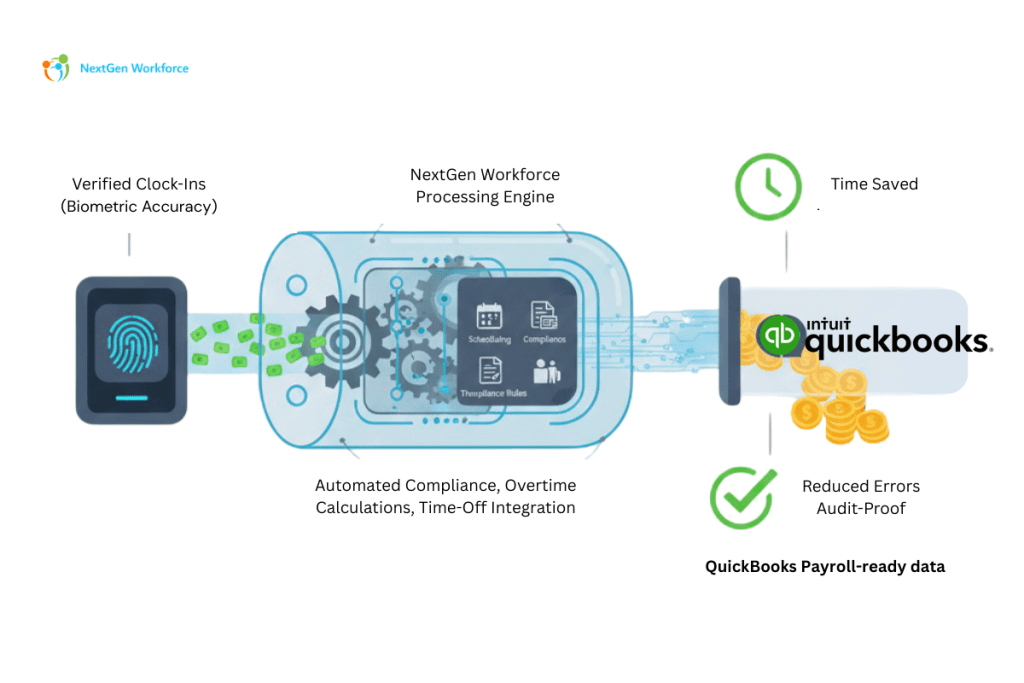
Employers can effectively track their employees’ work hours by using time and attendance software with QuickBooks integration. It can be used to track actual hours worked, absences, overtime, and leave balances while keeping you in compliance with labor laws. Online scheduling, GPS tracking options, and team chat are additional features that many time and attendance systems offer. At the same time, some providers may charge extra or require you to sign up for a premium plan to use these features. In this blog, we reviewed many options to determine the top time and attendance software for companies before settling on our top 5 suggestions: OnTheClock’s Time Clock Tracking employee sign-ins using biometric data is the best approach to confirm that your staff is on-site no matter what industry you’re in. With OnTheClock’s biometric fingerprint technology, you can eliminate unauthorized sign-ins and stop wondering if your employees are bending the rules. This time clock allows your team to sign in from any device. You can be sure that your employees are working when they are supposed to, thanks to security features like device authorization and sophisticated GPS controls. OnTheClock’s time-tracking integration with QuickBooks offers precise payroll information. Employee time cards are exported into QuickBooks payroll system, making it simple for you to log time and access payroll. Buddy Punch’s Time Clock The time card app from Buddy Punch makes it easier to manage overtime, time off, and attendance tracking in real-time. With GPS, image tracking, and camera images for each clock-in or clock-out, together with supervision on any modifications, you can keep track of your employees’ work locations. Whenever one of your employees punches in or out, the webcam feature will automatically take their picture. Your time clock dashboard will reflect this so you can confirm who punched in. With an internet connection, Chrome or Firefox users can use this capability to clock in. Even while facial recognition is an optional function, it offers a higher level of protection than fingerprint time clocks. This time clock also easily integrates with QuickBooks. NextGen Workforce NextGen Workforce is a complete attendance management solution compatible with biometric time clocks, GPS Geofencing enabled mobile apps and a cloud-based web interface that allows employees to clock in using their mobile phones or desktops, which minimizes the tedious manual data entry process. Seamless integration with Intuit QuickBooks Online and Enterprise/Desktop reduces payroll processing time. Easy to configure attendance rules like paid, unpaid break and overtime calculation, shift and scheduling, approval workflow, PTO, etc. Comprehensive reporting. GPS Tracking and Geofencing. Employee self portal to view timesheet. Key benefits uAttend’s Time Clock The touchless time clock from uAttend employs facial recognition to track attendance. An optional temperature reader is also offered with the DR2500 for increased workplace security during Covid. Using the DR2000 Touch-Free Facial Recognition and Voice Control, your business will have a completely touch-free solution, thanks to the integration of voice commands and cutting-edge facial recognition technology in the time clock. Voice recognition supports both simple and complex time clock features. Your employees can use straightforward voice commands to punch in and out for breaks, lunches, shifts, department transfers, and job monitoring. Advanced facial recognition reduces the possibility of unwanted sign-ins while providing rapid and simple identification. Additionally, uAttend offers less expensive options for fingerprint scanners and card time clocks. This software provides a supported integration with QuickBooks Online Advanced. Findd’s Time Clock Findd’s facial recognition time clock syncs with QuickBooks to track employees, jobs, hierarchy, etc. Findd collects your employee punch data and instantly transfers that data to QuickBooks Software for processing without any extra steps needed from you. Employees can use Findd’s mobile biometrics to punch in and out of work, submit leave, review their schedules, and allow administrators to prep for payroll. The Findd mobile clock app functions as a standalone face recognition clock on Android and iOS once an integration between Findd and QuickBooks is built. Punching using a Findd time clock is simple. As soon as the punch happens, it is immediately posted to the Findd time-servers and sent for processing to the QuickBooks time system. Wrapping Up The most effective time and attendance systems are those that are simple for both you and your staff to use. It should simplify the payroll process besides giving you access to internet tools for precisely and securely tracking clock-ins and clock-outs. As a result, the software can figure out various wage rates, overtime, unpaid breaks, and deductions for absences. Additionally, to enable easy transfers of time data for payment processing, the solution should integrate with online payroll providers and offer exportable time sheets.
Best Practices For Managing Overtime Costs

When it comes to business expenses, labor is the most expensive. Every business owner knows that overtimes are among the highest costs on the spreadsheet. Still, when you consider things like insurance, health benefits, hazard pay, retirement, etc., each employee is worth more than a monthly salary. Unnecessary overtime drives up labor costs, which can be terrible for small companies with constrained operating budgets. There are undoubtedly busy times of the year when you’ll require your staff to put in more hours to meet customer demands or finish orders ahead of schedule. But if unchecked all year, overtime can quickly spiral out of control. So companies have to manage overtime effectively to reduce labor costs and maintain acceptable levels of employee health and productivity. This can be especially hard when company employee time tracking is done manually. In this blog, we’ve put together the following best practices to manage overtime costs without sacrificing workforce satisfaction. 1. Re-examining Your Workflows The first step in tackling overtime is to evaluate your processes because poor workflow management is one of the primary causes of overtime. Make a list of your existing procedures and regulations. Examine the efficiency of each one. Where necessary, modify or make new ones. Check the workplace’s timing and motion to verify if everything moves as it should. Additionally, consider monitoring how your employees spend their time while at work. Since time is money, keeping track of your staff’s work time is essential if you want to stay under your operational budget. 2. Keeping An Eye On Schedules By watching schedules, you can predict when employees reach their 40-hour mark. By anticipating those overruns, you can modify timetables and establish more practical production goals, avoiding expensive overtime pay. Monitoring schedules can also help determine whether specific employees are clocking in more overtime than others. This knowledge can be utilized for adjusting policies, modifying programs, and assigning responsibilities to ensure that your staff is operating at optimal productivity and efficiency. Monitoring employee schedules are complex when you’re working with spreadsheets. But when you use an automated time tracking system, you can easily keep track of when your employees work overtime. 3. Rostering Staff More Efficiently So many companies overspend on overtime because of inefficiencies in personnel planning. This mainly results from poor rostering or scheduling. Employees that are rostered effectively can do their work more quickly and efficiently. Thus, ensure that your team members are scheduled correctly based on their responsibilities and expectations. Once a company has accurate time and attendance data, it can combine this data with information about employee availability and skill sets, enabling managers to place the right people in the right roles for them as frequently as possible. 4. Training Your Employees The lack of fully trained employees is a significant factor in organizations having to use excessive extra hours. A well-trained worker is productive and doesn’t work unnecessarily long hours. Schedule frequent training sessions to keep employees’ skills and knowledge up to date. Thus, you can help your teams achieve goals more easily without resorting to overtime hours by cross-training and expanding the skills & knowledge of your staff. This also lessens the reliance on specific employees who must put in extra time due to their expertise. 5. Setting Limits On Overtime Hours In some situations, the best way to prevent workers from clocking in excessive hours is to limit the number of hours each employee is allowed to work in a certain period. Limiting the number of hours spent working over a certain period while still leaving enough time to complete all necessary tasks can help to prevent time theft in the form of employees who might take longer to complete assignments to earn more money by working extra. The right time tracking system will allow you to establish guidelines for when employees can take extra shifts, as well as a limit on the number of overtime hours permitted. 6. Planning In Advance During a company’s busiest times, it may face some problems like understaffing, stressed employees, and a need for extra overtime. Businesses can predict demand peaks and troughs using past production and sales data, allowing shifts to be modified and staffed while reducing the need for premium overtime. Employees can be scheduled to work a little bit longer during busy times and receive time off during slower times. Thus overtime costs can be easily reduced by planning for busy periods and allowing workers to take flexible hours. If necessary, you can supplement your current staff by hiring temporary workers for a lower rate. 7. Automating Time Recording One of the most crucial steps toward reducing the amount spent on overtime is checking the accuracy of your organization’s attendance and overtime data. Employees in several businesses are expected to enter timesheets at the end of each week manually. However, this practice can lead to several errors, which can add up to a significant overrun for the organization. Implementing automated time recording puts a stop to this kind of overspending. You can track hours worked to the minute with automated clock-in/clock-out, making it far easier to compare actual hours worked to rostered hours and identify overtime at the source. 8. Using A Scheduling Tool Accidents and sick days are inevitable. When this occurs, employees must swap shifts, but their supervisors often lack the time or resources to find a replacement, which causes some employees to work too many hours. But using an automated staff scheduling technology makes it simple to immediately identify which personnel are available, whether their skill set matches, and whether they are about to clock in for overtime. All of this can be done swiftly while avoiding overtime pay. The most effective way to do this is by using the right scheduling software, such as Next Gen Solution. 9. Investing In Tech And Equipment Investing in technology and equipment that reduces employees’ time on repetitive processes means they will have more time to devote to more essential tasks. With more time available, projects will be completed faster,