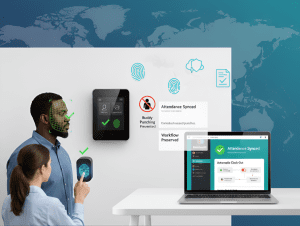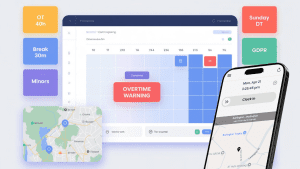
If you manage people across cities, states, or countries, you already know: compliance isn’t one-size-fits-all. Overtime thresholds, break rules, youth restrictions, and paid leave entitlements vary by jurisdiction and are subject to frequent changes. The difference between a regular time clock and a smart time-tracking platform is straightforward: one records hours, while the other protects your business.
Below is a practical guide to what truly matters in a time-tracking tool when local labor law compliance is the goal.
1) A Localized Rule Engine (Not Just Generic Settings)
Why it matters: California has daily overtime, Michigan has 40-hour weekly OT, the Bahamas has Sunday double-time, and Switzerland has rest periods. Your tool should encode local rules, not force HR to remember them.
What good looks like
-
Configurable rules by country/state/city/site
-
Daily and weekly overtime thresholds, double-time, and premium differentials
-
Meal/break logic (length, timing, auto-deduct with safeguards)
-
Minor labor protections (max hours, mandatory breaks)
Win: Managers schedule confidently; payroll exports are already law-aligned.
2) Effective-Dated Policies (Because Laws Change)
Why it matters: Minimum wage bumps, new sick leave rules, and union agreement policies evolve. Re-keying settings mid-pay period creates disputes.
What good looks like
-
Effective-dated pay rules and policies
-
“From/To” windows for grandfathered agreements
-
Historical recalculation that preserves audit trails
Win: Smooth transitions with audit-ready records.
3) Schedule-Aware Timekeeping
Why it matters: Compliance issues often come from the gap between schedule and reality, unapproved early starts, short rest between shifts, and accidental OT.
What good looks like
-
Time entries validated against the schedule
-
Warnings for clopening (close-then-open) and insufficient rest
-
Overtime forecasts before publishing schedules
Win: Prevents violations upstream, not after payroll.
4) Location Controls: Geofencing and Job-Site Validation
Why it matters: Some laws and client contracts require on-site presence. Location spoofing or off-site punches create compliance risk.
What good looks like
-
Geofencing to allow clock-ins only within approved zones
-
Auto clock-out when a worker leaves the site (optional, policy-based)
-
Route history and location tags in the timecard
Win: Verifiable attendance and fewer disputes about where work happened.
5) Built-In Leave & Sick Time Compliance
Why it matters: Many regions require paid sick leave accruals with carryover limits and protected reasons. Penalizing protected absences risks legal trouble.
What good looks like
-
Accrual engines (e.g., 1 per 30/35 hours worked)
-
Front-load or accrual models with caps and carryover
-
Protected leave exclusion rules (no points, no attendance penalties)
-
Manager workflows with balances visible at approval time
Win: No double-booking; no accidental penalties for protected time.
6) Exception Handling With Documentation & Appeals
Why it matters: Real life happens with illness, transit issues, and system outages. A fair process protects both the business and the employee.
What good looks like
-
Reason codes and attachments on exceptions
-
The manager approves/denies with notes
-
All changes are audit-logged (who, what, when, why)
Win: Transparent, defensible decisions and fewer grievances.
7) Data Privacy, Consent, and Access Controls
Why it matters: GDPR, nFADP, and local privacy rules govern how you store time, location, and biometric data.
What good looks like
-
Role-based permissions, data minimization, and encryption
-
Clear consent flows for biometrics/location (where applicable)
-
Region-specific data retention policies
Win: Compliance isn’t only labor law, it’s privacy law too.
8) Multilingual UX & Policy Communication
Why it matters: Compliance fails when people can’t understand the rules.
What good looks like
-
Multilingual UI and policy labels
-
Plain-language prompts (“Meal break due in 10 minutes”)
-
Mobile notifications that explain what to do
Win: Better adherence because instructions are clear and local.
9) Payroll-Ready, Audit-Ready Reporting
Why it matters: The best time data is useless if payroll can’t consume it or if inspectors can’t verify it.
What good looks like
-
Exports with regular/OT/DT, premiums, paid leave, differentials
-
Effective-dated pay rates and cost centers
-
Reports that show scheduled vs. worked vs. overtime, exceptions, and break compliance
-
Tamper-evident audit logs for every edit
Win: Faster payroll, fewer corrections, and confident audits.
10) Integrations That Actually Reduce Risk
Why it matters: Re-typing data between systems creates errors that become compliance issues.
What good looks like
-
HRIS sync for people/teams/locations
-
Payroll integrations (ISL, ADP, QuickBooks, etc.) with mapped codes
-
Calendar and scheduling integrations to prevent overlaps
-
Webhooks or APIs for downstream compliance reporting
Win: One source of truth, less manual work, and fewer mistakes.
Red Flags to Avoid
-
“One policy for all locations” with no local overrides
-
No visibility into break compliance or rest periods
-
No effective dates for changing policies
-
Lack of appeals or documentation on exceptions
-
No audit log (or editable histories)
-
Only mobile punches with no location control
-
Exports that don’t separate OT/DT/premiums clearly
A Short, Practical Checklist
Use this list when you evaluate tools:
-
Can I configure overtime, breaks, minors, and premiums per location?
-
Are policies effective-dated with audit-safe history?
-
Does scheduling predict overtime and enforce rest periods?
-
Are there geofencing and auto clock-out options?
-
Does leave management exclude protected absences from points/discipline?
-
Are exceptions documented with reasons and attachments?
-
Is the platform privacy-aware (consent, retention, encryption)?
-
Do I get payroll-ready OT/DT/premiums and clean cost center mapping?
-
Are reports audit-ready with a tamper-proof log?
-
Do integrations remove manual entry across HRIS, scheduling, and payroll?
How NextGen Workforce Checks the Boxes
-
Local rule engine for OT, premiums, breaks, minors; site-level overrides
-
Effective-dated policies with historical recalculation
-
Schedule-aware timekeeping and overtime forecasts
-
Geofencing and optional auto clock-out with violation alerts
-
Leave accruals (front-load or per-hour) with protected-leave exclusions
-
Exception workflows with evidence, reason codes, and audit trails
-
Privacy-first design: access control, encryption, regional retention
-
Payroll-ready exports + HRIS integrations (e.g., BambooHR)
-
Reporting: scheduled vs. worked vs. OT, break compliance, exception trends
Result: A single system that helps HR and operations stay compliant by default, reduces admin effort, and keeps employees informed.
Final Thought
Compliance is not a checkbox; it’s a living process. Choose a time-tracking platform that treats local labor law as a first-class citizen, not an afterthought. When rules are embedded, schedules are aware, and data is audit-ready, you get what you actually need: clarity, control, and confidence.
[Connect with NextGen Workforce] to see how the Smart-timetracking can streamline your HR operations, simplify compliance, and empower your team with data that works as hard as they do.

The NGW Workforce team writes about HR tech, time tracking, scheduling, and workforce compliance.