
QuickBooks Time Tracking Integration for Payroll-Ready Timesheets
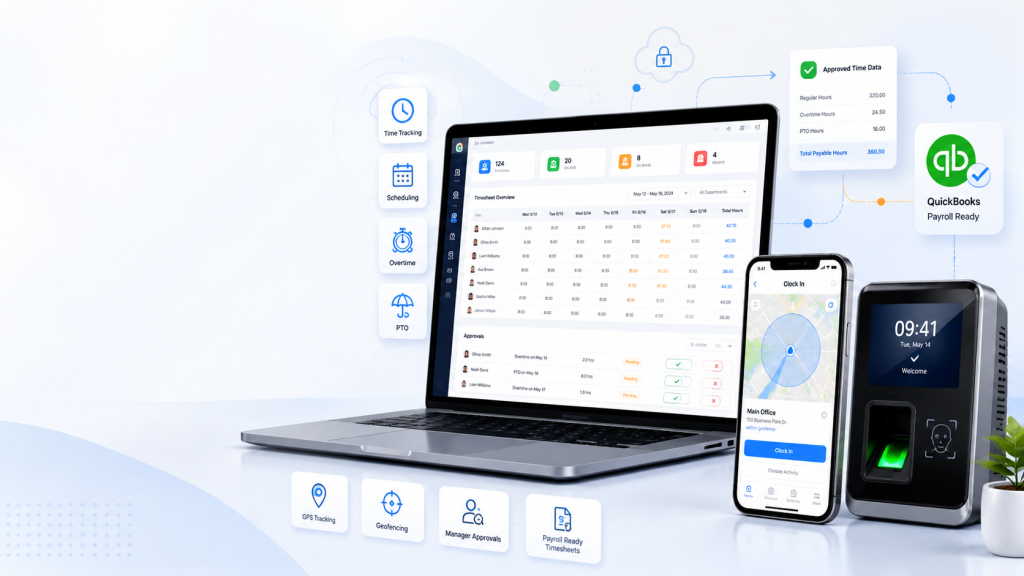
Payroll Problems Usually Start Before QuickBooks
- Missing punches: Employees forget to clock in or out.
- Unapproved overtime: Managers review extra hours too late.
- PTO mismatches: Approved leave does not match the timesheet.
- Wrong earning codes: Regular, overtime, holiday, PTO, and premium hours need manual correction.
- Schedule changes: Payroll cannot easily compare scheduled versus actual hours.
- Job code issues: Project, task, or department data is missing.
- Mobile workforce issues: Field punches need GPS or geofence review.
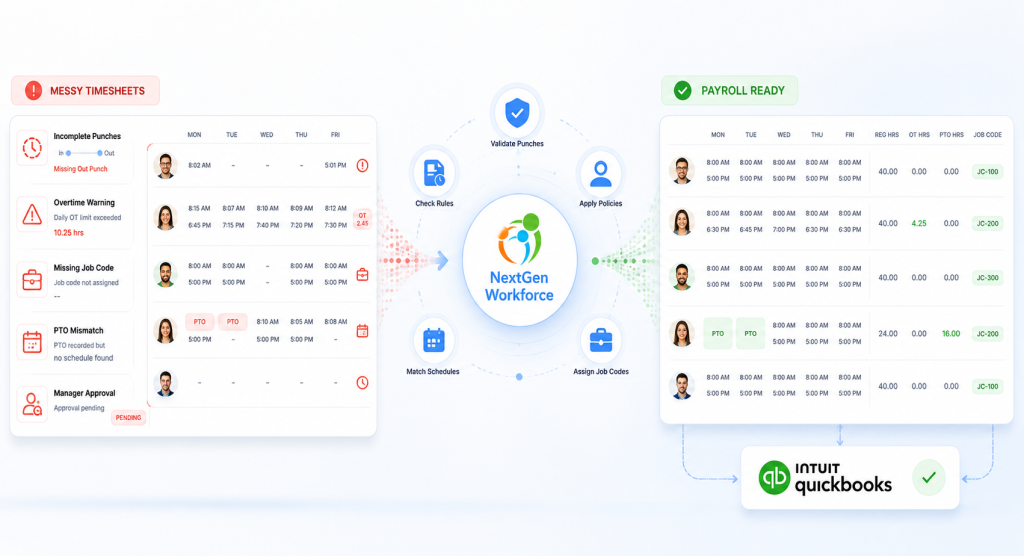
How NextGen Workforce Prepares Time Data for QuickBooks
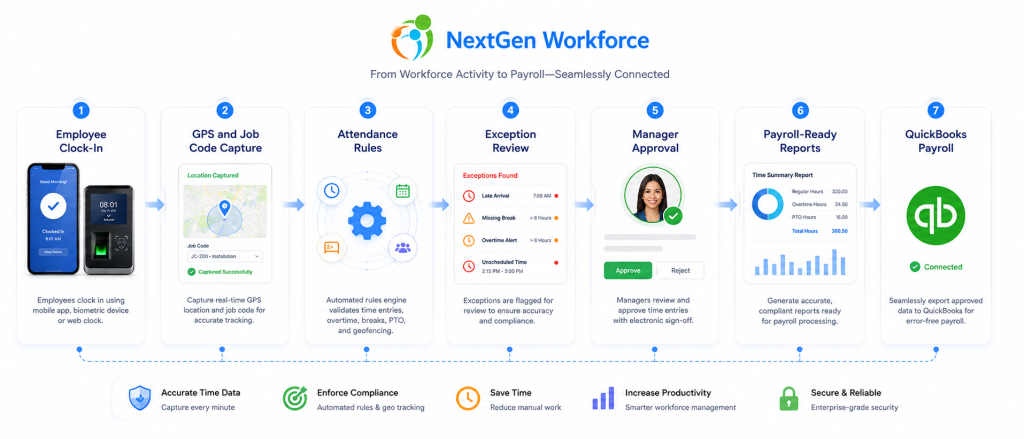
Everything Your Payroll Team Needs Before QuickBooks
| Data Type | Why It Matters | How NextGen Workforce Helps |
|---|---|---|
| Regular hours | Base payroll hours need to be accurate | Captures and summarizes approved work time |
| Overtime | Manual overtime calculation creates risk | Applies configurable overtime rules |
| Double time | Some businesses need premium pay categories | Supports complex pay rules where configured |
| PTO and sick time | Leave must match payroll records | Connects approved time off with timesheets |
| Holiday hours | Holiday pay may need separate categories | Supports payroll-ready holiday records |
| Shift premiums | Different shifts may need different pay handling | Supports shift differential workflows |
| Job and project codes | Hours may need jobs or cost centers | Captures structured job and project data |
| Approvals | Payroll needs reviewed records | Routes timecards for manager approval |
Built For Complex Workforces Using QuickBooks
Have Time Tracking Rules QuickBooks Alone Cannot Handle?
NextGen Workforce helps configure complex attendance, scheduling, geofencing, biometric time clocks, custom punch fields, approvals, and payroll-ready reports.
Book A Free DemoReal Implementation Experience With Complex Payroll Workflows
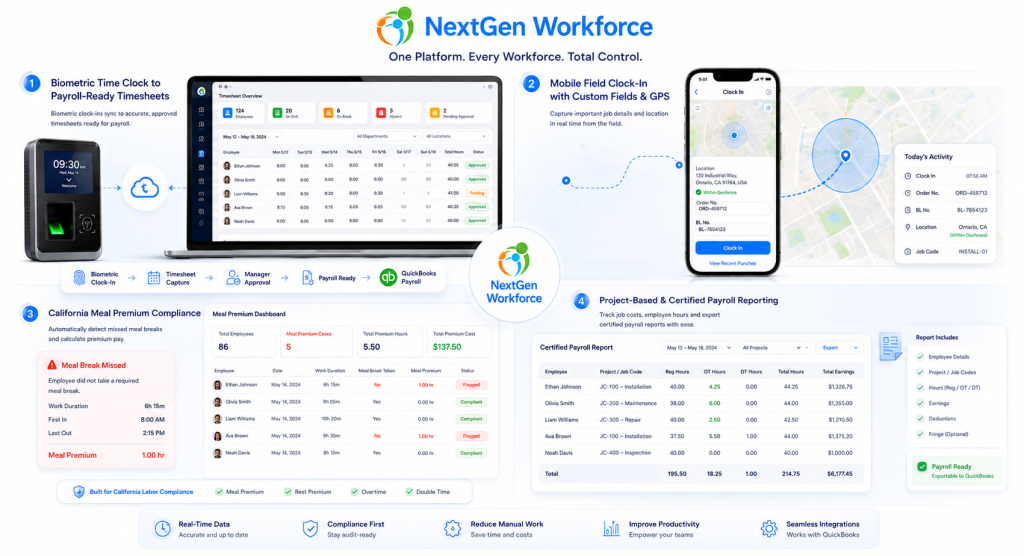
Field Employees Capturing Order No. And BL No.
California Meal Premium Automation
Certified Payroll And Project-Based Reporting
Manual Timesheets Vs. NextGen Workforce + QuickBooks
| Payroll Task | Manual Process | NextGen Workforce + QuickBooks Workflow |
|---|---|---|
| Time capture | Paper, spreadsheet, or basic punch records | Biometric, mobile, web, kiosk, or GPS attendance |
| Missing punches | Payroll follows up manually | Exceptions flagged before payroll |
| Overtime | Spreadsheet calculation | Rule-based overtime calculation |
| PTO and holidays | Checked separately | Connected time-off and holiday records |
| Job data | Notes, messages, or separate sheets | Custom punch fields and job codes |
| Approvals | Email or verbal approval | Digital timecard approval workflow |
| Payroll preparation | Manual cleanup before QuickBooks | Payroll-ready reports and categorized hours |
Best-Fit Industries
Manufacturing & Warehousing: Manage shift schedules, overtime, biometric punches, premiums, and payroll-ready reports.
Security & Cleaning Services: Track employees across posts, sites, customer locations, and mobile work areas.
Healthcare & Clinics: Manage hourly teams, changing schedules, PTO, approvals, and overtime before payroll.
Retail & Hospitality: Support part-time teams, shift swaps, late clock-outs, schedules, and payroll-ready timesheets.
Heavy Machinery & Mobile Operations: Capture GPS location, Order No., BL No., job details, and export-ready records.
What To Check Before Sending Time Data To QuickBooks
- Employee records: Confirm employees match payroll setup.
- Completed punches: Resolve missing clock-ins and clock-outs.
- Approved timecards: Confirm manager review is complete.
- Overtime: Review regular, overtime, double time, and premium hours.
- PTO and sick time: Confirm approved leave is included.
- Holiday hours: Verify holiday time and earning categories.
- Shift premiums: Review differentials or special pay rules.
- Geofence exceptions: Check punches outside approved locations.
- Job and project codes: Confirm cost coding and reporting fields.
- Payroll codes: Confirm regular, overtime, PTO, holiday, and premium categories.
Ready To Reduce Payroll Cleanup Before QuickBooks?
Prepare clean, approved, payroll-ready time data with biometric clocks, mobile GPS, geofencing, scheduling, PTO, overtime rules, approvals, custom fields, and reports.
Talk To An ExpertFrequently Asked Questions
Does NextGen Workforce Integrate With QuickBooks?
NextGen Workforce helps businesses prepare clean, reviewed, payroll-ready time data for QuickBooks workflows. This can include regular hours, overtime, PTO, holidays, approvals, job codes, and categorized time records for payroll review.
Can NextGen Workforce Track Overtime Before Payroll?
Yes. NextGen Workforce can support configurable overtime, double time, shift premium, holiday, and custom attendance rules based on customer requirements.
Can Employees Clock In Using Biometric Devices?
Yes. NextGen Workforce supports biometric time clock workflows, including fingerprint or face reader options depending on the customer setup.
Can Field Employees Use Mobile GPS Clock-In?
Yes. Field employees can use mobile clock-in workflows, and GPS tracking can help managers review where punches happened.
Can NextGen Workforce Support Geofencing?
Yes. NextGen Workforce supports geofencing workflows so businesses can validate or restrict punches based on approved job sites, branches, or work locations.
Can Employees Clock In From A Web Kiosk?
Yes. NextGen Workforce supports web kiosk attendance from a tablet, PC, laptop, or shared device, with options such as IP restrictions and custom fields.
Can Custom Fields Be Captured During Clock-In?
Yes. NextGen Workforce can capture custom punch fields such as job code, project, department, work location, Order No., BL No., task, or notes.
Who Is This Best For?
This workflow is best for businesses using QuickBooks with hourly employees, field workers, multi-location teams, shift schedules, biometric clock needs, mobile attendance, overtime rules, and complex payroll workflows.
See How NextGen Workforce Works With QuickBooks
Book a short demo and show us your current time tracking, scheduling, approval, or payroll challenge. We will walk through how NextGen Workforce can help prepare cleaner time data before payroll runs.
Book A Free Demo