
AI Workforce Management
NextGen Workforce MCP Connector for Claude
Ask Claude workforce questions using approved NextGen Workforce data.
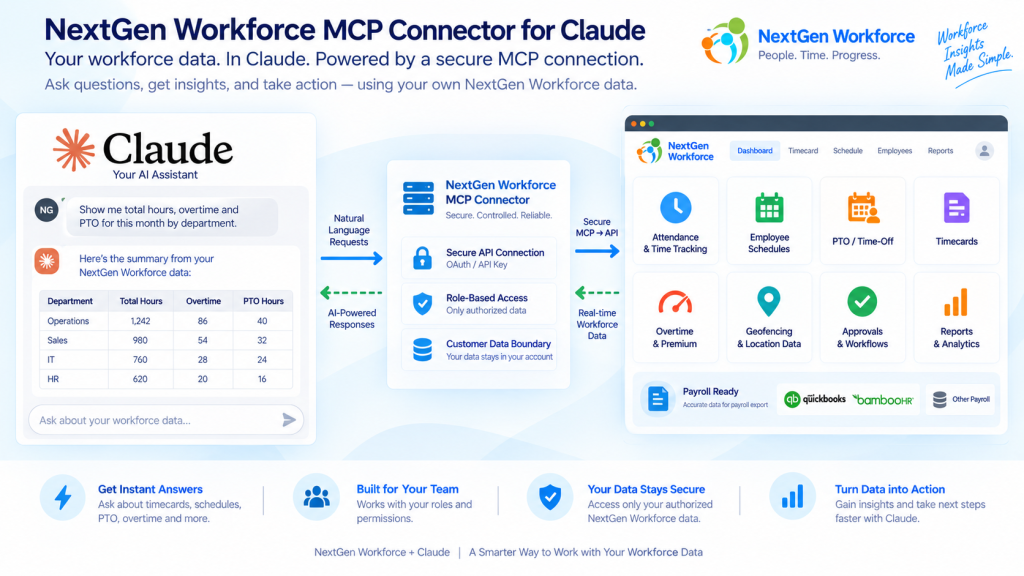
The NextGen Workforce MCP connector lets approved customers connect Claude with NGW APIs so authorized users can review attendance, schedules, PTO, timecards, approvals, reports, and payroll readiness using natural-language questions.
The NextGen Workforce MCP connector lets approved customers connect Claude with NGW APIs so authorized users can review attendance, schedules, PTO, timecards, approvals, reports, and payroll readiness using natural-language questions.
What Is the NextGen Workforce MCP Connector?
Quick answer: The NextGen Workforce MCP connector is a custom Claude connector that lets authorized users interact with approved NGW APIs using natural-language questions and guided actions.
MCP stands for Model Context Protocol. It allows Claude to connect with approved business systems through a controlled connector.
For NGW customers, Claude can help retrieve and summarize schedules, timecards, PTO, missing punches, pending approvals, attendance status, reports, and other workforce data according to the signed-in user’s access.
The connector is currently offered through custom Claude connector setup for approved NextGen Workforce customers.
For NGW customers, Claude can help retrieve and summarize schedules, timecards, PTO, missing punches, pending approvals, attendance status, reports, and other workforce data according to the signed-in user’s access.
The connector is currently offered through custom Claude connector setup for approved NextGen Workforce customers.
Key takeaway: NGW MCP lets customers use Claude as an AI workforce assistant while NextGen Workforce remains the system of record.
Why Workforce Teams Need an AI Assistant
Quick answer: HR, payroll, operations, and managers often need fast answers from workforce data. An AI assistant can reduce manual report searching and help teams find schedule, attendance, PTO, and payroll-readiness information faster.
Attendance
Who missed a punch? Who is late, clocked in, or not started?
Scheduling
Who is working today? Which shifts are open this weekend?
Payroll Readiness
Which timecards need approval? Are there missing punches before payroll?
What Teams Can Ask Claude
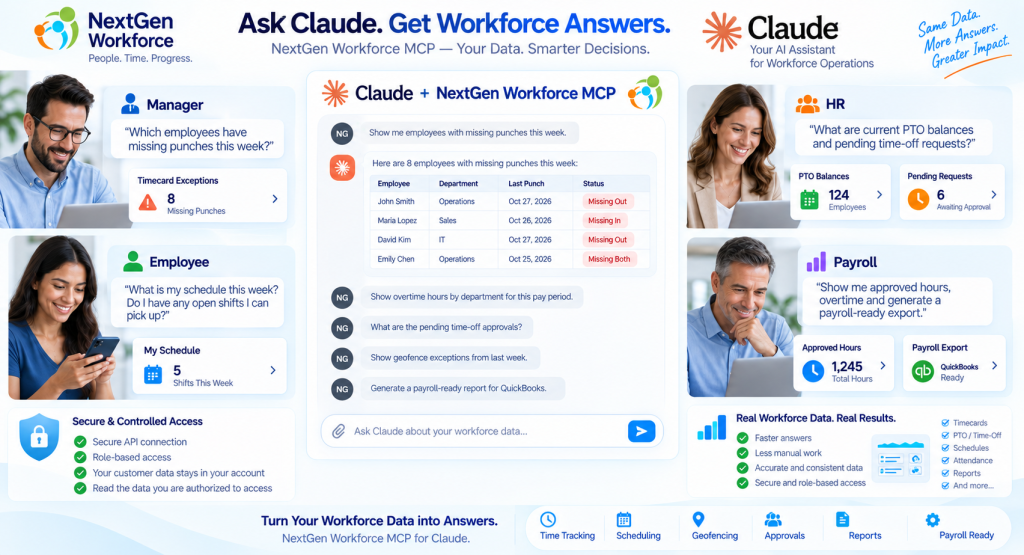
Quick answer: Approved users can ask Claude about schedule, timecards, PTO, missing punches, open shifts, approvals, attendance status, access privileges, and reports.
Employee Self-Service
Schedule, PTO balance, time-off requests, timesheet, missing punches, last punch, notes, and audit history.
Manager Questions
Team timesheet summaries, pending approvals, who is online, attendance status, schedules, employee search, and team time-off requests.
Scheduling Questions
Published shifts, open shifts, shift details, swap candidates, unavailability, schedule boards, and open shift requests.
Access & Permissions
Effective access, approval troubleshooting, login profiles, assigned employees, and privilege definitions.
How the MCP Connector Works
Quick answer: NGW MCP passes through the signed-in user’s token, calls approved APIs, respects role access, and returns structured results for Claude to summarize.
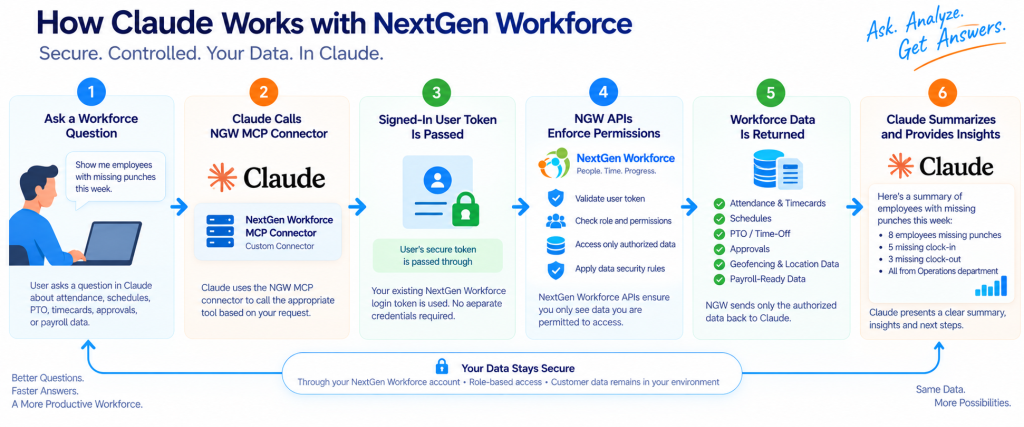
1. Ask Claude
User asks a workforce question.
2. NGW MCP Connector
Claude routes the request through the custom connector.
3. Signed-In Token
The tool call uses the user’s own authentication.
4. NGW Permission Checks
Customer scope and user access rules are enforced.
5. Structured Workforce Data
Approved NGW API data is returned.
6. Claude Summarizes
The user receives a practical workforce answer.
Built With Role-Based Access in Mind
Quick answer: The connector uses authenticated access and separates employee tools from manager tools, helping ensure users only access data and actions available to their role.
Token Pass-Through
Tool calls run as the signed-in user.
Customer Data Scope
NGW APIs enforce customer-level and row-level access.
Employee Self-Service
Employees can access their own schedule, PTO, timecards, and requests.
Manager Gating
Manager tools require manager or super-user access.
Permission Checks
Access tools help diagnose what a user can see or approve.
Controlled Setup
MCP access is enabled through approved custom connector configuration.
Read and Write Workflows
Quick answer: The MCP connector supports read workflows and selected write workflows. Write actions use a preview → confirm process before final submission.
| Workflow Type | Example | How It Works |
|---|---|---|
| Read | Show my schedule | Claude retrieves approved data from NGW APIs |
| Read | Show pending approvals | Manager access is checked before results are returned |
| Write preview | Request time off | Claude creates a confirmation preview first |
| Write preview | Clock in or clock out | User confirms before the action is submitted |
| Write preview | Approve timesheets | Manager reviews and confirms before approval is processed |
Users can review an intended action before it changes workforce records.
Employee Self-Service Capabilities
Quick answer: Employees can use Claude to review their schedule, timesheet, PTO balance, time-off requests, missing punches, pay period, notes, and audit information.
| Capability | Example Question |
|---|---|
| My schedule | What shifts do I have this week? |
| My PTO balance | How much PTO do I have? |
| My time-off requests | Show my pending time-off requests. |
| My timesheet | Show my timesheet for this pay period. |
| Missing punches | Do I have any missing punches? |
| Last punch | What was my last clock-in or clock-out? |
| Timecard requests | Show my correction requests. |
| Notes and audit | Show notes or audit history for my timecard. |
Manager and Operations Capabilities
Quick answer: Managers can use Claude to review team timesheets, attendance status, schedules, pending approvals, employee search, team time-off requests, open shifts, schedule boards, and approval workflows.
- ✓team timesheet summaries
- ✓all timesheets within supported date ranges
- ✓team schedules
- ✓pending approvals
- ✓who is online
- ✓team attendance now
- ✓employee search
- ✓team time-off request review
- ✓schedule boards
- ✓open shift requests
- ✓schedule publishing workflows
- ✓timesheet approval workflows
Scheduling and Shift Marketplace Capabilities
Quick answer: The MCP connector supports viewing schedules, open shifts, shift details, unavailability, swap candidates, schedule boards, creating/updating schedules, publishing schedules, and managing open shifts where configured.
- ✓my schedule
- ✓schedule details
- ✓shift templates
- ✓open shifts
- ✓claimed shifts
- ✓unavailability
- ✓swap candidates
- ✓team schedule
- ✓schedule board
- ✓open shift status counts
- ✓schedule creation and updates
- ✓schedule publishing
- ✓open shift creation and publishing
- ✓open shift assignment
Payroll Readiness and Reporting
Quick answer: Claude can help authorized users ask payroll-readiness questions using timecard summaries, approvals, missing punches, reports, PTO, schedules, and attendance exceptions from NextGen Workforce.
- ✓missing punches
- ✓timecard totals
- ✓pending approvals
- ✓PTO and time-off requests
- ✓schedule mismatches
- ✓overtime
- ✓attendance exceptions
- ✓notes and audit history
- ✓report outputs
Ask Better Payroll-Readiness Questions
Use Claude with NGW MCP to review missing punches, approvals, timecards, schedules, PTO, reports, and payroll readiness faster.
MCP Connector vs. Traditional API
Quick answer: Traditional APIs are built for developers and system integrations. The MCP connector lets approved users ask workforce questions in Claude while still using approved NGW APIs behind the scenes.
| Traditional API | NextGen Workforce MCP Connector |
|---|---|
| Developers call endpoints manually | Users ask workforce questions in Claude |
| Requires technical query building | Supports natural-language workflow |
| Best for system-to-system integration | Best for AI-assisted workforce review |
| Returns API data | Claude can summarize and explain results |
| Requires custom reporting or UI work | Helps teams explore workforce data faster |
| Technical users usually operate it | HR, payroll, operations, managers, and admins can benefit |
Who Is This For?
Quick answer: Best for customers who want Claude-assisted access to attendance, schedules, timecards, PTO, approvals, reports, permissions, and payroll readiness.
- ✓HR directors
- ✓payroll managers
- ✓operations managers
- ✓department managers
- ✓business owners
- ✓customer administrators
- ✓technical integration teams
- ✓businesses with complex attendance rules
- ✓businesses using QuickBooks or BambooHR workflows
- ✓teams that want faster workforce visibility
Important Access and Availability Notes
The NextGen Workforce MCP connector is currently intended for Claude custom connector use for approved customers. Access depends on NGW configuration, authentication, API scope, enabled MCP tools, and user permissions. Some capabilities may be read-only, while selected write actions may require confirmation before submission.
Frequently Asked Questions
Is the NextGen Workforce MCP connector listed on the Claude marketplace?
No. It is currently available as a Claude custom connector for approved customers.
What can Claude access through NGW MCP?
Approved NGW APIs according to the signed-in user’s authentication and permissions, including supported schedules, timecards, PTO, approvals, reports, attendance status, open shifts, and access details.
Can employees use it for self-service?
Yes. Employees can review their own schedule, PTO, requests, timesheets, missing punches, last punch, notes, and audit history where enabled.
Can managers use it for team visibility?
Yes. Managers can review team schedules, summaries, attendance status, approvals, time-off requests, open shifts, and related data where they have access.
Can Claude approve timesheets?
Where enabled and permitted, approval workflows can use preview-and-confirm before submission.
Can Claude create or update schedules?
Where enabled and permitted, scheduling tools can support create, update, publish, and open-shift workflows with confirmation-based actions.
Does the MCP connector respect NGW permissions?
Yes. Tool calls run as the signed-in user and NGW APIs enforce customer scope and row-level permissions.
Does the connector support write actions?
Yes, selected write actions are supported where enabled, using preview-and-confirm.
What is needed to enable the connector?
Approved access to the NGW MCP URL, a valid NGW login, appropriate permissions, and connector setup support from the NGW team.
About NextGen Workforce
NextGen Workforce helps businesses manage time tracking, biometric attendance, mobile GPS clock-in, geofencing, web kiosk punching, employee scheduling, PTO, approvals, attendance rules, payroll-ready reporting, and workforce integrations. The NGW MCP connector extends this platform with Claude-assisted workforce insights and supported actions through controlled API workflows.
Request Access to the NextGen Workforce MCP Connector
See how Claude can help your team ask workforce questions, review schedules, inspect timecards, find missing punches, check approvals, summarize PTO, and prepare payroll-ready insights faster.