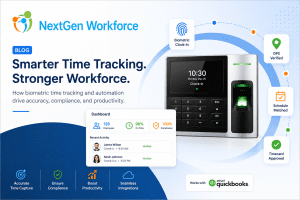
What Is QuickBooks Time Tracking?
QuickBooks time tracking refers to the process of capturing employee work hours, overtime, PTO, attendance, and approvals before payroll processing inside QuickBooks. Businesses often use workforce management systems to prepare payroll-ready timesheets and reduce payroll errors.
QuickBooks is a powerful tool for payroll and accounting. Many businesses in the USA and Canada rely on it every pay period to process wages, manage payroll records, and keep their financial operations moving.
But here’s the thing.
QuickBooks can only work with the data it receives.
Businesses often discover that payroll software alone cannot solve workforce data quality issues without connected attendance and approval workflows.
If employee hours are incomplete, overtime is not reviewed, punches are missing, or PTO is not properly tracked, payroll still becomes stressful. The payroll system may be ready, but the time data is not.
And that is where many payroll problems begin.
For a lot of businesses, payroll accuracy does not start inside QuickBooks. It starts earlier — with how employee time is captured, reviewed, approved, and prepared before payroll ever runs.
That is why QuickBooks time tracking should not be treated as just a clock-in and clock-out process. It should be part of a larger workforce workflow that connects attendance, schedules, overtime, PTO, approvals, and payroll-ready timesheets.
The Real Payroll Problem Is Usually Bad Time Data
Quick answer: Payroll errors usually happen when employee time data is incomplete, unapproved, or not reviewed before payroll processing.
Most payroll teams are not struggling because they do not know how to run payroll.
They are struggling because the information coming into payroll is messy.
A manager forgot to approve hours.
An employee missed a punch.
Someone worked outside their scheduled shift.
Overtime was triggered but not reviewed.
A PTO request was approved, but the timesheet does not reflect it clearly.
A field employee clocked in, but there is no location validation.
Individually, these issues may seem small.
But at payroll time, they add up quickly.
That is when payroll managers end up chasing supervisors, fixing timesheets manually, reviewing exceptions, and trying to make sure employees are paid correctly before the deadline.
This creates stress for payroll teams, confusion for employees, and risk for the business.
Using QuickBooks but Still Fixing Payroll Errors Manually?
NextGen Workforce helps businesses prepare cleaner, payroll-ready time data before payroll runs.
With connected time tracking, scheduling, overtime rules, PTO, approvals, mobile clock-in,
geofencing, and payroll-ready exports, your team can reduce last-minute corrections
and run payroll with more confidence.
QuickBooks Is Strong — But It Cannot Fix Every Time Tracking Issue
Quick answer: QuickBooks can process payroll, but businesses still need clean attendance, PTO, overtime, and approval data before sending hours into payroll.
QuickBooks helps businesses manage payroll and accounting. But it should not be expected to solve every workforce data problem by itself.
If attendance records are not clean before they reach QuickBooks, the payroll team still has to deal with the same issues.
For example:
- Missing punches still need to be corrected
- Overtime still needs to be reviewed
- PTO and holidays still need to be confirmed
- Employee schedules still need to match actual hours
- Manager approvals still need to be completed
- Mobile or field punches may still need location validation
QuickBooks can process payroll, but the accuracy depends heavily on the quality of the time data behind it.
That is why businesses need a time tracking system that prepares the data before payroll begins.
What Payroll-Ready Time Tracking Should Include
A strong QuickBooks time tracking process should do more than collect hours.
It should help your team answer practical payroll questions before the pay period closes.
For example:
Did every employee clock in and out correctly?
Missing punches are one of the most common causes of payroll corrections. A good system should make them easy to find and fix.
Was overtime calculated correctly?
Overtime can become complicated when employees work across different schedules, locations, departments, or pay periods.
Were PTO, holidays, and time off handled properly?
Approved time off should flow clearly into payroll-ready timesheets, so payroll teams do not have to manually compare multiple systems.
Did managers review and approve timecards?
Payroll should not depend on last-minute email confirmations or verbal approvals.
Were mobile punches captured from the right location?
For field teams, construction crews, cleaning companies, healthcare workers, security teams, and multi-location businesses, location validation can be just as important as the punch itself.
When these items are handled before payroll, QuickBooks receives cleaner, more reliable information.
That makes payroll smoother.
Free Checklist: Payroll-Ready Checklist for QuickBooks Users
Before sending employee hours to payroll, your team should review the most common issues that create payroll corrections.
Use this checklist to catch missing punches, unapproved overtime, PTO gaps, schedule mismatches, manager approval delays, and mobile punch issues before payroll runs.
- Employee punch review
- Schedule vs. actual hours check
- Overtime review
- PTO and holiday verification
- Mobile and GPS punch validation
- Manager approval status
- QuickBooks export readiness
Why This Matters for Businesses in the USA and Canada
Businesses in the USA and Canada often deal with different payroll rules, overtime requirements, work locations, employee types, and approval processes.
Even small companies can run into complexity quickly.
A business may have hourly employees, salaried employees, field workers, part-time staff, multiple departments, and different pay periods. Add PTO, holidays, overtime, scheduling changes, and mobile work into the mix, and payroll becomes much harder to manage manually.
This is especially true for industries like:
- Healthcare
- Construction
- Security
- Cleaning and field service
- Retail
- Hospitality
- BPO and call centers
- Multi-location businesses
In these environments, payroll accuracy depends on daily workforce visibility.
Waiting until payroll day to clean everything up is risky. It also puts too much pressure on payroll and HR teams.
A better approach is to catch problems earlier.
How NextGen Workforce Helps Before Payroll Runs
Quick answer: NextGen Workforce helps businesses prepare payroll-ready timesheets by connecting time tracking, scheduling, overtime rules, PTO, approvals, mobile attendance, and QuickBooks-ready exports.
NextGen Workforce helps businesses manage employee time before it reaches payroll.
Instead of simply collecting punches and pushing them forward, NGW supports the full time-to-payroll process.
That includes:
- Biometric time clocks
- Mobile clock-in and web clock
- GPS punch validation
- Geofencing attendance
- Employee scheduling
- PTO and holiday tracking
- Overtime and attendance rules
- Timecard approvals
- Payroll-ready reports and exports
- QuickBooks-ready workforce data
This gives payroll teams a cleaner starting point.
Instead of asking, “What went wrong with payroll?” after the fact, businesses can review and fix issues before payroll begins.
That is a much healthier process.
It also builds trust with employees because their hours, overtime, PTO, and approvals are handled more consistently.
Better Time Data Means Fewer Payroll Surprises
Payroll surprises are frustrating because they usually show up when there is very little time left to fix them.
An employee says their overtime is missing.
A manager says a shift was changed.
A payroll admin finds a missing punch.
Someone realizes PTO was approved but not reflected.
A field employee’s hours need location review.
These are not just administrative issues.
They affect paychecks. They affect trust. They affect compliance. And they affect how much time your team spends cleaning up payroll instead of running it confidently.
With a connected time tracking process, many of these problems can be caught earlier.
That is the real value of QuickBooks time tracking done properly.
It is not just about moving hours into payroll.
It is about making sure those hours are accurate, approved, and ready.
QuickBooks Time Tracking Should Support the Payroll Team, Not Add More Work
A time tracking system should make payroll easier.
It should not create another spreadsheet.
It should not force managers to confirm hours manually.
It should not leave payroll teams guessing why overtime changed.
It should not make HR compare PTO, schedules, and attendance across different places.
The right system gives everyone better visibility.
Employees can clock in properly.
Managers can review exceptions.
HR can track time off and approvals.
Payroll can work with cleaner timesheets.
Owners can have more confidence that labor costs are being tracked correctly.
That is how time tracking becomes more than attendance software.
It becomes part of workforce operations.
Final Thoughts
QuickBooks is a strong payroll and accounting platform. But payroll accuracy depends on what happens before the data reaches QuickBooks.
If your team is still dealing with missing punches, manual corrections, overtime surprises, PTO confusion, and last-minute approvals, the issue may not be payroll itself.
The issue may be the time tracking process before payroll.
NextGen Workforce helps businesses in the USA and Canada manage time tracking, scheduling, overtime, PTO, approvals, and payroll-ready timesheets in one connected workflow.
Because accurate payroll does not start when payroll runs.
It starts with clean workforce data.
Ready to Reduce Payroll Errors Before Payroll Runs?
NextGen Workforce helps businesses manage time tracking, scheduling, overtime, PTO,
approvals, mobile attendance, geofencing, and payroll-ready timesheets for QuickBooks.
Give your payroll team cleaner time data before payroll starts.
Does QuickBooks include time tracking?
QuickBooks offers payroll and time-related tools depending on the products and setup a business uses. However, many businesses need additional workforce management features such as biometric clocks, geofencing, advanced scheduling, overtime rules, PTO tracking, and approval workflows before sending data to payroll.
Why do payroll errors happen even when using QuickBooks?
Payroll errors often happen because the time data going into payroll is incomplete or incorrect. Missing punches, unapproved overtime, schedule changes, PTO issues, and manual corrections can all create payroll problems before the data reaches QuickBooks.
What is payroll-ready time tracking?
Payroll-ready time tracking means employee hours are reviewed, approved, categorized, and prepared before payroll is processed. This can include regular hours, overtime, PTO, holidays, approvals, schedules, and location-based attendance records.
How does time tracking help reduce payroll errors?
Time tracking helps reduce payroll errors by capturing employee hours accurately and making exceptions easier to find before payroll runs. A stronger system can flag missing punches, overtime, schedule mismatches, and approval issues earlier.
Is mobile time tracking useful for QuickBooks payroll?
Yes. Mobile time tracking is useful for businesses with remote, field, or multi-location employees. When combined with GPS validation and geofencing, it helps confirm where employees clocked in and supports cleaner payroll records.
Can NextGen Workforce support QuickBooks payroll workflows?
Yes. NextGen Workforce helps businesses prepare payroll-ready attendance data with time tracking, scheduling, overtime rules, PTO, approvals, mobile clock-in, geofencing, and payroll export workflows that can support QuickBooks payroll processes.
How can businesses reduce payroll corrections in QuickBooks?
Businesses can reduce payroll corrections by reviewing employee attendance, overtime, PTO, approvals, and missing punches before payroll processing. Workforce management systems help prepare cleaner payroll-ready timesheets.
What industries benefit most from workforce time tracking?
Industries with hourly, field, shift-based, or multi-location employees — such as healthcare, construction, security, retail, hospitality, and cleaning services — often benefit the most from connected workforce time tracking systems.